

Countdown Timer for Email
2 个评分
)
概述
Add a countdown timer to your email, and get the maximum sales conversion.
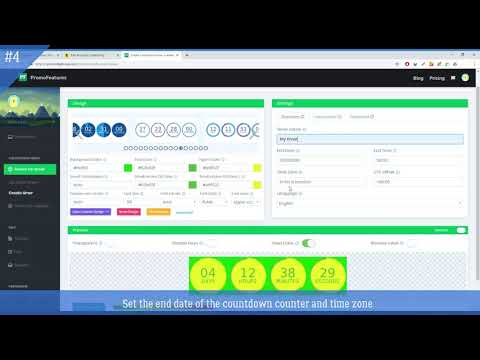
This chrome extension helps you simplify the process of setting a countdown timer in your email email. The countdown timer has long become an integral part of selling sites. Timer encourages the audience to commit target actions on the site, limiting the time of the action, creating the effect of urgency and the effect of shortage of goods. Our service simplifies creation of countdown timers for emails and websites. By visiting our site, you can create a code snippet using our timer constructor. It is quite easy to create this code. You only need to choose the design of the counter, then specify its size, color, etc. (we have a lot of additional settings with which you can make a timer for every taste). Then you need to choose the end date of the counter, then click "Save" and your HTML code is ready for embedding in the letter. When developing the editor, we created as many controllers as possible for more precise adjustment of external view. Primarily, many of them may scare you. But don`t be afraid because you can always find in our tutorial a description of any controller or contact us at a support for more detailed information. The counter for email is a GIF animation that is created by using our editor. When you click the “Save” button, our editor generates the code that needs to be inserted into the HTML code of the email. There are many different online editors to help you paste this code into a letter (mailchimp, activecampaing, etc.). When you set this code in an e-mail and send a newsletter, then when you open this letter with your client, our counter starts generating a GIF animation with a countdown of the time left until the end of your event that you set. The animation will count for about 60 seconds (time may vary depending on the size of the timer), after this time, if the user logs back on this letter, the counter will be regenerated again only with a different time (in our case this is 1 minute less). If you don`t have an account, then you can create a countdown counter by going to this page https://promofeatures.com/create-countdown-timer-for-email. If you have an account, then you can create it in your account: https://promofeatures.com/profile/create-mail-timers. In any case, it will be more convenient for you to create an account on the site in order to save your timer and further edit it.
5 星(5 星制)2 个评分
详情
- 版本1.2.1
- 上次更新日期2025年7月3日
- 提供方PromoFeatures
- 大小64.16KiB
- 语言English (United States)
- 开发者
邮箱
support@promofeatures.com - 非交易者该开发者尚未将自己标识为交易者。欧盟地区消费者须知:消费者权利可能不适用于您与该开发者达成的合约。
隐私权
该开发者已声明,您的数据:
- 不会因未获批准的用途出售给第三方
- 不会为实现与产品核心功能无关的目的而使用或转移
- 不会为确定信用度或放贷目的而使用或转移
支持
若有任何疑问、建议或问题,请在桌面浏览器中打开此页面