

Countdown Timer for Email
2 valoraciones
)
Descripción general
Add a countdown timer to your email, and get the maximum sales conversion.
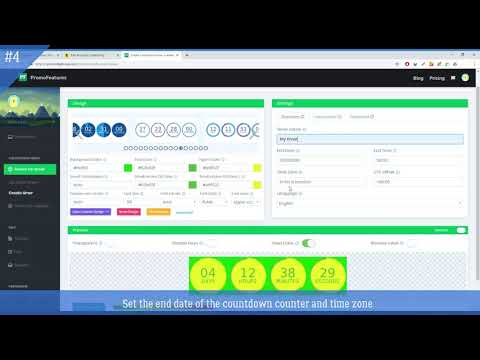
This chrome extension helps you simplify the process of setting a countdown timer in your email email. The countdown timer has long become an integral part of selling sites. Timer encourages the audience to commit target actions on the site, limiting the time of the action, creating the effect of urgency and the effect of shortage of goods. Our service simplifies creation of countdown timers for emails and websites. By visiting our site, you can create a code snippet using our timer constructor. It is quite easy to create this code. You only need to choose the design of the counter, then specify its size, color, etc. (we have a lot of additional settings with which you can make a timer for every taste). Then you need to choose the end date of the counter, then click "Save" and your HTML code is ready for embedding in the letter. When developing the editor, we created as many controllers as possible for more precise adjustment of external view. Primarily, many of them may scare you. But don`t be afraid because you can always find in our tutorial a description of any controller or contact us at a support for more detailed information. The counter for email is a GIF animation that is created by using our editor. When you click the “Save” button, our editor generates the code that needs to be inserted into the HTML code of the email. There are many different online editors to help you paste this code into a letter (mailchimp, activecampaing, etc.). When you set this code in an e-mail and send a newsletter, then when you open this letter with your client, our counter starts generating a GIF animation with a countdown of the time left until the end of your event that you set. The animation will count for about 60 seconds (time may vary depending on the size of the timer), after this time, if the user logs back on this letter, the counter will be regenerated again only with a different time (in our case this is 1 minute less). If you don`t have an account, then you can create a countdown counter by going to this page https://promofeatures.com/create-countdown-timer-for-email. If you have an account, then you can create it in your account: https://promofeatures.com/profile/create-mail-timers. In any case, it will be more convenient for you to create an account on the site in order to save your timer and further edit it.
5 de 52 valoraciones
Detalles
- Versión1.2.1
- Actualizado3 de julio de 2025
- Ofrecido porPromoFeatures
- Tamaño64.16KiB
- IdiomasEnglish (United States)
- Desarrollador
Correo electrónico
support@promofeatures.com - No operadorEste desarrollador no se ha identificado como operador. Los consumidores residentes en la Unión Europea deben tener en cuenta que los derechos de los consumidores no son aplicables a los contratos que suscriban con este desarrollador.
Privacidad

Este desarrollador declara que tus datos:
- No se venden a terceros, excepto en los casos de uso aprobados
- No se usan ni se transfieren para fines no relacionados con la función principal del elemento.
- No se usan ni se transfieren para determinar la situación crediticia ni para ofrecer préstamos.
Ayuda
Si tienes alguna pregunta, sugerencia o problema, abre esta página en tu navegador para ordenadores