

CopyXD: Copy Multiple Texts, Paste One by One in Order

Overview
Copy multiple items in a row, then paste them one by one in order across tabs. Clipboard manager for bulk copy and faster pasting.
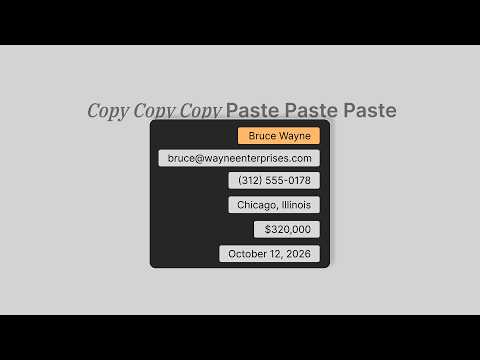
CopyXD is a multi copy paste extension that lets you copy multiple texts in a row and then paste them sequentially in order, across different tabs. Just copy everything first, switch tabs, and keep pressing Ctrl+V. That's it. 🪐 THE PROBLEM IT SOLVES: Your system's clipboard holds only one item at a time, so every new copy overwrites the last one. So moving several pieces of text, like filling rows of a spreadsheet from a notes app or email, becomes really slow. ❌ Before: Copy > Switch Tab > Paste > Switch Back > Copy > Switch Tab > Paste… --------------- ✅ Now it's: Copy, Copy, Copy > Switch Tab > Paste, Paste, Paste. CopyXD collapses that entire loop into two steps: copy everything, then paste everything. Simple. ⚡ HOW IT WORKS: It's a multiple clipboard manager. Unlike the default clipboard that only remembers the last thing you copied, CopyXD builds a queue of copied items. It turns your normal Ctrl+C / Ctrl+V into a sequential clipboard that remembers multiple items. 1. Copy text with Ctrl+C on any webpage. 2. Copy another text again (copy as many items as you want) 3. Switch to any other tab (such as a spreadsheet or web form) 4. Press Ctrl+V. The first item is pasted. 5. Press Ctrl+V again. The next item is pasted. and so on… It's the bulk copy and paste tool you wish browser had by default. KEY FEATURES: 🥪 Copy multiple items at once, paste them in order Build a queue of copied text and paste it back one item at a time, using the same Ctrl+C and Ctrl+V shortcuts you already know. 🌐 Works across tabs Copy from one tab and paste into another. Your clipboard queue follows you across every tab in your browser. 📜 Clipboard UI A small clipboard-style panel sits in the bottom right corner of your screen so you can see your queued items. Hide or show it whenever you want. 🎢 Choose your paste order: (FIFO or LIFO) - LIFO (Last In, First Out): The last item you copied is the first item pasted. Think of a stack of plates: you take the top plate first. This is best when you want to paste the most recent copy first and work backwards. - FIFO (First In, First Out): The first item you copied is the first item pasted. Think of a line at a coffee shop: whoever arrives first is served first. This is best when you want data pasted in the same order you collected it. 🔒 PRIVACY & SECURITY - No tracking. - No data collection. - No backend servers. - Your copied text never leaves your computer. - Everything stored locally in your browser. - All processing happens locally in your browser. Website: https://copyxd.web.app have a great day :)
0 out of 5No ratings
Details
- Version1.0.0
- UpdatedOctober 9, 2026
- Offered byKey Correct
- Size625KiB
- LanguagesEnglish
- DeveloperKey Correct
New Ashok Nagar Ashok Nagar, Delhi 110096 INEmail
neuhiman@gmail.com - Non-traderThis developer has not identified itself as a trader. For consumers in the European Union, please note that consumer rights do not apply to contracts between you and this developer.
Privacy

This developer declares that your data is
- Not being sold to third parties, outside of the approved use cases
- Not being used or transferred for purposes that are unrelated to the item's core functionality
- Not being used or transferred to determine creditworthiness or for lending purposes
Support
For help with questions, suggestions, or problems, visit the developer's support site