

CopyCat for Chrome

Overview
Record browser actions and screenshots, analyze automatically, and create automations, tutorials and skills.
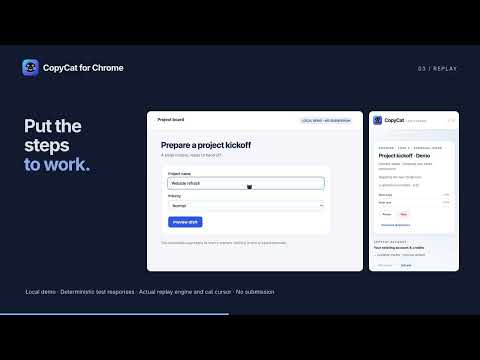
CopyCat for Chrome is a browser workflow automation extension that turns recorded website tasks into reusable automations, tutorials and skill files. Record browser actions and screenshots, edit the instructions, then run the workflow from Chrome's side panel. RECORD, REVIEW AND REUSE • Record actions and screenshots across ordinary tabs in the current Chrome window. No audio is recorded. • Stop to check final-state coverage and automatically send representative screenshots and necessary context for AI analysis. Incomplete captures explain the gap before paid analysis. • Edit saved instructions, reusable inputs and clarification answers before a run. • Search saved automations in the side panel. Choose Element-based or Computer replay, reuse matching tabs and open missing starting pages. • Follow live progress, answer required questions, and pause or stop. Successful completion retains a result card with verified outcomes. The optional cat cursor marks automation targets; it is excluded from CopyCat's own captures and exported evidence. CREATE TUTORIALS AND EXPORT SKILLS Build tutorials with editable scenes, screenshots, crop and annotation tools, branding, captions and optional AI narration. Download PDF, DOCX, PPTX or MP4. Export reusable workflow instructions as skill files, with guidance for importing them into compatible AI tools. Downloads include import guidance; the extension does not install files into another app. ACTION APPROVALS AND WEBSITE ACCESS YOLO is on by default for new, unset Chrome preferences. It automatically approves routine task actions and task-required website access after Chrome grants optional access to HTTP/HTTPS websites. Turn YOLO off in Account & settings to approve browser actions and task website access. Existing saved choices are retained. Sign-in and essential missing information still pause for your attention in either mode. Chrome may show a debugger notice during recording or replay; closing it pauses CopyCat. You can keep working with the side panel closed. ACCOUNT, CREDITS AND PRIVACY A CopyCat account and sufficient credits are required for analysis, replay and AI tutorial generation. Account credits are shared with CopyCat on Mac; Chrome and Mac keep separate local workflow libraries. AI narration requires purchased credits; trial credits do not cover narration. Local rendering, artifact downloads and skill exports do not buy inference. Saved actions and screenshots are encrypted locally in your Chrome profile. Representative screenshots and necessary context leave the device for analysis when you Stop. Replay uses task page observations and screenshots through CopyCat and its AI services. Pause before sensitive content: later privacy edits cannot recall material already submitted. Read the privacy policy before recording or running a workflow. REQUIREMENTS AND SCOPE Requires Chrome 125 or later. Supports ordinary websites, not Chrome internal pages, native dialogs, files or desktop apps. Scheduling, provider keys and desktop workflow imports are outside this extension's scope. Privacy: https://copycat.lavenberry.com/privacy/chrome-extension Website: https://copycat.lavenberry.com Support: https://copycat.lavenberry.com/support — support@lavenberry.com
0 out of 5No ratings
Details
- Version0.1.3
- UpdatedOctober 21, 2026
- FeaturesOffers in-app purchases
- Offered bybane6080
- Size10.65MiB
- LanguagesEnglish
- DeveloperFREEMAN SENECHARLES
6577 Rivermill Club Dr Lake Worth, FL 33463 USEmail
support@lavenberry.comPhone
+1 561-809-8479 - TraderThis developer has identified itself as a trader per the definition from the European Union and committed to only offer products or services that comply with EU laws.
Privacy

CopyCat for Chrome has disclosed the following information regarding the collection and usage of your data. More detailed information can be found in the developer's privacy policy.
CopyCat for Chrome handles the following:
This developer declares that your data is
- Not being sold to third parties, outside of the approved use cases
- Not being used or transferred for purposes that are unrelated to the item's core functionality
- Not being used or transferred to determine creditworthiness or for lending purposes
Support
For help with questions, suggestions, or problems, visit the developer's support site