

Copy URL — One-Click URL Copier & Link Shortcut (Ctrl+Shift+C)
3 ratings
)
Overview
One-click URL copier — copy any URL to clipboard with a keyboard shortcut. The fastest way to copy links in Chrome. Free & simple.
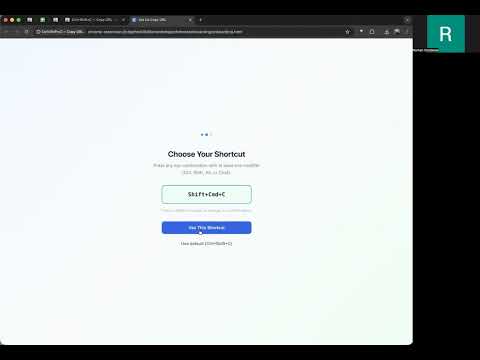
Copy Chrome tab URL custom shortcut. Instantly copy the current tab's URL to your clipboard you custom shortcut. WHAT IT DOES Copy URL is a fast, free URL copier for Chrome. Press one keyboard shortcut and the tab URL goes to your clipboard. No clicks. Just copy link and go. HOW IT WORKS Press Ctrl+Shift+C (or your custom shortcut) Tab URL is copied to your clipboard Paste anywhere AFTER INSTALL Reload Chrome tabs once. On first use, a simple onboarding screen lets you choose your keyboard shortcut. We recommend Ctrl+Shift+C, but you can pick any key you like. WHY YOU NEED IT Stop wasting time with right-click menus. One-click copy makes sharing links 10x faster. Copy tab URL from any page in under a second. FEATURES - Copy URL with one keyboard shortcut - Works on every tab and page - Customizable hotkey - Clean popup confirms each copy - Lightweight, zero speed impact PRIVACY Zero data collected. No tracking. No analytics. No accounts. Nothing stored or sent. Your clipboard, your URLs, your business. Great for developers, students, researchers, and anyone who shares links daily.
5 out of 53 ratings
Details
- Version1.1.0
- UpdatedFebruary 18, 2026
- Offered byromangordeew
- Size18.32KiB
- LanguagesEnglish (United States)
- Developer
Email
romangordeew@gmail.com - Non-traderThis developer has not identified itself as a trader. For consumers in the European Union, please note that consumer rights do not apply to contracts between you and this developer.
Privacy

This developer declares that your data is
- Not being sold to third parties, outside of the approved use cases
- Not being used or transferred for purposes that are unrelated to the item's core functionality
- Not being used or transferred to determine creditworthiness or for lending purposes
Support
For help with questions, suggestions, or problems, please open this page on your desktop browser