

Copy to Figma - 100% free, 100% private, works on all Figma plans
18 ratings
)
Overview
v1.2.3: capture open menus, Ctrl+Shift+1/2 shortcuts, local HTML, placeholders, ↑↓ picker.
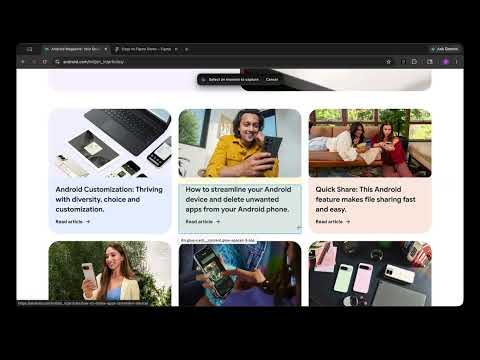
Works on Figma free plan too. Doesn't require logging in to Figma to activate. Copy any webpage and paste it into Figma as a fully editable design — no plugin, no export, no setup. Click the extension, copy the page, then paste (Cmd+V / Ctrl+V) directly onto the Figma canvas. Every layer comes through as a real Figma object — frames, text, images, vectors — ready to restyle, remix, or use as a reference. What you can do with it • Turn any live website into an editable Figma file in one click • Copy individual sections or components — hover, copy, paste • Use real production sites as starting points for redesigns, audits, or moodboards • Capture competitor flows and landing pages with their actual layout and typography intact • Pull marketing pages, dashboards, or docs into Figma to annotate or iterate on What gets captured • Layout and structure as native Figma frames and auto-layout • Text with the page's real fonts (web fonts are detected and preserved) • Images, icons, and SVGs — including cross-origin assets • Background colors, gradients, borders, and shadows • CSS pseudo-element and background images (icons, decorative assets) Why use this instead of a screenshot A screenshot is a flat image. This gives you editable layers. Change the copy, swap the colors, replace an image, restyle a button — it all behaves like it was designed in Figma from scratch. How it works • Open any webpage • Open Copy to Figma chrome plugin • Hit "Copy to clipboard" • Paste into Figma (Cmd+V on Mac, Ctrl+V on Windows) • In element picker mode: ↑ parent, ↓ child to drill into the DOM before copying That's it. No Figma plugin to install, no account to connect, no file uploads. Privacy Your page never leaves your browser. The extension reads the current tab only when you click it, packages the design locally, and writes it to your clipboard. Nothing is sent to any server.
4.9 out of 518 ratings
Details
- Version1.2.3
- UpdatedAugust 17, 2026
- Offered byDesignDev
- Size118KiB
- LanguagesEnglish
- Developer
Email
mangoishapp@gmail.com - Non-traderThis developer has not identified itself as a trader. For consumers in the European Union, please note that consumer rights do not apply to contracts between you and this developer.
Privacy

Copy to Figma - 100% free, 100% private, works on all Figma plans has disclosed the following information regarding the collection and usage of your data. More detailed information can be found in the developer's privacy policy.
Copy to Figma - 100% free, 100% private, works on all Figma plans handles the following:
This developer declares that your data is
- Not being sold to third parties, outside of the approved use cases
- Not being used or transferred for purposes that are unrelated to the item's core functionality
- Not being used or transferred to determine creditworthiness or for lending purposes