

Copy & Prep — Text from here and there, copied together.

Overview
Stop copying, pasting, then fixing. Collect text as you browse, get the order and line breaks right, then paste it all at once.
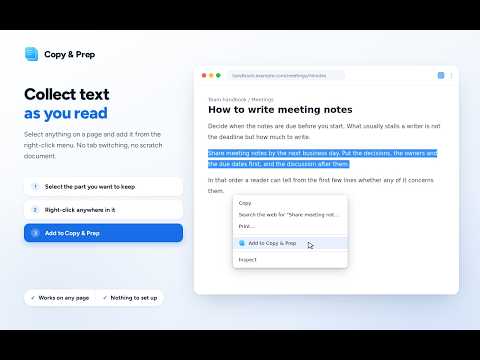
Copy & Prep is a tool for collecting before you paste. It gathers only the text you pick with the right-click menu into a temporary workspace, lets you fix the order and the line breaks, and copies the lot in one go. Comparing research, moving notes into an email or a ticket, drafting a document. All of it means copying text again and again from different pages — or from different places on one page — and then fixing the order, the stray line breaks and the extra spaces after you paste. This extension removes that round trip. ■ How it works 1. Select text on a page and choose "Add to Copy & Prep" from the right-click menu 2. Open the toolbar icon and choose "Open settings" to review, edit and reorder what you collected 3. Use "Tidy up" if you want the awkward line breaks and trailing whitespace removed 4. "Copy all" joins everything in display order into one piece of text ■ Nothing is rewritten on its own "Tidy up" shows you the text before and after, side by side. You decide whether to apply it. Bullet lists, numbered lists, tables and code keep their structure; only lines wrapped inside a paragraph are rejoined. It never summarizes, rephrases or proofreads, and one step takes you back to the text as it was captured. ■ You choose the output Plain text or Markdown. The page name, URL and date added are kept alongside each piece but are not part of the output by default. Turn on only the ones you want, and pick the source label language (Japanese or English) independently of your interface language. ■ Private by construction ・It collects only the text you explicitly pick with the right-click menu. It never scans page content and never captures clipboard history. ・Everything is stored in chrome.storage.local on your own device. chrome.storage.sync is not used, so nothing syncs to your other devices. ・No transmission to any server, no analytics, no telemetry. It holds no network permission and loads no external CDN, font or image. ・It requests exactly three permissions: contextMenus, storage and activeTab. No host permissions (<all_urls> or similar) and no content scripts. ・You can delete individual pieces, or clear everything, at any time. ■ What it does not do Capture clipboard history automatically, store whole pages, store images or files, sync to the cloud, require an account, summarize or classify or proofread with AI, or produce academic citation formats (APA, MLA and so on). ■ Good to know (limitations) ・Works on any Chrome with Manifest V3 support (88 or later). ・Reordering uses Move up / Move down buttons; drag and drop is not supported. ・Tidying only adjusts whitespace and line breaks — it does not summarize, rephrase or proofread. ・The tidy-up preview does not highlight differences. ・The interface language follows your browser (only the source label language is independent). ・Japanese and English are supported. Chinese localization is not available. Privacy policy: https://legacy-tools.dev/legal/prep/privacy
5 out of 51 rating
Details
- Version1.0.1
- UpdatedOctober 11, 2026
- Size96.74KiB
- Languages2 languages
- DeveloperWebsite
Email
support@legacy-tools.dev - Non-traderThis developer has not identified itself as a trader. For consumers in the European Union, please note that consumer rights do not apply to contracts between you and this developer.
Privacy

Copy & Prep — Text from here and there, copied together. has disclosed the following information regarding the collection and usage of your data. More detailed information can be found in the developer's privacy policy.
Copy & Prep — Text from here and there, copied together. handles the following:
This developer declares that your data is
- Not being sold to third parties, outside of the approved use cases
- Not being used or transferred for purposes that are unrelated to the item's core functionality
- Not being used or transferred to determine creditworthiness or for lending purposes
Support
For help with questions, suggestions, or problems, visit the developer's support site