

Copresent - Remote Control for Google Slides

Overview
Remote-control & co-present Google Slides from any device. Co-presenters join by link - no install, no sign-up. Setup in 30s.
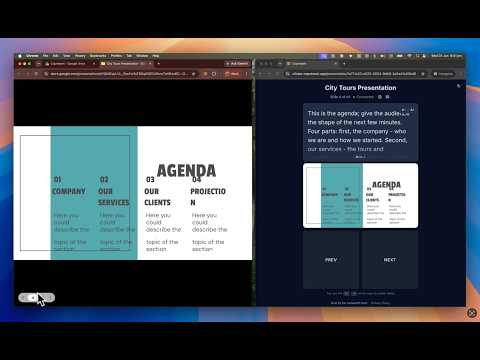
Turn your phone into a remote for Google Slides — and let your whole team hold the clicker. Copresent is a Google Slides remote control that works from any device, so you can advance slides from the stage, from the back of the room, or from a laptop on the other side of a call. Use it solo as a presentation clicker: swipe to move through your slides, watch the current slide live, and read your speaker notes on an iPhone, Android, iPad or laptop — no hardware to buy, nothing to pair. Or co-present: share one secure link and unlimited co-presenters control the same Google Slides deck, taking turns with no "next slide, please." Your audience can ask questions from their phones too. Only the main presenter installs the extension — everyone else joins instantly in any browser. No downloads, no accounts, no extra apps. KEY FEATURES 🖼️ See the current slide live in your remote — no need to watch the projector 📱 Turn your phone into a remote for Google Slides — swipe to advance, no clicker needed 📝 Read your speaker notes on every device ⏱️ Built-in presentation timer — know how long is left without leaving the remote 🤼 Unlimited co-presenters control one deck, taking turns 🙋 Audience Q&A — the room scans a QR on your slides and asks from their phones 🔗 One shared link — co-presenters join instantly, no sign-up 🎥 Works over Zoom, Google Meet & Microsoft Teams 🆓 Free, and set up in under 30 seconds 🖼️ Live Slide Preview 🖼️ - Co-presenters see the current slide, rendered live, right in their remote - Always know what's on screen — from the back of the room or a second monitor - Stays in sync even when your presenting window is in the background - Turn it on by connecting your Google account (optional) 📱 Your Phone, a Google Slides Remote 📱 - Swipe left and right to move through your Google Slides - Remote-control your slides from the stage or the back of the room — no physical clicker needed - Works in any mobile browser — nothing to install 🤼 Present Together 🤼 - Unlimited co-presenters control the same deck - Anyone can advance the slides — no awkward "next slide, please" - Everyone sees the same live slide and stays in sync 🙋 Audience Q&A 🙋 - Put a QR code on your slides with one tap — the room scans it and asks from their phones - Questions land in your remote as they come in, most upvoted first - Every question shows which slide was on screen when it was asked - Mark questions answered or hide them as you go - Pause questions during a demo, resume when you're ready - Your audience needs no app and no sign-up — they just open a link 📝 Speaker Notes Everywhere 📝 - Your speaker notes appear right in the remote, on every device - Stay on script whether you're on stage or holding your phone - No flipping back to presenter view ⏱️ Keep To Time ⏱️ - A presentation timer right in your remote — no second app, no phone stopwatch - Set your slot and glance down; it turns amber in the last minute and red once you're over - Co-presenters get their own timer too, so everyone can pace their section - Survives a reload or a locked screen — the clock keeps its place 🔗 Share With A Link 🔗 - Every presentation gets its own secure link - Co-presenters open it in any browser — no account, no install - Generate a fresh link anytime to revoke the old one PERFECT FOR 🤝 Client presentations — each team member runs their own section 💼 Investor pitches — co-founders take turns with zero handoff fumbles 🏫 Town halls & all-hands — multiple speakers, one screen share 🎓 Lectures & workshops — roam the room, control slides from your phone 🙋 Conference talks — take audience questions and keep to a hard time slot 🎥 Remote meetings — present over Zoom, Google Meet & Microsoft Teams 🎤 Solo presenting — just want a phone clicker and your notes? That works too ABOUT COPRESENT Copresent is the easiest way to co-present and remote-control Google Slides with a team — on stage, in the boardroom, or fully remote. One install, a shared link, and you're in sync — and when it's time for questions, the room asks from their phones. Works with Google Slides. Set up in under 30 seconds.
5 out of 54 ratings
Details
- Version1.9.0
- UpdatedOctober 21, 2026
- Size433KiB
- LanguagesEnglish
- Developer
- Non-traderThis developer has not identified itself as a trader. For consumers in the European Union, please note that consumer rights do not apply to contracts between you and this developer.
Privacy

Copresent - Remote Control for Google Slides has disclosed the following information regarding the collection and usage of your data. More detailed information can be found in the developer's privacy policy.
Copresent - Remote Control for Google Slides handles the following:
This developer declares that your data is
- Not being sold to third parties, outside of the approved use cases
- Not being used or transferred for purposes that are unrelated to the item's core functionality
- Not being used or transferred to determine creditworthiness or for lending purposes