


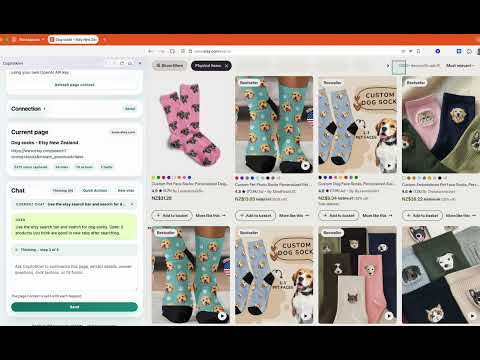
Overview
An AI browser agent that can understand pages, perform browser actions, & complete multi-step workflows directly inside Chrome.
CopilotKiwi - AI Browser Agent for Chrome CopilotKiwi is an AI browser agent for Chrome that works inside a side panel alongside the page you are already viewing. It is built to do real browser work, not just answer questions about a page. You can give CopilotKiwi a goal in plain English and it can carry out supported browser actions, move step by step through tasks, and keep working with the updated page as it goes. CopilotKiwi is designed to feel like a browser operator, not just a page summariser. CopilotKiwi is especially built for: - Multi-step browser workflows - Supported browser actions using natural language - Multi-tab research and comparison - Cross-page extraction from listings, directories, and results pages - Repetitive browser task assistance - CSV export for extracted data - Saved local chat history with multiple threads Supported browser actions include: - Clicking elements - Focusing fields and controls - Filling inputs and textareas - Choosing select options - Toggling checkboxes and radio buttons - Submitting forms - Opening links - Navigating to pages - Scrolling through pages These actions can be chained together into multi-step flows on supported pages, helping users complete tasks faster without doing each step manually. CopilotKiwi can also support page understanding tasks such as: - Chatting with the current web page - Summarising articles, product pages, directories, and search results - Extracting key details from what is on screen - Answering follow-up questions based on the live page - Helping with writing, note taking, explanations, and research Useful built-in features include: - Quick actions for research, drafting, summaries, and extraction - Refresh page context on demand - Context stats for captured text, links, form fields, and action targets - Busy-state protection to prevent overlapping requests - Activity indicators when CopilotKiwi is thinking or performing actions - Manual review mode for suggested browser actions - Optional auto-run mode for supported actions CopilotKiwi uses a bring-your-own OpenAI API key model. Users add their own OpenAI API key, choose their own model, and usage stays under their own OpenAI account. How to use CopilotKiwi: 1. Install CopilotKiwi in Chrome 2. Open the side panel 3. Add your OpenAI API key and choose a model 4. Open any supported web page 5. Ask CopilotKiwi to perform a browser task, run a workflow, research across pages, extract data, or summarise content The extension is built with a local-first approach: - API key and selected model are stored locally in Chrome extension storage - Chat history, research sessions, and extraction sessions are stored locally on the device - Normal workflows do not route page context through CopilotKiwi-owned servers - Relevant prompt and page context are sent directly to OpenAI using the user’s own API key CopilotKiwi is a good fit for: - Running multi-step browser tasks - Automating repetitive browser work - Comparing options across multiple tabs or pages - Extracting structured information from directories and listings - Creating CSV outputs from extraction jobs - Summarising long or complex web pages - Asking questions about what is currently on screen - Drafting notes or content using page context CopilotKiwi helps users automate browser work, complete multi-step tasks faster, compare information across pages, extract useful data, and use AI directly inside Chrome without switching tools. Website: https://copilot.kiwi
5 out of 52 ratings
Details
- Version1.1.0
- UpdatedApril 9, 2026
- Size61.71KiB
- LanguagesEnglish
- DeveloperWebsite
Email
contact@jasper.studio - Non-traderThis developer has not identified itself as a trader. For consumers in the European Union, please note that consumer rights do not apply to contracts between you and this developer.
Privacy

This developer declares that your data is
- Not being sold to third parties, outside of the approved use cases
- Not being used or transferred for purposes that are unrelated to the item's core functionality
- Not being used or transferred to determine creditworthiness or for lending purposes
Support
For help with questions, suggestions, or problems, visit the developer's support site