

Coolbar — Canvas assignments, study planner & memory

Overview
Pulls your Canvas and Gradescope assignments into a planner that fits your week, preps you for exams, and remembers what you read.
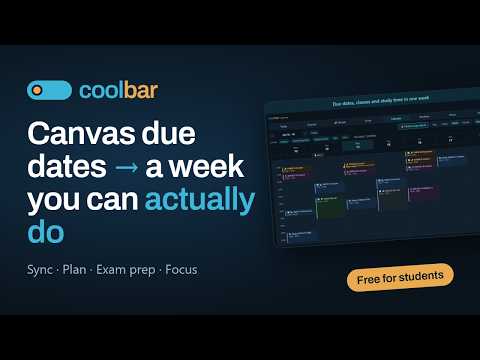
Coolbar turns what your courses throw at you into a week you can actually do — and remembers everything you read along the way. FOR STUDENTS • Your assignments, without the copying. Open Canvas (bCourses and every other Canvas school), or Gradescope, and Coolbar reads your courses' assignments and due dates into your planner — and keeps them current every time you open a course page. Press Sync now in the planner for an instant refresh. • Due dates on a real calendar. Classes, labs, exams and deadlines side by side with your life. Day, 3-day, week and month views. Import a syllabus from a photo or PDF. • Plan my week. Coolbar spreads your study sessions around your classes and your breathing room — no back-to-back marathons, no study after midnight unless you want it — and re-plans when things move. • A focus timer that counts starts. Countdown or open count-up, pause freely, add five minutes with one tap. Built for people who freeze under a shrinking ring. Time spent feeds back into how long your next task really takes. • Exam prep from your study guide. Attach the study guide and your notes; Coolbar builds a step-by-step plan from the concepts you don't know yet, quizzes you in the exam's own question styles, tracks what you've mastered, and runs a timed rehearsal before the day. • Ask Coolbar. "What's due this week?", "move my chem study to Sunday", "quiz me on kinetics" — everything you can click, you can ask. FOR EVERYONE • Save any page with one keystroke — Ctrl+Shift+S — and Coolbar reads it, summarises it, tags it and keeps a searchable copy. No folders, no filing. • Highlight what matters — select a passage and press Alt+Shift+H. It's still there when you come back. • Ask about this page, or ask your memory — "that article about pricing psychology" finds it months later, even if those words never appear on the page. • "You saved this already" — the popup tells you when you've read a page before, with your own summary. WHY IT READS THE PAGE IN YOUR BROWSER Because a server fetching the same URL gets a paywall or a login screen. Reading it inside your tab means what you save is what you actually saw, and your courses sync from a page you're already signed in to — Coolbar never holds a school password. The extension reads a page only when you act — pressing save, opening the popup, or asking. It doesn't follow you between sites. With autopilot on, it also re-reads the course pages of a Canvas tab you have open, every few hours, using the same read-only calls the page itself makes, to keep your assignments current — you can turn this off in the extension's settings, and it never changes anything on a portal and never holds a portal password. One exception to "only when you act": when you press Sync now in the planner, Coolbar may briefly open your course page in a background tab, read it and close it — only for a linked course with no tab of yours already open, and only for that one press. PRIVACY Your saves are turned into searchable embeddings on our own servers — the text of your memories is never sent to a third party to be indexed. We don't sell your data or use it to train models. Free plan: 100 saves and 50 questions a month, plus a planner that syncs your courses. Requires a free account at coolbar.com. https://coolbar.com/privacy
5 out of 51 rating
Details
- Version1.16.1
- UpdatedSeptember 27, 2026
- Size119KiB
- LanguagesEnglish
- DeveloperFarukh D. TamboliWebsite
17 Barnyard Ct Plainsboro Township, NJ 08536-3137 USEmail
support@novaluna.aiPhone
+1 347-413-0164 - TraderThis developer has identified itself as a trader per the definition from the European Union and committed to only offer products or services that comply with EU laws.
Privacy

Coolbar — Canvas assignments, study planner & memory has disclosed the following information regarding the collection and usage of your data. More detailed information can be found in the developer's privacy policy.
Coolbar — Canvas assignments, study planner & memory handles the following:
This developer declares that your data is
- Not being sold to third parties, outside of the approved use cases
- Not being used or transferred for purposes that are unrelated to the item's core functionality
- Not being used or transferred to determine creditworthiness or for lending purposes
Support
For help with questions, suggestions, or problems, visit the developer's support site