

Cookify - Swagger UI API Client, JWT & Cookie Manager
5 ratings
)
Overview
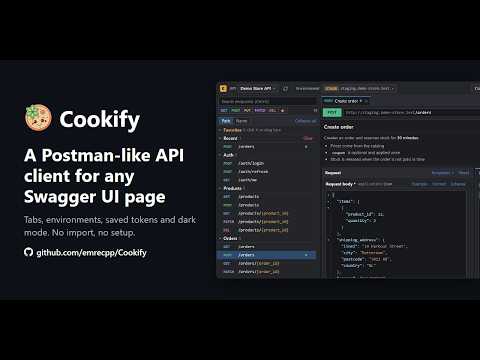
Postman-like API client for any Swagger UI page. Dark mode, tabs, environments, JWT and cookie manager. No import, no setup.
Cookify turns the Swagger UI page you already have into a fast API client. There is nothing to import and nothing to set up. Open your API docs as usual. Cookify recognizes the page and gives you a compact workspace with your endpoints, schemas and examples already in place. It reads both Swagger 2.0 and OpenAPI 3 documents, whichever framework serves them. SEND REQUESTS • Keep several endpoints open in tabs • Fill in parameters with fields that fit their type, and edit request bodies in a JSON editor • See missing or invalid values before you send • Read the response next to your request, with every documented response colored by status code • Your request bodies are saved, with one click back to the default FIND ANYTHING • Open any endpoint, tab or command from the command palette (Ctrl+P) • Filter the list by method or favorites • Copy any request as a ready-to-run code snippet • Export your endpoints as a Postman collection WORK ACROSS ENVIRONMENTS • Save an API once and switch between development, staging and production • Tabs, favorites and drafts stay with you, and each environment keeps its own token • Sign in from the page and see who you are and when your token expires • New, changed and removed endpoints are marked when the API changes COOKIES AND TOKENS • Save, organize and apply cookies and JWT tokens from the popup, grouped by project SYNC AND BACKUP • Optional Google Drive sync lets you continue on another computer where you left off • Export everything to one file, encrypted if you set a password PRIVATE BY DEFAULT No account and no analytics. Requests go straight from your browser to your API. Google Drive sync is optional and uses a private app folder in your own Drive. Dark theme by default, with a light theme one click away. Classic view brings back the original page at any time. Cookify is open source and made by Emre Demircan: https://github.com/emrecpp/Cookify
5 out of 55 ratings
Details
- Version2.0.5
- UpdatedNovember 10, 2026
- Offered byEmre Demircan
- Size802KiB
- LanguagesEnglish
- Developer
Email
esh243159@gmail.com - Non-traderThis developer has not identified itself as a trader. For consumers in the European Union, please note that consumer rights do not apply to contracts between you and this developer.
Privacy

This developer declares that your data is
- Not being sold to third parties, outside of the approved use cases
- Not being used or transferred for purposes that are unrelated to the item's core functionality
- Not being used or transferred to determine creditworthiness or for lending purposes