

ConvoFlow – Save & Continue & Compare Chats Across ChatGPT, Claude & Gemini

Overview
Save conversations from ChatGPT, Claude and Gemini, then reuse the right context in any AI chat without explaining everything again.
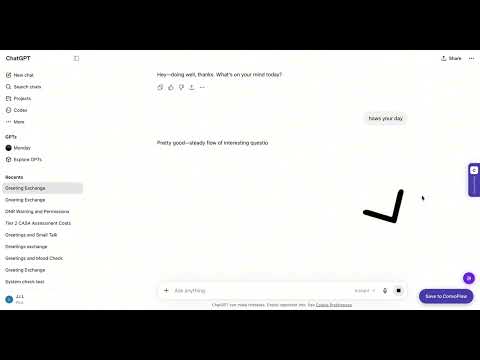
Stop re-explaining your work every time you start a new AI conversation. ConvoFlow lets you save, summarize and reuse important context across ChatGPT, Claude, Gemini, and other supported AI tools. Save a conversation in one click. Later, select the relevant memory and insert it into any new AI chat—so the assistant understands your project, previous decisions and open questions without making you start over. 🧠 SAVE IMPORTANT AI CONVERSATIONS Click “Save to ConvoFlow” directly inside a supported AI app. ConvoFlow turns the conversation into a concise summary containing: • Important context • Decisions and conclusions • Open questions and next steps • A searchable topic tag You can save conversations manually or enable optional auto-save for completed conversations. 🔎 CHECK IMPORTANT AI ANSWERS Click “Check this answer” beneath an AI response to review its factual claims against current web sources. ConvoFlow helps you: • Identify checkable claims in the response • See which claims are supported by available sources • Flag claims where no clear source was found • Open the supporting sources yourself • Save the checked result for later reuse Automated checks can be incomplete. Review the original sources before making important decisions. 🚀 REUSE CONTEXT IN ANY AI CHAT Bring saved context into a new conversation in three ways: • Open the Memory button and select a saved conversation • Use the ConvoFlow side panel and click “Insert to Chat” • Let ConvoFlow suggest memories related to your active conversation You remain in control of what is inserted. Suggested memories are never sent without your action. 🌐 CONTINUE ACROSS AI PLATFORMS Save a conversation in one AI app and continue it in another. ConvoFlow works across ChatGPT, Claude, Gemini, and other supported AI platforms. Your context is no longer locked inside one provider. 📁 ORGANIZE CONTEXT BY PROJECT Group related conversations, prompts and decisions into projects so different areas of your work stay separate. Select an active project and bring its accumulated context into a new AI conversation when needed. 🧭 TRACK IMPORTANT DECISIONS When you save a conversation, ConvoFlow can extract important decisions and compare them with previous memories in the same project. Potential contradictions are highlighted so you can review them before changing direction. 📡 COMPARE MULTIPLE AI ANSWERS For questions that deserve a second opinion, send one prompt to multiple supported AI platforms and compare their answers side by side. ConvoFlow can show: • Where the answers agree • Where they disagree • Unique insights from each AI • A synthesized final response Save the complete comparison as a reusable memory. 📊 BUILD A DAILY CONTEXT BRIEF Create a focused summary of your day using selected information from your calendar, email, GitHub and other supported tools. Review and edit the brief before inserting it into an AI conversation. Integrations are optional and use read-only access where available. ✨ SAVE REUSABLE PROMPTS Keep frequently used prompts in a structured library for writing, coding, research, design, video and marketing. Insert a saved prompt into any supported AI app without searching through old documents or notes. 🛠️ HOW IT WORKS 1. Install ConvoFlow and complete the one-time consent flow. 2. Open a supported AI app and have a conversation. 3. Click “Save to ConvoFlow” to summarize and store it. 4. Start a new conversation in any supported AI app. 5. Open Memory and select the context you want. 6. Click “Insert to Chat” and continue where you left off. No account is required. No subscription is needed to get started. 🔒 PRIVACY AND CONTROL • Saved memories are stored locally on your device • Conversation content is not sent to product analytics • Relevant session text is sent to the Anthropic Claude API only when AI-powered processing is requested • AI processing includes summarization, decision extraction and contradiction detection • Calendar, email and developer-tool integrations are optional • You can delete locally stored data from Settings at any time • See the full privacy policy for complete details 🌍 AVAILABLE IN 11 LANGUAGES English, 繁體中文, 简体中文, 日本語, 한국어, Español, Français, Deutsch, Português, العربية and Bahasa Indonesia. ConvoFlow gives your AI conversations continuity—across sessions, projects and AI platforms. Your context. Your device. Your control.
5 out of 59 ratings
Details
- Version0.5.1
- UpdatedJuly 24, 2026
- Size338KiB
- LanguagesEnglish
- Developer
- TraderThis developer has identified itself as a trader per the definition from the European Union and committed to only offer products or services that comply with EU laws.
Privacy

ConvoFlow – Save & Continue & Compare Chats Across ChatGPT, Claude & Gemini has disclosed the following information regarding the collection and usage of your data. More detailed information can be found in the developer's privacy policy.
ConvoFlow – Save & Continue & Compare Chats Across ChatGPT, Claude & Gemini handles the following:
This developer declares that your data is
- Not being sold to third parties, outside of the approved use cases
- Not being used or transferred for purposes that are unrelated to the item's core functionality
- Not being used or transferred to determine creditworthiness or for lending purposes