


Overview
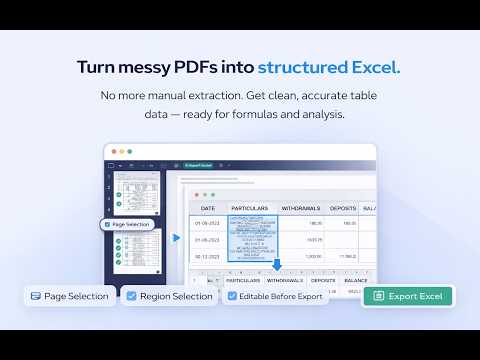
Convert PDF to Excel. OCR text recognition. Convert entire page or select specific tables with inline edit and preview.
Convert PDF to Excel format. PDF to XLS converter. Instantly convert PDF tables and data into editable Excel spreadsheets — right from your browser. No complicated software. Just click and convert. How It Works: Open any PDF in Chrome and click the extension icon. Your PDF opens in a powerful built-in viewer where you can select the pages you want to convert, crop specific regions, and get clean spreadsheet data in seconds. Key Features: ★ One-Click PDF to Excel Conversion — Convert any PDF page into structured spreadsheet data instantly. ★ Smart Region Selection — Don't need the whole page? Draw a rectangle around the exact table or area you want to convert. Only that region gets processed. ★ Multi-Page Support — Select multiple pages at once using Ctrl+Click or Shift+Click. Batch convert them all in one go. ★ Built-In Spreadsheet Editor — Preview and edit your converted data before exporting. Click any cell to modify values, delete unwanted rows or columns, and get your data exactly how you need it. ★ Flexible Export Options — Export all pages into a single Excel sheet, or create separate tabs for each page. Copy data to clipboard for quick pasting into Google Sheets or other apps. ★ Full-Featured PDF Viewer — Zoom from 50% to 500%, navigate with keyboard shortcuts, switch between dark and light themes, and open local PDF files from your computer. ★ Works Everywhere — Automatically detects PDFs on any website, in embedded viewers, and in Chrome's built-in PDF reader. A floating button appears so you never miss a PDF. Functionality: Extract tables from PDF to Excel instantly Convert PDF to Excel (XLSX / XLS) Convert PDF to CSV Extract structured data from PDF Convert scanned PDF to Excel Extract financial statements from PDF Convert bank statement PDF to Excel Extract invoice data from PDF Export PDF reports to spreadsheet format Detect and extract tabular data automatically Perfect For: Extracting tables from financial reports, invoices, and bank statements Converting PDF data into spreadsheets for analysis Pulling structured data from scanned documents and forms Accountants, analysts, researchers, and anyone who works with PDF data daily What Users Love No file size limits or page restrictions Editable cells with Excel-style column/row headers Keyboard shortcuts for fast navigation Clean, modern interface with dark mode support Lightweight — installs in seconds If you're searching for: extract table from pdf pdf data extraction tool convert pdf table to excel pdf to excel chrome extension pdf to xlsx converter best way to extract data from pdf automate pdf data entry This is the tool you’ve been looking for.
5 out of 510 ratings
Details
- Version1.0.16
- UpdatedMay 15, 2026
- FeaturesOffers in-app purchases
- Size871KiB
- LanguagesEnglish
- DeveloperWebsite
Email
support@boopis.com - Non-traderThis developer has not identified itself as a trader. For consumers in the European Union, please note that consumer rights do not apply to contracts between you and this developer.
Privacy

PDF to XLS. Transform PDF to Excel has disclosed the following information regarding the collection and usage of your data. More detailed information can be found in the developer's privacy policy.
PDF to XLS. Transform PDF to Excel handles the following:
This developer declares that your data is
- Not being sold to third parties, outside of the approved use cases
- Not being used or transferred for purposes that are unrelated to the item's core functionality
- Not being used or transferred to determine creditworthiness or for lending purposes
Support
For help with questions, suggestions, or problems, please open this page on your desktop browser