

Conversation Graph for ChatGPT, Claude, and Grok by KnowTree

Overview
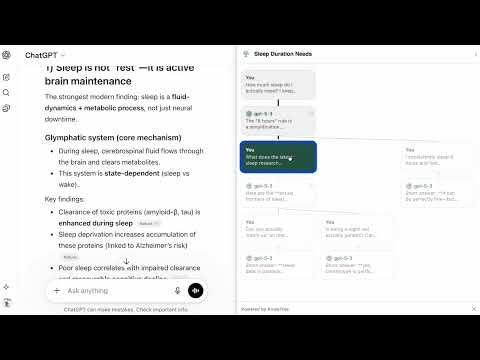
See ChatGPT, Claude, and Grok conversations as a graph. Navigate branches visually. Never lose a thread again.
Every time you edit a message or regenerate a response in ChatGPT Gork or Claude, a new branch is created — but you can't see it. They hides the full tree behind tiny "1/2" arrows, making it easy to lose track of where you've been. KnowTree Conversation Graph adds a sidebar that reveals the complete branching structure of any conversation, in real time. **What you get:** - Interactive tree visualization of your entire conversation, including all branches - One-click navigation — click any node to jump to that message instantly - Branch awareness — see where edits and regenerations created new paths - Cross-conversation branches — "Branch in new chat" conversations appear connected to their origin - Active path highlighting — always know where you are in the tree - Light/dark theme — automatically matches your ChatGPT theme - Resizable sidebar (240–600px) — adjust to your screen - Minimal footprint — no account required, no data sent anywhere, runs entirely in your browser **How it works:** Open any ChatGPT, Grok, Claude conversation and the sidebar appears with the full tree. Each node shows a preview of the message — your messages on one side, assistant responses on the other. Branch points are clearly marked. Click any node to navigate there. **Privacy:** This extension runs entirely in your browser. It reads your ChatGPT conversation structure to build the graph — nothing is stored, nothing is sent to external servers. No account or sign-up required. **Works with:** - chatgpt.com - chat.openai.com - grok.com - claude.ai Made by the team behind KnowTree (knowtree.chat) — a platform for branching knowledge exploration with AI. ## Category Productivity ## Language English
5 out of 52 ratings
Details
- Version1.0.1
- UpdatedMay 18, 2026
- Size131KiB
- LanguagesEnglish
- DeveloperWebsite
Email
yoav@knowtree.chat - Non-traderThis developer has not identified itself as a trader. For consumers in the European Union, please note that consumer rights do not apply to contracts between you and this developer.
Privacy

This developer declares that your data is
- Not being sold to third parties, outside of the approved use cases
- Not being used or transferred for purposes that are unrelated to the item's core functionality
- Not being used or transferred to determine creditworthiness or for lending purposes
Support
For help with questions, suggestions, or problems, please open this page on your desktop browser