


Overview
Automatically save, organize, and search every AI conversation across ChatGPT, Claude, Gemini, Copilot, and 14+ platforms.
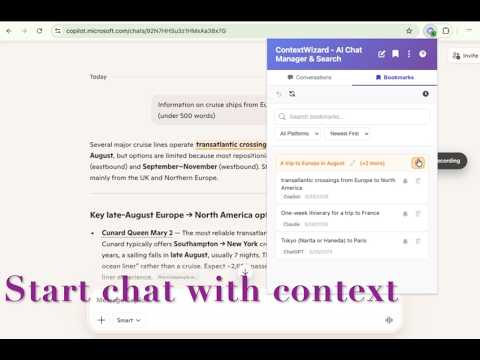
👇 **Install once. Never lose an AI insight again.** You use ChatGPT for brainstorming, Claude for deep writing, Gemini for research, Copilot for coding, and Grok for analysis. Every platform generates valuable content — but none of them talk to each other. ChatGPT has no idea what Claude told you last week. Bookmarks only save links, not content. Copy-pasting kills context. Your AI knowledge is trapped in silos. **ContextWizard is a unified memory layer for all your AI conversations.** It runs silently in your browser, automatically captures everything you discuss across every major AI platform, and makes it all instantly searchable from one place. All data stays on your computer. No accounts required. No configuration needed. 🆓 **Free to install** · 🔒 **100% local, no upload** · ⏱️ **Works immediately, zero setup** --- ### How ContextWizard Solves the AI Knowledge Fragmentation Problem Every AI tool you use produces insights — code snippets, marketing angles, research findings, architectural decisions. Without a way to connect them, you're re-explaining what you already figured out, digging through browser history, or forgetting great ideas entirely. ContextWizard changes that. Install it once, and from that moment on, every conversation you have with any AI is automatically saved, tagged, and searchable. You stop losing context. You stop repeating yourself. Your entire AI knowledge base grows organically, without any manual effort. --- ### ✨ KEY FEATURES #### 🤖 Automatic Capture — Works While You Do Conversations are saved in real time as you chat. No buttons to press, no workflows to learn. Intelligent debouncing prevents duplicates, even in fast back-and-forth threads. **Works out of the box with:** ChatGPT (chatgpt.com), Claude (claude.ai), Gemini, Copilot, and 14+ platforms. Need to add an internal or lesser-known AI platform? Custom URL patterns let you extend coverage in seconds. Domain filters give you per-platform control — auto-save everything, or exclude specific sites. #### 🔍 Full-Text Search — One Query, Every Platform Search across thousands of conversations from every AI platform at once. Type one query — get results from titles, summaries, and message bodies across ChatGPT, Claude, Gemini, and more, all in a single result set. • **Sub-millisecond results** powered by WebAssembly — even with years of history • **Accurate CJK search** — Chinese, Japanese, and Korean text is tokenized properly, so your queries match the right characters, not garbled fragments • **Preview context** — see the surrounding conversation without opening the thread • **Smart filters** — narrow by platform, workspace, or recency instantly #### 📂 AI Workspaces & Smart Bookmarks Stop organizing by platform. Group conversations by project — Marketing, Architecture, Research, whatever matters to you. Drag and drop to reorganize. • **Context Injection (v2.0+):** Pick past bookmarks and inject them directly into new conversations. Stop re-explaining context you already worked out. • **Message-level bookmarks:** Mark the exact message that matters inside a long thread — not just the thread itself. • **Nested bookmark groups** with instant-undo and automatic empty-group cleanup. #### ⏰ Smart Reminders — Never Lose a Follow-Up Set a reminder on any bookmarked message. Choose Once, Daily, Weekdays, Weekly, or Monthly (by date or weekday). System notifications fire reliably even when the browser is minimized. Click the notification to jump straight to the exact message. --- ### 🔒 YOUR DATA NEVER LEAVES YOUR COMPUTER ContextWizard is built local-first. Everything — every conversation, every search index, every bookmark — is stored in IndexedDB on your own machine. • **Zero telemetry, zero tracking, zero analytics.** We don't collect anything. • **100% GDPR and privacy compliant** by default — confidential prompts, proprietary code, and business context stay completely offline. • **Works fully offline.** No internet needed for any core feature. • **Cloud Sync (optional, v2.0+):** End-to-end encrypted sync across devices via Google SSO only — no third-party data access. Subscription feature. > **Uninstall anytime?** All local data is wiped from your device. Cloud data is retained securely for 30 days, then permanently deleted. --- ### 🛠️ WHO IS CONTEXTWIZARD FOR? 💻 **FOR DEVELOPERS** Unify code snippets, debugging sessions, and architecture discussions from GitHub Copilot, ChatGPT, and Claude in one searchable knowledge base. ✍️ **FOR WRITERS & MARKETERS** Cross-reference drafts and brainstorming sessions across multiple AI models without switching tabs or losing the thread. 🔬 **FOR RESEARCHERS & STUDENTS** Group literature reviews, data analysis, and expert discussions into clean, project-specific local knowledge bases. --- ### 📦 WHAT'S NEW IN V2.2.0 **Reliable cloud sync, now with an email key backup.** Setting up a new device emails your encryption key backup to your login address — search "Sync Key Backup" in your inbox any time and use "Import Key" to restore. Sync problems are no longer silent: expired subscription, expired session, and network errors now show clear, localized guidance instead of endless waiting, so your conversations are always recoverable. ### 📦 WHAT'S NEW IN V2.1.2 **Better notification behavior** — clicking a reminder notification now brings your browser window to the front, so you can immediately act on your bookmarked conversations. Plus, visual polish to the bookmark editor input for consistent sizing across platforms. ### 📦 WHAT'S NEW IN V2.1.1 **Bookmark Context Injection** is here! Select bookmarks and inject them directly into your AI chat conversations. ContextWizard now extracts the most relevant context — your bookmarked text plus surrounding conversation turns — and feeds it to ChatGPT, Claude, Gemini, and more. Works across languages: search in English, find results in Chinese, and vice versa. Smarter, faster, more useful. ### 📦 WHAT'S NEW IN V2.1.0 • **Jump to bookmarks** — One click opens the Bookmark Manager and scrolls directly to the exact message you saved. • **Smarter CJK search** — Accurate word tokenization means your Chinese, Japanese, and Korean queries finally match the right text. • **Unmissable reminders** — Monthly reminders land on the exact day you set. Bookmarked threads are protected from auto-cleanup. --- ### ❓ FREQUENTLY ASKED QUESTIONS **How much does ContextWizard cost — is it really free?** Yes. Core features including unlimited captures, bookmarks, workspaces, full-text search, and reminders are 100% free with no artificial caps. Cloud Sync across multiple devices requires a paid subscription. **How to save ChatGPT conversations automatically?** ContextWizard captures ChatGPT conversations in real time as you chat on chatgpt.com — no buttons to press, no manual export needed. It works the same way for Claude, Gemini, Copilot, Perplexity, and 14+ other platforms. **Can I use ContextWizard offline?** Yes. All core features work fully offline since all data is stored locally via IndexedDB on your machine. Internet is only needed for optional Cloud Sync. **Is ContextWizard safe — does it affect browser performance?** It's a passive observer using optimized MutationObserver APIs with intelligent debouncing. There's no impact on browsing speed or memory usage during normal use. **How to search across all AI platforms at once?** A single search query in ContextWizard simultaneously searches titles, summaries, and message bodies across every captured platform — ChatGPT, Claude, Gemini, and more — and returns results in one unified list. **Does it work with ChatGPT Teams or Enterprise?** It works natively with chatgpt.com including Teams. Enterprise deployments on custom domains are supported via custom URL patterns. **What happens to my data if I uninstall?** All locally stored IndexedDB data is immediately wiped from your device. Cloud Sync data (if enabled) is retained securely for 30 days before permanent automatic deletion. **Is there a way to try it before committing?** It's free. Install takes 30 seconds. If it doesn't fit your workflow, uninstall and all data is cleaned up automatically — zero commitment. --- ### 🖱️ READY TO CONNECT YOUR AI CONVERSATIONS? **➡️ [ Add to Chrome — Free, 30-second install ]** ContextWizard respects your privacy, runs entirely offline, and works immediately with the AI tools you already use. No sign-up. No configuration. No data leaves your computer. --- ### 📋 TECHNICAL SPECIFICATIONS • **Architecture:** Manifest V3 · TypeScript · esbuild • **Storage:** IndexedDB (local-first architecture) • **Search Engine:** WebAssembly-accelerated, CJK-optimized (Chinese, Japanese, Korean) • **Capture Technology:** Advanced MutationObserver adapters + universal MessageExtractor fallback • **Visuals:** Automated screenshot capture and local thumbnail generation for every thread • **Supported Platforms:** 14+ major models including ChatGPT, Claude, Gemini, Copilot • **Cloud Synchronization:** End-to-end encrypted via Google SSO (optional, subscription-based) --- * Follow development on GitHub: https://github.com/dqj1998/contextwizard-releases
5 out of 54 ratings
Details
- Version2.2.0
- UpdatedAugust 17, 2026
- Size1.48MiB
- Languages12 languages
- DeveloperWebsite
Email
dqj1998@gmail.com - Non-traderThis developer has not identified itself as a trader. For consumers in the European Union, please note that consumer rights do not apply to contracts between you and this developer.
Privacy

ContextWizard – AI Chat History & Search has disclosed the following information regarding the collection and usage of your data. More detailed information can be found in the developer's privacy policy.
ContextWizard – AI Chat History & Search handles the following:
This developer declares that your data is
- Not being sold to third parties, outside of the approved use cases
- Not being used or transferred for purposes that are unrelated to the item's core functionality
- Not being used or transferred to determine creditworthiness or for lending purposes
Support
For help with questions, suggestions, or problems, visit the developer's support site