


Overview
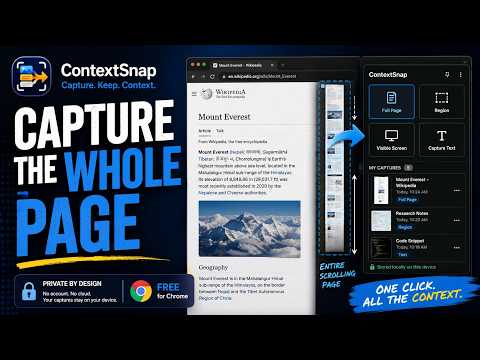
Capture text, screen regions, or an entire long page into one local tray, then copy it wherever you work.
Capture a full page screenshot in Chrome — including content beyond the visible screen. ContextSnap captures entire webpages, independently scrolling panels, selected areas, visible screens, and highlighted text. Keep everything organized in one temporary local session tray, then copy or export what you need. FIVE WAYS TO CAPTURE • Full Page — Scroll and stitch an entire webpage into one continuous screenshot, including content below the visible browser window. • Scrollable Area — Select a scrolling panel, conversation, list, or dashboard section. ContextSnap captures the panel's content and restores its original scroll position. • Visible Screen — Capture the current browser viewport. • Area — Select a specific region of the visible webpage. • Text — Capture highlighted webpage text directly. COPY AND EXPORT YOUR CAPTURES • Copy Image — Copy an individual screenshot to your clipboard. • Copy All Images — Combine the image captures in your session tray into one image, in your chosen order, ready to paste into compatible applications. • Export All Images (ZIP) — Download your captured screenshots as separate original PNG files in one ZIP archive. • Export for Word (.docx) — Create a Microsoft Word document containing your screenshots. Long captures are divided into readable pages. Screenshots remain images, not editable text. • Copy Context — Combine captured text into reusable context. ONE LOCAL SESSION TRAY Collect captures from different webpages, reorder them, remove individual items, and copy or export the results. Your captures stay organized while you work. BUILT FOR EVERYDAY WORKFLOWS ContextSnap is useful for research, documentation, AI prompts and context gathering, comparing information, collecting reference material, and preserving webpage sections, charts, tables, and conversations. PRIVACY BY DESIGN ContextSnap processes and stores captures locally in your browser. No account is required. Captured content is not uploaded to ContextSnap servers. ZIP and Word exports are generated locally and downloaded through your browser. Some protected, extremely long, or dynamically loading webpages may limit capture functionality. Free to use. No account required. Capture the page. Keep the context. Continue working.
0 out of 5No ratings
Details
- Version1.1.0
- UpdatedOctober 17, 2026
- Size84.67KiB
- LanguagesEnglish (United States)
- DeveloperWebsite
Email
support@contextsnap.biz - Non-traderThis developer has not identified itself as a trader. For consumers in the European Union, please note that consumer rights do not apply to contracts between you and this developer.
Privacy

ContextSnap has disclosed the following information regarding the collection and usage of your data. More detailed information can be found in the developer's privacy policy.
ContextSnap handles the following:
This developer declares that your data is
- Not being sold to third parties, outside of the approved use cases
- Not being used or transferred for purposes that are unrelated to the item's core functionality
- Not being used or transferred to determine creditworthiness or for lending purposes
Support
For help with questions, suggestions, or problems, visit the developer's support site