

ContextFlow: Truth Check for Articles & Videos

Overview
See how true a video or article is, statement by statement, with quoted sources. Plus summaries, quizzes and a reading recap.
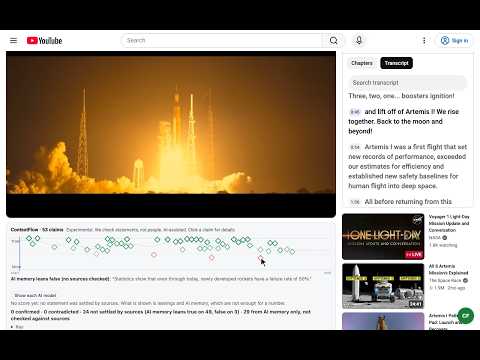
ContextFlow checks the statements in what you watch and read, and shows you the result as a curve you can scan in seconds. ON ANY VIDEO - A truth curve under the player covers the whole runtime: high and green leans true, low and red leans false. - Point at a mark to read the exact statement. Click it to jump to that moment. - Drag across the chart to check just one part of a long video. ON ANY ARTICLE - A rail on the right edge marks each checked sentence where it sits on the page. - Click a mark to jump to the sentence, highlighted in place. The page's own text is never changed. - Each result comes with its reason and the sources, quoted word for word, with links. HOW IT DECIDES - Statements are checked against independent web sources. A statement counts as confirmed or contradicted only when sources settle it. - When sources do not settle it, ContextFlow says so, and shows separately what several AI models recall from memory, clearly labelled as memory and not counted in the score. - You can see each AI model's answer side by side. - We check statements, not people. Results are AI-assisted and experimental; use them as a starting point, not a final ruling. ALSO INCLUDED - Section summaries and key points as you scroll. - Short comprehension quizzes. - A reading recap showing how much of the page you covered. PLANS - Free to try on your first pages. - Paid plans raise the monthly amount of checking. You can also use your own AI provider key. PRIVACY - ContextFlow sends the text of the page or transcript you ask it to check to its service and AI providers in order to produce the result. - Results for public pages may be saved so the next reader gets them instantly. - Full policy: https://sagearbor.github.io/contextFlow-upgrade/privacy-policy.html - Support: https://sagearbor.github.io/contextFlow-upgrade/support.html
0 out of 5No ratings
Details
- Version0.1.80
- UpdatedNovember 24, 2026
- FeaturesOffers in-app purchases
- Offered bysagearbor
- Size2.34MiB
- LanguagesEnglish
- DeveloperSage Arbor
15119 Ballantyne Country Club Drive Charlotte, NC 28277 USEmail
sagearbor+chromeWebStoreDev@gmail.com - Non-traderThis developer has not identified itself as a trader. For consumers in the European Union, please note that consumer rights do not apply to contracts between you and this developer.
Privacy

ContextFlow: Truth Check for Articles & Videos has disclosed the following information regarding the collection and usage of your data. More detailed information can be found in the developer's privacy policy.
ContextFlow: Truth Check for Articles & Videos handles the following:
This developer declares that your data is
- Not being sold to third parties, outside of the approved use cases
- Not being used or transferred for purposes that are unrelated to the item's core functionality
- Not being used or transferred to determine creditworthiness or for lending purposes
Support
For help with questions, suggestions, or problems, please open this page on your desktop browser