


Overview
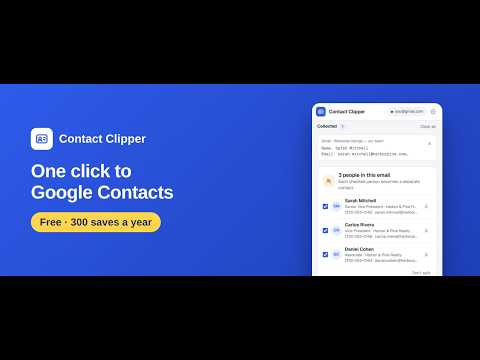
Save everyone in an email to Google Contacts in one click. Paste any signature, it sorts itself. Logs to Sheets, sends to your CRM.
Everyone in an email becomes a contact in one click — and anyone already in your contacts is updated, not copied. Anything you paste sorts itself into the right fields. Each contact can log itself to your Google Sheet and go straight to your CRM. An email with three people in it? One click, three Google Contacts — each with their own phone, title and company. A signature, a "Contact us" page, a flyer, a PDF? Copy, paste, and name, company, title, phones, email, address and website land in the right fields, ready to save. GOOD TO KNOW • Email signatures come in endless shapes, so no tool reads every one perfectly. In our tests, 95.9% were read with every field right. Fields it is not sure about are marked for you to check, and you can edit anything before you save. • A signature saved as a picture — an image with the name and number inside it — cannot be read. Only text you can select and copy. ONE CLICK IN GMAIL (free) • Open an email and click "Add to Contacts". Pick the sender — or everyone: sender, To, Cc, and every person listed in the message, such as the agents on a listing announcement. • Each person becomes their own contact with their own details. Save them all at once. • Already in your Google Contacts? That contact is updated with the new details instead of being saved twice. • Works with any signature — Outlook, iPhone, Gmail, newsletters, e-blasts. No setup, no special signature format. • Quoted earlier messages in the thread are left alone, so nothing old sneaks in. Want someone from a quoted reply? Copy that part and paste it — each person becomes a contact. PASTE FROM ANYWHERE — IT SORTS ITSELF • Copy contact details from a website, a flyer, a PDF, a text message, a LinkedIn profile — anything you can select — and paste into the side panel. Or right-click "Add to Contact Clipper", or press Alt+Shift+C. • Paste several times and everything merges into one contact. Several people in one text become separate contacts, saved together. • Nothing you paste is lost: anything that does not fit a field goes to Notes, as written. LOG TO GOOGLE SHEETS (Pro) • Flip the switch on the contacts you choose, and each one is added as a row to your own Google Sheet — name, company, phone, email, date, source, plus the columns you add yourself. • Your follow-up list, prospect sheet or client log fills itself. The sheet stays in your Drive. SEND TO YOUR CRM (Pro) • Follow Up Boss and HubSpot: the contact is there the moment you save it. • Zapier and Make (webhook): pass every saved contact on to thousands of other apps. ALSO • Already have that person? It updates the contact you have: new phones, emails, title or company are added, and what is already there stays. Saving one person, you see the match first and choose. Saving several at once, anyone with the same email or phone is updated automatically. • Google Contacts labels and vCard (.vcf) export • Reads English signatures with US, Canadian, UK, Irish, Australian and Indian address formats • Also reads signatures in Japanese, Korean, Chinese, Spanish, Portuguese, French, German, Italian and Vietnamese — names, addresses, titles and phone labels the way each country writes them • Interface in 11 languages: English, Español, Français, Deutsch, Português, Italiano, 日本語, 简体中文, 繁體中文, Tiếng Việt, 한국어 FOUND ONE IT GOT WRONG? A complicated signature — several company names, a department that looks like a company — can put a value in another field. Tell us at support@contactclipper.app — a copy of the text (with private details changed) helps most. Write in any language you like. We read every report and fix what we can, as fast as we can. FREE AND PRO Free: the Gmail button, pasting, duplicate check, labels, vCard export, and 300 saves to Google Contacts a year, counted from your first save (saving a new contact or updating one counts as a save). Pro: unlimited saves, the Google Sheets log with your own columns, Follow Up Boss, HubSpot, Zapier and Make, and several labels on one contact. A one-time Lifetime plan is available at the launch price. PRIVACY Contact Clipper reads only the text you paste, or the email on your screen when you click the button. Contacts are saved to your own Google account and — only if you turn it on — to your own sheet or the services you connect. We never see your contacts. WHO IT IS FOR Real estate agents, loan officers, recruiters, sales reps, consultants — anyone who gets contact details by email all day and is tired of retyping them. WHAT'S NEW IN 2.6.6 Reads Japanese, Korean, Chinese, Spanish, Portuguese, French, German, Italian and Vietnamese signatures much better. Saving is faster. A letter next to a number sets its type (M = mobile, W = work, H = home). Free plan: 300 saves a year. "Report a problem" link under the panel. Questions, ideas or a signature it got wrong: support@contactclipper.app Gmail, Google Contacts and Google Sheets are trademarks of Google LLC. Contact Clipper is not affiliated with Google.
0 out of 5No ratings
Details
- Version2.6.6
- UpdatedNovember 8, 2026
- FeaturesOffers in-app purchases
- Size878KiB
- Languages11 languages
- DeveloperTotal Commercial, Inc.Website
3680 Wilshire Blvd Ste P04 #A204 Los Angeles, CA 90010-2709 USEmail
support@contactclipper.appPhone
+1 323-686-2340 - TraderThis developer has identified itself as a trader per the definition from the European Union and committed to only offer products or services that comply with EU laws.
Privacy

Contact Clipper — Gmail to Google Contacts has disclosed the following information regarding the collection and usage of your data. More detailed information can be found in the developer's privacy policy.
Contact Clipper — Gmail to Google Contacts handles the following:
This developer declares that your data is
- Not being sold to third parties, outside of the approved use cases
- Not being used or transferred for purposes that are unrelated to the item's core functionality
- Not being used or transferred to determine creditworthiness or for lending purposes
Support
For help with questions, suggestions, or problems, visit the developer's support site