

Console Copy Tool: Copy Console Logs for AI
2 ratings
)
Overview
Record a tab's console and copy clean, AI-ready logs for ChatGPT, Claude or Cursor. Filter by [Tag] and paste only what matters.
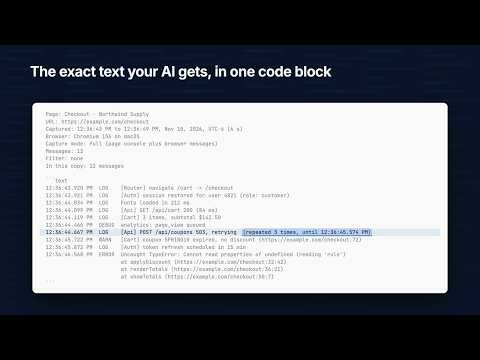
New in 2.0: recording tells you when it stops and why, copies come ready for ChatGPT or Claude with a header and a code block, Open in ChatGPT and Open in Claude copy the logs and open a chat in one press, and work computers that block full recording can record page logs instead. Console Copy Tool records the console of the tab you choose and copies it as clean text an AI can read. Click Start Recording, reproduce the bug, click Copy Logs, and paste. It's for developers and support staff who debug web pages with ChatGPT, Claude, Cursor or another AI assistant. Recording that tells you what's happening - Start Recording records the current tab only. The popup says Recording once Chrome has turned console capture on, so a Start that failed never looks like it worked. - If recording stops or can't start, you get one plain sentence saying why and what to do next, for example when Chrome's debugging bar was closed, when the page is one Chrome won't let extensions record, or when your organization's policy blocks it. - The toolbar icon shows REC on each tab being recorded and ERR on a tab whose recording failed or was cut off. - Each message is captured once, even when the page reloads. Stopping keeps what you captured until you clear it, close the tab or close Chrome. - Stop all ends every recording at once. Complete copies - Console calls, uncaught errors, unhandled rejections and Chrome's own messages (network failures, security and deprecation warnings) copy the way Chrome's console shows them, including format specifiers, objects, tables, stack traces and groups. - A promise rejection the page handled later is marked "(handled later)", so it doesn't pass for a crash. - Each tab keeps its newest 5,000 messages. When older ones are dropped, or a copy is too big for the clipboard, the copy says how many are missing. AI-ready copies - Every copy starts with a short header: the page title and address, when the capture ran, your browser, and how many messages it holds. The logs follow in a code block. - A line logged hundreds of times in a row copies as one row with its count. - Copy options can put errors and warnings first, show times from the first message, and add a prompt above the logs: Find the error, Explain the warnings, or one you write. - A copy over 200,000 characters trims log and info lines from the middle and keeps every error. - When you want console logs for ChatGPT or another AI chat, Open in ChatGPT and Open in Claude copy the logs, show which keys paste them, and open a new chat. On the options page you can switch on Gemini, Grok, Claude Code or Codex, or add your own chat site. - Plain Copy Logs works as a console log export for bug tickets and support replies. Page logs when full recording is blocked On a work computer where your organization's policy turns off full recording, the popup and the DevTools panel offer "Record page logs instead". Page logs record the page's own console calls, uncaught errors and unhandled rejections. Chrome asks you to allow that one site, and the extension never asks for all sites. A page-logs copy says so in its header and lists what page logs can't see, such as browser messages. Tag filter The DevTools panel turns [Tag] prefixes like [Auth] or [Api] into filter chips. Pick chips, search, or hide lines with -word, and the copy follows the filter whether you copy from the popup, the panel or the right-click Copy Console Logs entry on the toolbar icon. Privacy Your logs stay on your computer. The extension makes no network requests and has no analytics. Captured logs sit in Chrome's session storage, which Chrome keeps in memory, and they're deleted when you close the tab, click Clear Logs or close Chrome. Settings and prompts stay in local storage on this device. Logs can include tokens or other secrets your page prints, so check the copy before you paste it. Console Copy Tool is free. The popup has an optional tip link if you want to chip in.
5 out of 52 ratings
Details
- Version2.0.0
- UpdatedNovember 11, 2026
- Offered byPotterDigital
- Size264KiB
- Languages3 languages
- DeveloperPoter Digital LLC
2704 SE 8th Terrace Blue Springs, MO 64014-2128 USEmail
brian@potterdigital.comPhone
+1 281-639-7928 - TraderThis developer has identified itself as a trader per the definition from the European Union and committed to only offer products or services that comply with EU laws.
Privacy

Console Copy Tool: Copy Console Logs for AI has disclosed the following information regarding the collection and usage of your data. More detailed information can be found in the developer's privacy policy.
Console Copy Tool: Copy Console Logs for AI handles the following:
This developer declares that your data is
- Not being sold to third parties, outside of the approved use cases
- Not being used or transferred for purposes that are unrelated to the item's core functionality
- Not being used or transferred to determine creditworthiness or for lending purposes