

Comping – eBay Sold Price & Reseller Profit Checker
1 rating
)
Overview
Free Chrome extension for resellers — see eBay sold prices and profit estimates on any product page.
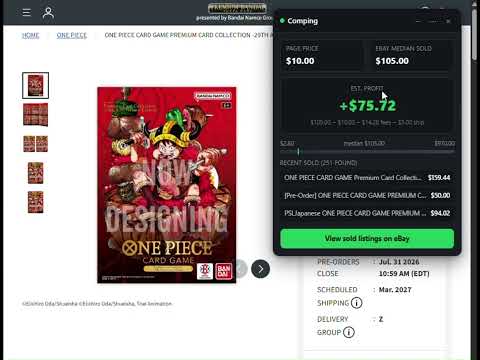
Comping shows you what similar items have actually sold for on eBay — automatically, on almost any product page — so you can tell in seconds whether something is worth buying to resell. If you do online arbitrage, retail arbitrage, thrift flipping, or reselling of any kind, you already know the real question isn't "what's this listed for" — it's "what does this actually sell for." Comping answers that instantly, without leaving the page you're already on. WHO THIS IS FOR Comping is built for resellers who source across many different places and need a fast, reliable way to check resale value before buying: - Online arbitrage sellers who buy from Amazon, Walmart, or other retail sites to resell on eBay - Thrift store and garage sale flippers checking resale value on their phone or laptop mid-trip - Trading card and collectibles resellers (Pokémon, One Piece, sports cards, and similar) who need accurate sold-price comps, not just "similar item" guesses - Amazon-to-eBay and cross-platform flippers comparing margins before committing to a purchase - Anyone doing retail arbitrage who's tired of opening a new tab, retyping a product name into eBay, and manually scanning through sold listings for every single item If you've ever bought something because it "seemed like a good flip," only to find out later the sold prices didn't support that — Comping is built to catch that before you spend the money, not after. HOW IT WORKS Comping works in three ways, depending on what kind of page you're on: 1. Automatic detection. On most e-commerce sites, Comping reads the page's own structured product data (the same kind of data Google uses to show product info in search results) to identify the product name and price. When it finds a clear match, a small badge appears in the corner of the page — click it, and Comping fetches what similar items have recently sold for on eBay, then shows you the median sold price, the price range, and an estimated profit compared to the page's price. 2. Amazon-specific detection. Amazon's product pages don't reliably expose the same structured data other sites do, so Comping uses a dedicated detector built specifically for Amazon's page layout — including handling Amazon's single-page-app navigation, so the badge updates correctly when you move between related products without a full page reload. 3. Manual lookup, for everywhere else. Not every page has a detectable product — a marketplace listing, a forum post, a photo in a Facebook group. For those, highlight any text describing the item, right-click, and choose "Check eBay sold prices for..." — or open Comping's toolbar icon and type a search directly. This works on literally any page, with no detection required. In every case, Comping is checking actual sold listings on eBay — not current asking prices, which can be wildly inflated and don't reflect what buyers are really paying. THE PROFIT ESTIMATE Comping's profit estimate isn't just "eBay price minus your price." It factors in eBay's final value fees (currently modeled at 13.6%, in line with eBay's typical seller fees) and a flat shipping cost estimate, so the number you see is a realistic estimate of what you'd actually walk away with — not a number that looks better than reality. The full formula is shown directly in the card, so you can see exactly how the estimate was calculated rather than trusting a black box. CURRENCY-AWARE, NOT JUST US-FOCUSED A lot of price-checking tools assume every price is in US dollars. Comping doesn't. It detects the currency of the page you're on and checks the matching regional eBay site — ebay.com for USD, ebay.com.au for AUD, ebay.co.uk for GBP, ebay.ca for CAD, and ebay.de for EUR — so the profit math is never silently mixing currencies. If you're sourcing internationally, or reselling from a country where "just assume it's USD" tools get the numbers wrong, this matters. ONLY SHOWS UP WHEN IT SHOULD Comping is deliberately conservative about when it activates. It only shows the automatic badge when a page has clear, unambiguous product data — a single identifiable product with a price. It will not appear on search results pages, category/listing pages, shopping carts, or checkout pages, and it never runs on pages that look like banking, email, or webmail sites. If you don't want it running on a specific store at all, there's a one-click "don't show on this site again" option in the overlay's menu. PRICING Comping is free to use, with a daily limit on lookups. If you're checking items regularly — a real sourcing session at a thrift store or wholesale lot can easily mean dozens of checks. The Pro plan removes the daily limit entirely for unlimited lookups, billed monthly, yearly and there's an one-off lifetime plan. In addition, the Pro plan also has a "Hands-free deal alerts" feature that runs in the background. It silently checks profitability in the background as you browse, without need to click the badge on every page. Set your own dollar thresholds in the toolbar popup, and the badge itself lights up once the threshold is triggered. Both are off by default, so nothing changes unless you turn them on. PRIVACY Comping has no backend server of its own. Everything it stores — your per-site preferences, your daily lookup count, a short-lived cache of recent results — stays only in your own browser's local storage. The only outside request Comping makes is the eBay search itself, which is the same request your browser would make if you searched eBay directly. Read the full privacy policy for complete details on exactly what is and isn't stored. WHY COMPING EXISTS This started as a personal tool to stop manually checking eBay sold prices dozens of times during a single sourcing trip. If you've ever bought something because it "felt like" a good flip and later found out the math didn't actually work — or skipped the check entirely because it was too slow to be worth doing every time — Comping exists to make that check instant instead of optional. FEEDBACK If you have any feedback or questions, please send them to compingio123@gmail.com.
5 out of 51 rating
Details
- Version1.3.6
- UpdatedAugust 19, 2026
- FeaturesOffers in-app purchases
- Offered bycompingio
- Size53.16KiB
- LanguagesEnglish
- Developer
Email
compingio123@gmail.com - Non-traderThis developer has not identified itself as a trader. For consumers in the European Union, please note that consumer rights do not apply to contracts between you and this developer.
Privacy

This developer declares that your data is
- Not being sold to third parties, outside of the approved use cases
- Not being used or transferred for purposes that are unrelated to the item's core functionality
- Not being used or transferred to determine creditworthiness or for lending purposes
Support
For help with questions, suggestions, or problems, visit the developer's support site