Item logo image for Compass

Compass

Item media 6 (screenshot) for Compass
Item video thumbnail
Item media 2 (screenshot) for Compass
Item media 3 (screenshot) for Compass
Item media 4 (screenshot) for Compass
Item media 5 (screenshot) for Compass
Item media 6 (screenshot) for Compass
Item video thumbnail
Item media 2 (screenshot) for Compass
Item media 3 (screenshot) for Compass
Item media 4 (screenshot) for Compass
Item media 5 (screenshot) for Compass
Item media 6 (screenshot) for Compass

Overview

Navigate AI conversations with sticky scroll headers and a prompt minimap

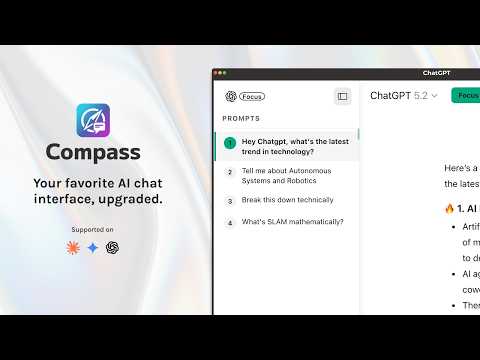
Do you ever get lost in long, complex conversations with AI? Compass supercharges your workflow on ChatGPT and Claude by giving you the tools to effortlessly navigate, organize, and track your chats. No more endless scrolling to remember what you asked, or losing track of context in massive AI responses. Compass blends seamlessly into the native UI, making it feel like an official feature. Core Features: Prompt Minimap - Get a bird's-eye view of your entire conversation. A sleek side-panel displays an outline of all your prompts. Hover to preview them, and click to instantly jump to any point in the chat. (Toggle with Cmd/Ctrl + Shift + Y). Sticky Scroll Headers - Never lose context again. As you scroll through a long AI response, the original prompt stays pinned to the top of your screen. Click the sticky header to jump straight to the source. Session Checklists - Keep your thoughts organized. Create custom to-do lists tied directly to specific conversations to track requirements, follow-ups, or debugging steps as you chat. Prompt Builder - Craft better prompts faster. Use our built-in templates (Coding, Writing, Learning) to construct structured, high-quality prompts without leaving the chat. Native Design & Dark Mode - Compass adapts perfectly to both ChatGPT and Claude. Whether you use Light Mode or Dark Mode, the extension looks and feels completely native to the platform. Privacy First - All data (like your checklists and settings) is stored locally on your device. We only request permissions necessary to modify the UI on chatgpt.com and claude.ai.

Details

  • Version
    2.0.1
  • Updated
    March 10, 2026
  • Offered by
    prayas.lashkari98
  • Size
    778KiB
  • Languages
    English
  • Developer
    Email
    prayas.lashkari98@gmail.com
  • Non-trader
    This developer has not identified itself as a trader. For consumers in the European Union, please note that consumer rights do not apply to contracts between you and this developer.

Privacy

Manage extensions and learn how they're being used in your organization
The developer has disclosed that it will not collect or use your data.

This developer declares that your data is

  • Not being sold to third parties, outside of the approved use cases
  • Not being used or transferred for purposes that are unrelated to the item's core functionality
  • Not being used or transferred to determine creditworthiness or for lending purposes

Related

WebSelect

0.0

Select anything on website and instantly chat with AI

WhatsApp Chat Summarizer

4.8

Summarize Your WhatsApp Chats Instantly with AI

QuickPrompts

0.0

Quickly inject predefined prompts into conversations

Retry in Another AI - Transfer conversations between ChatGPT and Claude

1.0

Retry conversations between ChatGPT and Claude with a single click - continue your chat in another AI

Prompt Navigator

4.8

Helps you quickly and smoothly navigate to previous prompts on conversational AI platforms.

ChatGPT Folders, Search, Bookmarks - ChatFolderz: AI Chat Organizer Tool.

1.5

Organize your AI conversations into Folders, Bookmark key discussions, Search, Prompts Library and more...

ChatMark

5.0

Auto-bookmark your ChatGPT prompts and jump to any message instantly. Stop scrolling, start navigating.

AITree

5.0

Visual tree of your AI conversations with branching for new ideas and fast search

Prompt Enhancer & Chat Navigator

4.9

Enhance prompts and navigate chat history on AI platforms.

Ophel Atlas - AI Chat Organizer & Navigator

4.9

Turn AI chats into readable, navigable knowledge. Use outlines, folders, and prompts to organize your workflow and stop scrolling.

NavVault: Chat Folders & Export(PDF, MD, JSON) for ChatGPT, Claude, Gemini

4.2

Universal AI chat navigator and organizer for ChatGPT, Claude, Gemini & Grok

Chat Prompt Assistant - AI Chat Prompt Manager

0.0

Supports conversations on AI platforms the sidebar tool for managing prompts on AI chat easily manage your prompts。

WebSelect

0.0

Select anything on website and instantly chat with AI

WhatsApp Chat Summarizer

4.8

Summarize Your WhatsApp Chats Instantly with AI

QuickPrompts

0.0

Quickly inject predefined prompts into conversations

Retry in Another AI - Transfer conversations between ChatGPT and Claude

1.0

Retry conversations between ChatGPT and Claude with a single click - continue your chat in another AI

Prompt Navigator

4.8

Helps you quickly and smoothly navigate to previous prompts on conversational AI platforms.

ChatGPT Folders, Search, Bookmarks - ChatFolderz: AI Chat Organizer Tool.

1.5

Organize your AI conversations into Folders, Bookmark key discussions, Search, Prompts Library and more...

ChatMark

5.0

Auto-bookmark your ChatGPT prompts and jump to any message instantly. Stop scrolling, start navigating.

AITree

5.0

Visual tree of your AI conversations with branching for new ideas and fast search

Google apps