

Comments Scraper: Extract comments from 6 social media sites

Overview
comments scraper - Scrape comments from supported and popular 6 social media sites
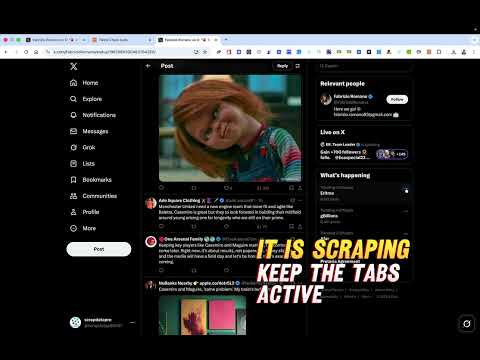
Comment Scraper – Extract Comments from 6 Social Media Platforms . Easily scrape comments from popular social media sites Using the Comment Scraper Chrome Extension. Simply copy a post URL, paste it into the extension, and it will automatically navigate through all comments to extract key information for you. ⚙️ Key Features: ✅ Multi-Platform Support – Works with Six Supported Social Media Sites. ✅ Google Sign-In – Securely log in to access your dashboard and saved data. ✅ Comprehensive Comment Extraction ✅ Review Past Scrapes , and download ✅ Pick Random users – Extract: Full name of the commenter Social media handle Profile icon URL Comment text Comment date ✅ Easy to Use – Paste a post URL, click start, and let the extension scrape automatically. ✅ Multi-Format Export – Download all scraped data in CSV, XLSX, or JSON formats. ✅ Subscription Plans – Free users have limited scraping; premium users unlock unlimited scraping. ✅ Fast & Reliable – Works directly in your browser with no proxies, APIs, or manual navigation. 🚀 Perfect For: Social media marketers Agencies & freelancers Influencer research Engagement analysis Data analysts tracking social media trends 💡 How It Works: 1️⃣ Copy the post URL from any supported social media platform. 2️⃣ Paste the URL into the Comment Scraper Chrome Extension. 3️⃣ Sign in with Google to start your session. 4️⃣ Click Start Scraping — the extension will automatically navigate through comments and extract all key information. 5️⃣ Export your results to CSV, XLSX, or JSON. 🔒 Privacy & Security: Your Google account is only used for authentication. All scraping happens locally on your device — we never store or share your social media data. ✨ Save hours of manual work and collect comment data across 6 platforms in seconds! Install Comment Scraper Chrome Extension today and start scraping like a pro.
3 out of 52 ratings
Details
- Version3.7
- UpdatedSeptember 28, 2026
- Size1.36MiB
- LanguagesEnglish
- Developer
- Non-traderThis developer has not identified itself as a trader. For consumers in the European Union, please note that consumer rights do not apply to contracts between you and this developer.
Privacy

Comments Scraper: Extract comments from 6 social media sites has disclosed the following information regarding the collection and usage of your data. More detailed information can be found in the developer's privacy policy.
Comments Scraper: Extract comments from 6 social media sites handles the following:
This developer declares that your data is
- Not being sold to third parties, outside of the approved use cases
- Not being used or transferred for purposes that are unrelated to the item's core functionality
- Not being used or transferred to determine creditworthiness or for lending purposes
Support
For help with questions, suggestions, or problems, please open this page on your desktop browser