

Comment View for YouTube
2 ratings
)
Overview
Watch YouTube with comments beside the video, timestamped reactions matched to playback, recommendations, and dark mode.
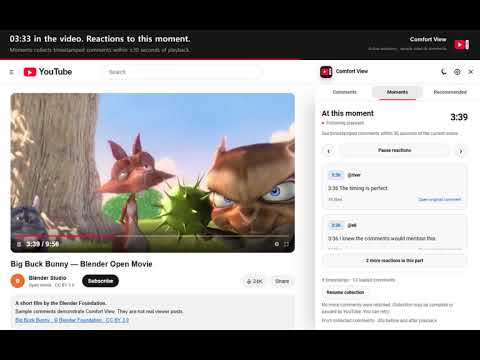
Read YouTube comments without scrolling the video out of view. Comfort View puts comments, recommendations, and available live chat in a resizable panel beside your video. On wide windows, the video fits the space beside the panel. On narrow windows, the panel opens as an overlay. MOMENTS: COMMENTS ABOUT THE SCENE YOU ARE WATCHING Someone comments “03:33 this part made me laugh.” When you watch that part of the video, Moments shows that comment beside it. • Shows timestamped comments within 30 seconds before or after your current playback position. • Updates as the video plays or when you seek to another scene. • Shows up to four results initially. Expand to read up to 30. • Pause following when you need more time to read. • Click a timestamp to jump to that scene, or open the original comment. • Jump to the previous or next collected timestamp. Moments automatically loads more comments while the Moments tab is active and the browser tab is visible. You can see collection progress and pause or resume it. Results come from comments collected so far. Collection is gradual and has a safety limit; it does not instantly retrieve every comment. The selected comment order and loaded replies affect the results. Deleted, private, and unavailable comments cannot appear. COMMENTS, RECOMMENDATIONS, AND CHAT • Use YouTube’s native comments, replies, like counts, pinned comments, and Top/Newest sorting. • Write comments and replies, like comments, and open links. • Browse recommended videos without scrolling away from the player. • Open live chat or chat replay when YouTube provides it. • Search comments already loaded on the page. • Check for new comments with optional automatic checks, a new-comment badge, and manual refresh. • Resize the panel and remember its width. On Shorts, the extension button or Alt+Shift+W opens YouTube’s native comments panel. Moments is designed for regular videos, not Shorts or live-chat messages. APPEARANCE AND LANGUAGE Choose Follow YouTube, Dark, or Light. Dark applies to the current regular-video page while Comfort View is open. Light changes only the Comfort View panel. Closing the panel or leaving the video restores the previous YouTube theme. The interface supports English and Korean, or follows YouTube’s language. NEW IN VERSION 0.3.0 • Added Moments for timestamped comments matched to playback. • Fixed repeated opening and closing when moving from regular videos to Shorts. • Updated the icon and English/Korean demo materials. PRIVACY No separate account, API key, advertising, analytics, or developer-operated server is required. Timestamp matching happens in the current browser tab. Comment text and playback position are not saved to device storage or sent to the developer. Only preferences are saved in Chrome. Automatic collection uses YouTube’s normal interface and network requests. Posting comments, replies, likes, or chat messages uses YouTube’s native interface and may require a YouTube sign-in. Comfort View for YouTube is an independent extension. It is not an official YouTube product and is not affiliated with or endorsed by YouTube or Google. YouTube is a trademark of Google LLC.
5 out of 52 ratings
Details
- Version0.3.2
- UpdatedOctober 28, 2026
- Offered bywlsgus9305
- Size48.31KiB
- Languages2 languages
- Developer개히망
독산동 1156 521호 금천구, 서울특별시 08608 KREmail
wlsgus9305@gmail.com - Non-traderThis developer has not identified itself as a trader. For consumers in the European Union, please note that consumer rights do not apply to contracts between you and this developer.
Privacy

Comment View for YouTube has disclosed the following information regarding the collection and usage of your data. More detailed information can be found in the developer's privacy policy.
Comment View for YouTube handles the following:
This developer declares that your data is
- Not being sold to third parties, outside of the approved use cases
- Not being used or transferred for purposes that are unrelated to the item's core functionality
- Not being used or transferred to determine creditworthiness or for lending purposes