


Overview
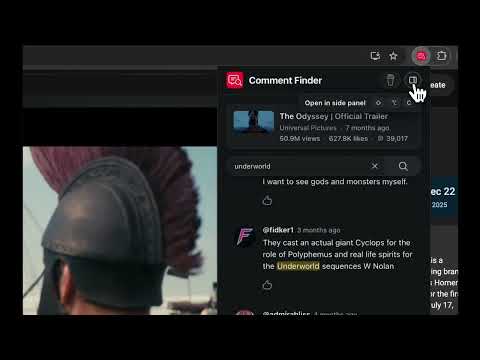
Search comments on any YouTube Video, Short or Channel.
This is a free and open-source extension that lets you easily find YouTube comments on any video, Short or across all the videos on a channel. Type a search query and jump straight to matching public comments instead of manually hunting through the thread. It can be used as a popup and in the side panel. HOW IT WORKS 1. Open a YouTube video, Short, channel, or @handle page. 2. Click the Comment Finder icon (or press Alt/Option+Shift+C to open it in the side panel). 3. Enter a keyword to search YouTube comments. 4. See all matching comments, replies, and timestamps in one place. KEY FEATURES • Search comments on YouTube videos, Shorts or across an entire channel • Keyword highlighting in matching comment text • See comment's author, likes, and time posted • Matching replies shown with the parent comment • Clickable video timestamps • Direct links to individual comments and source videos • Optional side panel so results stay open while you browse • Session restore for recent searches in the current browser session WHO IT’S FOR • Viewers who want to find YouTube comments on long videos without endless scrolling • Creators checking what people say about a topic across a channel • Researchers and fans looking up public discussion by keyword • Anyone who needs a fast YouTube comment search tool in Chrome PRIVACY & HOW IT WORKS Comment Finder uses the official YouTube API Services to look up public comments. It does not scrape YouTube pages, does not require a YouTube login, and does not keep a permanent comment database. Search results stay on your device for the current browser session only. Permissions are limited to what the extension needs: reading the active YouTube tab URL to know which video or channel to search, local/session storage for consent and temporary results, and a side panel option for a persistent search view. YouTube is a trademark of Google LLC. This extension is not affiliated with or endorsed by YouTube or Google.
0 out of 5No ratings
Details
- Version0.1.2
- UpdatedJuly 21, 2026
- Size77.96KiB
- LanguagesEnglish
- DeveloperWebsite
Email
3ow4w4y@gmail.com - Non-traderThis developer has not identified itself as a trader. For consumers in the European Union, please note that consumer rights do not apply to contracts between you and this developer.
Privacy

This developer declares that your data is
- Not being sold to third parties, outside of the approved use cases
- Not being used or transferred for purposes that are unrelated to the item's core functionality
- Not being used or transferred to determine creditworthiness or for lending purposes
Support
For help with questions, suggestions, or problems, visit the developer's support site