

Color Inspector & Picker
1 rating
)
Overview
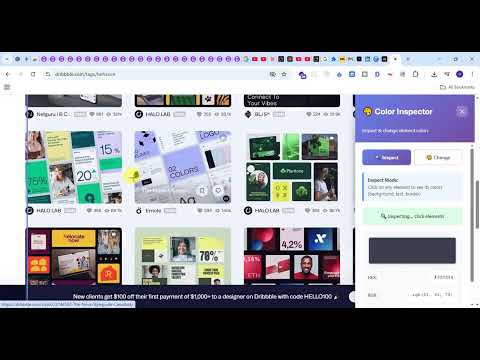
Inspect colors of any element and change them with a color picker
🎨 Color Inspector & Picker – Advanced Eyedropper Tool for Chrome Take full control of your design workflow with Color Inspector & Picker, a fast, lightweight, and privacy-focused Chrome extension for instantly identifying colors on any website. Whether you're building websites, designing UI, or creating digital content, this powerful color picker helps you extract accurate HEX, RGB, and HSL color values in seconds. 🚀 Why Designers & Developers Love It ✔ Instantly pick colors from any webpage ✔ Precise Eyedropper for pixel-perfect selection ✔ Get HEX, RGB, and HSL values instantly ✔ One-click copy for CSS-ready color codes ✔ Works on images, text, icons, backgrounds & UI elements ✔ 100% local processing — no tracking, no data collection ✔ Lightweight, fast, and simple to use No sign-up. No clutter. No ads. 🎯 Powerful Features 🎨 Advanced Eyedropper Tool Click anywhere on a webpage to capture exact color values with high accuracy. 📋 One-Click Copy Instantly copy HEX, RGB, or HSL codes and paste directly into CSS, Figma, Tailwind, or any design tool. 🖥 Works Across Modern Websites Compatible with design platforms, SaaS dashboards, landing pages, and dynamic web apps. ⚡ Fast & Lightweight Minimal performance impact — optimized for speed and stability. 🔒 Privacy First All color detection runs locally inside your browser. No tracking. No data sent to servers. 💼 Perfect For Frontend Developers UI/UX Designers Graphic Designers Web Designers Digital Marketers No-code Builders Students learning web design If you work with CSS, Tailwind, Bootstrap, Figma, Canva, Webflow, or WordPress — this tool saves hours. 🔎 Keywords (Improves Discoverability) Color picker Eyedropper tool HEX color finder RGB color picker HSL color generator CSS color tool Web color detector Chrome color inspector Website color picker ✨ Why Choose Color Inspector & Picker? Unlike heavy design tools, this extension focuses on speed, simplicity, and precision. It removes guesswork and helps you extract brand colors instantly from any website. From landing pages to dashboards — capture exact UI colors in seconds.
5 out of 51 rating
Details
- Version1.2.0
- UpdatedFebruary 19, 2026
- FeaturesOffers in-app purchases
- Offered byUdit
- Size28.95KiB
- LanguagesEnglish
- Developer
Email
uditsaurabh747@gmail.com - Non-traderThis developer has not identified itself as a trader. For consumers in the European Union, please note that consumer rights do not apply to contracts between you and this developer.
Privacy

This developer declares that your data is
- Not being sold to third parties, outside of the approved use cases
- Not being used or transferred for purposes that are unrelated to the item's core functionality
- Not being used or transferred to determine creditworthiness or for lending purposes
Support
For help with questions, suggestions, or problems, please open this page on your desktop browser