

Color by Fardos - Color Picker

Tổng quan
Pick colors from websites, save colors & gradients, get matching shades and tints and create beautiful gradients.
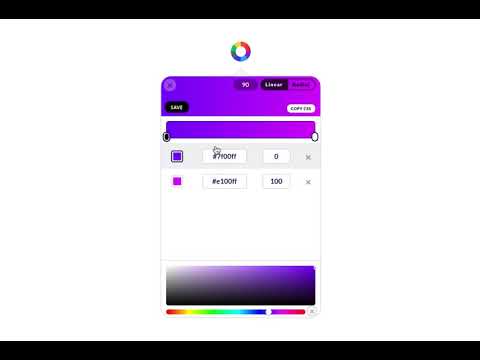
✅ Color pick and save multiple colors from any site (using zoom technology) ✅ Customize your color picker keyboard shortcut in options (default: Cmd/Ctrl + Shift + e) ✅ Add the color picker as the default in options ✅ Save your favorite colors and gradients, click any color and it's HEX is saved to your clipboard ✅ Find shades, tints, complementary and other color combinations for any color ✅ Create linear or radial gradients with unlimited stops ✅ Browse hundreds of beautiful gradients, edit, save and copy it's CSS whenever you need it ✅ Get color palettes from any gradient you create ✅ Site pallete fetches all the colors of any page ✅ Customize the color type when auto copying Have any new ideas to improve Color? Email us at support@fardoss.com and we will look into it. There are 5 different built in tools including a color picker to help you through your design journey. The first tool is the Color Picker. Our color picker uses zoom technology that will accurately get you the closest color to where you hover over. You can access the color picker by right clicking the page or Cmd/Ctrl + Shift + e. We made sure the experience of picking colors was smooth, quick and efficient. When you color pick on any website, we generate a picture from the site, and pinpoint the exact location of your cursor to find that color. Choose as many colors from any site, click Save & Exit and they are automatically added to your overall saves. Great color pickers are very hard to find which is why we added countless hours to make sure our color picker is the best. Our color picker is the most accurate, the fastest and we guarantee you will have the best experience with it. We created our color picker with the mind set of ease. Our color picker ensures that every color you pick is exactly that color or at least the closest color to it. With that in mind, our color picker is super quick and calculates that color hex wherever you hover over. The second tool is a Color Search. When developing this functionality, we took our personal experiences into consideration and found that finding colors that match each other was one of the hardest things. We would go to so many websites to find what we are looking for. We wasted so much time just to get the colors that worked together. If you are a designer or developer, you know what we are talking about. With Color by Fardos, it now takes seconds to get matching color combos like Shades, Tints, Complementary, Triadic, Analogous, Split Complementary and Tetradic colors. Within any color, there is an explosion of new similar colors that will work perfectly together all built into one extension. Within any color you choose, you can now save those colors so they stay with you wherever you go. We made sure this was a feature because everyone knows the pain of trying to find the color they used before. Accessing those colors on any Chrome browser is super easy. The third tool is a Color Chooser. We designed our color chooser with a black theme because we wanted to remove any distraction when trying to choose that perfect color. Whenever you change the color, it automatically changes the selected color within the entire extension. So, if you change from white to black and go to Color Search, that color is now black. This allows for a much more fluent experience within the entire extension. The fourth tool is Gradients. Gradients are incredibly painful to code. Finding the perfect blend of colors contributes largely to what works and what doesn't. We made sure that our gradient builder took that into consideration. With our gradient builder, every gradient is beautifully composed and generated. Add as many stops as you want, use your saved colors to make something beautiful, choose whether linear or radial and most importantly, save them so you can use them whenever you want. After you have created that gradient, all you have to do is click Copy CSS, and you are set. No more hassling if you missed a comma between your colors. Every gradient comes with a generated palette. Whether you are creating your own gradients, choose one of our gradients, color palettes help you find the perfect blend-able color. Copy the colors just by clicking and start using them in your designs. The fifth tool is Site Pallete. Site Pallete allows you to get all the colors of a page instantly. We quickly screenshot each section and allow you to add any of the colors you like, directly to your saved colors. Site Pallete is quick and easy and can be located in your toolbar next to the Eye Dropper / Color Picker. If you have any questions or issues about our Color Picker, Gradient, Color Search or other features, feel free to contact us at support@fardoss.com. Stay tuned for more life changing extensions like our Color Picker!
2,8/5227 lượt xếp hạng
Chi tiết
- Phiên bản3.2.0
- Đã cập nhật6 tháng 5, 2025
- Kích thước1.7MiB
- Ngôn ngữEnglish (United States)
- Nhà phát triểnTrang web
Email
support@fardoss.com - Người bán phi thương mạiNhà phát triển này không tự nhận mình là người bán. Đối với người tiêu dùng ở Liên minh Châu Âu, xin lưu ý rằng các quyền của người tiêu dùng không được áp dụng trong hợp đồng giữa bạn và nhà phát triển này.
Quyền riêng tư

Nhà phát triển này tuyên bố rằng dữ liệu của bạn
- Không được bán cho bên thứ ba, ngoài những trường hợp sử dụng đã được phê duyệt
- Không được sử dụng hoặc chuyển nhượng cho các mục đích không liên quan đến chức năng chính của mặt hàng
- Không được sử dụng hoặc chuyển nhượng để xác định khả năng thanh toán nợ hoặc phục vụ mục đích cho vay
Hỗ trợ
Nếu bạn có câu hỏi, ý kiến đề xuất hoặc gặp vấn đề, vui lòng mở trang này bằng trình duyệt dành cho máy tính để được trợ giúp