

Video Roll - All-in-One Video Assistant

Overview
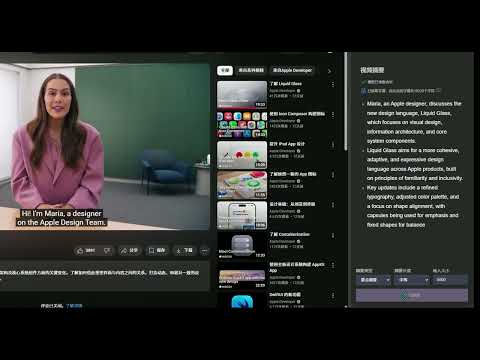
Video Assistant: rotate, zoom, download, record, VR mode, AI summarization, PiP, screenshot, focus, speed, volume and more
✨ VideoRoll - All-in-One Video Assistant ✨ Take full control of any video on the web — rotate, zoom, download, convert, record, loop, boost audio, grab subtitles, and much more. Everything is one click away from the floating quick panel on the page or the toolbar popup. 🚀 30+ tools behind one floating ball. No learning curve: open a video, click the ball, done. 【🎬 Video Features】 🔄 Rotate 🔍 Zoom 🖥️ Fullscreen ⬇️ Download (MP4 / HLS / m3u8) ⬇️ Convert 🎥 Record 🖼️ Picture in Picture 🖼️ Advanced PiP (Separate Window) 🖼️ Screenshot 🔤 OCR (Text Recognition) 💬 Subtitle Download 💬 Subtitle Upload 🔁 A-B Loop 🔁 Loop 🕹️ VR Mode 🤖 AI Summary 🎛️ Filter 🚦 Focus Mode ⏩ Speed 📺 Player 📦 Stretch 📦 Reposition 🌐 Video URL 🌐 Video QR 【🔊 Audio Features】 🔊 Volume Boost 🎚️ Pitch ⏱️ Audio Delay 🎧 Stereo 🌀 3D Surround 【🛠️ Others】 🎈 In-page Quick Panel (pinnable, draggable) 👤 Account & Pro (optional sign-in) 🚫 Ad Accelerator 🖥️ Multi-platform Support 🛑 One-click Disable 🗂️ Cache List 🗂️ Disable List ⌨️ Custom Shortcuts 🖼️ Custom Layout (drag & reorder rows) 【🔒 Privacy】No ads, no tracking. Sign-in is optional and only used for Pro features. We never sell your data. Video Roll does not download videos from websites that explicitly prohibit such actions (e.g., YouTube) in order to comply with Chrome Web Store policies and website terms of service. We respect the privacy and copyright of all content creators.
4.8 out of 5179 ratings
Details
- Version2.1.2
- UpdatedSeptember 17, 2026
- Size1.92MiB
- Languages11 languages
- DeveloperWebsite
Email
support@videoroll.app - Non-traderThis developer has not identified itself as a trader. For consumers in the European Union, please note that consumer rights do not apply to contracts between you and this developer.
Privacy

This developer declares that your data is
- Not being sold to third parties, outside of the approved use cases
- Not being used or transferred for purposes that are unrelated to the item's core functionality
- Not being used or transferred to determine creditworthiness or for lending purposes
Support
For help with questions, suggestions, or problems, please open this page on your desktop browser