


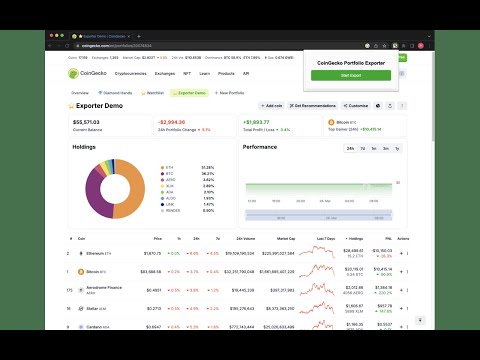
Overview
Exports CoinGecko portfolios and transactions to CSV.
Finally take full control of your crypto portfolio with the CoinGecko CSV Portfolio Exporter – the ultimate tool for exporting your CoinGecko portfolio and transaction data into CSV format in just a few clicks! Perfect for Tax Reporting! 🐸 Why Use This Extension? ✔️ Fast & Easy Exports – Download your total portfolio holdings and transactions directly from CoinGecko. ✔️ Accurate Data Capture – Exports all relevant details, including prices, holdings, PNL, and more. ✔️ Compatibility – Compatible with all major CSV software (Excel, Numbers, Google Sheets, and more!) ✔️ Secure & Private – No third-party servers; your data stays on your device. ✔️ One Free Export – Try it out! Then unlock unlimited exports with a small one-time payment. ✔️ Protect Your Data – If you ever lose your CoinGecko account your portfolio and transaction data will be protected by your own CSV file backups! 🐸 How It Works 1️⃣ Open your CoinGecko Portfolio or Transactions page. 2️⃣ Click the CoinGecko Portfolio Exporter extension icon. 3️⃣ Name your export and choose your data columns (optional). 4️⃣ Click Export Data to CSV (or JSON). 5️⃣ Download your CSV file instantly! 🚀 Perfect for Crypto Investors, Analysts, and Tax Reporting! Version 1.0.4 Update: Now supports JSON file exports, customized data columns, see previews, and more visually appealing UI. Version 1.0.5 Update: Fixed incorrect zeros in very small coin prices and improved decimal-comma handling. Transaction exports now recognize table columns more reliably, preserve CSV notes correctly, and support a CoinStats-like CSV template with confirmed coin and currency information. Preview data stays consistent with the download. Exports include loaded rows on the current page; open each coin's transaction page and export each page of history separately. ⚠️ Note: This extension is not affiliated with nor endorsed by CoinGecko. It simply automates data collection for personal use. ⚠️ Note: If the extension fails to export after confirming you are on the correct CoinGecko page, simply refresh the page. ⚠️ Note: Make sure to load all table rows (or most if more than 300). 🐸 Get started now and simplify your crypto tracking!
3.4 out of 59 ratings
Details
- Version1.0.5
- UpdatedOctober 4, 2026
- FeaturesOffers in-app purchases
- Offered byreal.profresher
- Size3.32MiB
- LanguagesEnglish (United States)
- Developer
Email
real.profresher@gmail.com - Non-traderThis developer has not identified itself as a trader. For consumers in the European Union, please note that consumer rights do not apply to contracts between you and this developer.
Privacy

This developer declares that your data is
- Not being sold to third parties, outside of the approved use cases
- Not being used or transferred for purposes that are unrelated to the item's core functionality
- Not being used or transferred to determine creditworthiness or for lending purposes