


Overview
Solve it. Sync it. Show it. Sync accepted LeetCode submissions to GitHub.
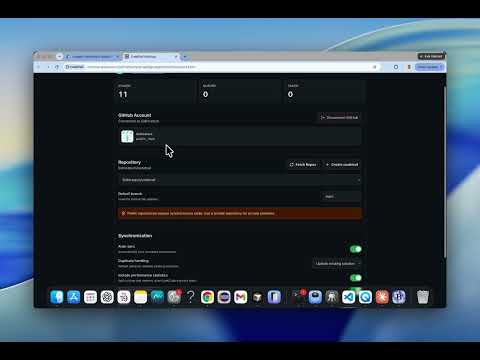
Turn your LeetCode practice into a structured GitHub portfolio. CodeTrail automatically detects your accepted LeetCode submissions and saves your solution code to a GitHub repository you select. No more manually copying solutions, creating folders, writing commit messages, or updating your progress. HOW CODETRAIL WORKS 1. Install CodeTrail and connect your GitHub account. 2. Select an existing repository or create a new CodeTrail repository. 3. Solve and submit a problem on LeetCode. 4. When your submission is accepted, CodeTrail automatically syncs the solution to GitHub. 5. Your repository README and progress statistics are updated automatically. KEY FEATURES • Automatic accepted-submission detection • Secure GitHub OAuth connection • Select an existing repository or create a new one • Organized folders based on problem difficulty and name • Correct source-code file extension for each programming language • Problem README with difficulty, language, submission date and performance • Recruiter-friendly main repository README • Meaningful GitHub commit messages • Duplicate-submission handling • Local retry queue for temporary synchronization failures • Runtime and memory statistics when available • Sync status and desktop notifications • Manual retry for failed sync operations ORGANIZED GITHUB REPOSITORY CodeTrail organizes solutions into a structure similar to: easy/two-sum/solution.java medium/add-two-numbers/solution.java hard/median-of-two-sorted-arrays/solution.java Each problem folder includes the submitted solution and a README containing available metadata and a link to the original problem. BUILT FOR DEVELOPERS CodeTrail helps you: • Preserve the work you complete during coding practice • Maintain an organized record of solved problems • Track your progress over time • Showcase your problem-solving consistency • Build a coding portfolio without repetitive manual work • Review previously solved problems more easily PRIVACY AND SECURITY CodeTrail only runs on supported LeetCode pages and only processes accepted submissions. • CodeTrail does not provide answers, hints or coding assistance. • CodeTrail does not automate LeetCode submissions. • Your source code is not sent to an AI service. • Your submitted code is sent only to the GitHub repository you select. • GitHub access is authorized securely using OAuth. • CodeTrail does not collect browsing history or unrelated website data. • Pending synchronization data is stored locally in your browser. • You can disconnect GitHub and clear local data at any time. If you select a public GitHub repository, your synchronized solutions will be publicly visible. You are responsible for selecting the appropriate repository visibility. CodeTrail is an independent developer tool and is not affiliated with, endorsed by or sponsored by LeetCode or GitHub.
5 out of 51 rating
Details
- Version0.1.0
- UpdatedJuly 19, 2026
- Size1006KiB
- LanguagesEnglish
- DeveloperSIDHIRA TECH AND CONSULTING LLCWebsite
1760 Linton Lake Dr Delray Beach, FL 33445-6881 USEmail
contact@sidhiratech.comPhone
+1 470-990-0329 - TraderThis developer has identified itself as a trader per the definition from the European Union and committed to only offer products or services that comply with EU laws.
- D-U-N-S144307744
Privacy

CodeTrail has disclosed the following information regarding the collection and usage of your data. More detailed information can be found in the developer's privacy policy.
CodeTrail handles the following:
This developer declares that your data is
- Not being sold to third parties, outside of the approved use cases
- Not being used or transferred for purposes that are unrelated to the item's core functionality
- Not being used or transferred to determine creditworthiness or for lending purposes
Support
For help with questions, suggestions, or problems, visit the developer's support site