

CodeSavvy: AI Writing Assistant, Popup Zapper & Page Unlocker
12 ratings
)
Overview
Fix grammar and tone on any website in one click — 50 free AI edits a day, no signup. Plus a popup zapper and copy-paste unlocker.
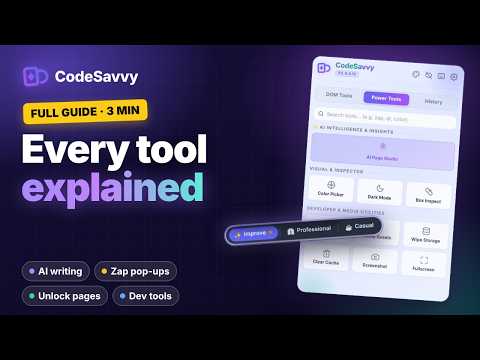
Fix grammar, spelling and tone on any website in one click. Select text, right-click, done: 50 free AI requests a day, with no account and no API key. CodeSavvy also removes annoying popups for good, brings back copy/paste and right-click on sites that block them, and summarizes long pages in seconds. ━━━━━━━━━━━━━━━━━━━━━━━━━━ ✍️ 1. AI WRITING ASSISTANT: WORKS ON ANY WEBSITE Select any text in an email, chat, form or post and right-click (or use your own keyboard shortcut, such as Ctrl+Shift+L once set in settings) to fix it in place: • Works Out of the Box: 50 free AI requests per day with no account or API key. Add your own Google Gemini API key to remove the daily limit (Google's own usage limits apply). • 7 Writing Modes: Improve Text (careful proofreader), Advanced Edit, Enhance Professionally, Make Casual, Prompt Engineer, Add Humor, and Roasted Mode. • Custom Right-Click Presets: Create, edit and reorder your own AI prompts (e.g. "Translate to French", "Turn into Bullet Points") right in the context menu. • Protected Terms: Lock brand names, project codenames, technical terms and version numbers so the AI never changes them. • Global Instructions: Set lasting rules for dialect (US vs. UK English), tone or formatting across all AI actions. • Safe Multi-Paragraph Mode: Selected several paragraphs or a whole page? CodeSavvy copies the improved text to your clipboard and shows it in a preview card, so complex page layouts never break. ⚡ 2. POPUP ZAPPER: REMOVE IT ONCE, IT STAYS GONE Tired of cookie walls, floating widgets, newsletter overlays and sticky headers? • Point, Click & Remove: Hover over anything distracting and click to remove it. • Remembered Per Website: Zapped elements stay hidden on every future visit, hidden before the page even paints, with no flicker. • Undo Anytime: Undo with Ctrl+Z, pause hiding per site, or preview hidden elements with a spotlight and restore them in one click. 🧠 3. AI PAGE STUDIO: GET THE GIST OF ANY PAGE Turn long articles, documentation and research into quick answers: • ⚡ TL;DR Summary: A 2–3 sentence summary, key highlights and estimated reading time. • 📌 Key Takeaways: Actionable lessons, numbers and core arguments. • 💻 Tech Stack Breakdown: Frameworks, libraries, APIs and architecture concepts mentioned on the page. • 👶 Explain Simply: Dense jargon rewritten in plain, beginner-friendly language. • 💬 Ask the Page: Ask your own questions, answered from the page's content. 🔓 4. UNLOCK RESTRICTED PAGES Take back control on websites that limit what you can do: • Copy, Paste & Select: Re-enable text selection (even inside Shadow DOM) and bypass copy/cut/paste blocks. • Right-Click Back: Restore the normal browser right-click menu on sites that hijack it. • Unlock Fields: Enable disabled buttons, read-only inputs and locked form fields, remove character limits, and reveal hidden password fields for debugging. • Live Edit Mode: Edit text directly on any live page for quick mockups and screenshots. • Text Casing & Highlighting: Change letter casing or highlight important content in one click. • Arabic ↔ English Keyboard Fixer: Typed a paragraph with the wrong keyboard layout? Convert it in place with one click. 🎨 5. INSPECTOR, DARK MODE & DEVELOPER TOOLS For designers, developers and power users: • 📐 Box & CSS Inspector: Hover over any element to see its size, font, colors, display, padding and margins, then click to copy its CSS. • 🎨 Color Picker: Sample any pixel on screen and copy it as HEX, RGB, HSL or a CSS variable. • 🌙 Smart Dark Mode: A high-contrast dark theme for bright websites that keeps images, videos and SVGs intact. • 🔤 Page Fonts: Replace hard-to-read fonts with 16+ curated typefaces (including Lexend Deca, Atkinson Hyperlegible and Poppins) without breaking code blocks or icons. • 🖼️ Media & SVG Extractor: Find every image, background graphic, video and inline SVG on a page, with previews and one-click downloads. • 📱 Offline QR Code: Create a QR code for the current page, fully offline, to open it on your phone. • 🧹 Storage Wiper & Hard Reload: Clear LocalStorage, SessionStorage and cookies for the current site, take a screenshot of the visible page, or reload without cache. 🌐 6. YOUR LANGUAGE, YOUR STYLE • 22 Languages: English, Arabic, Spanish, French, German, Chinese (Simplified & Traditional), Japanese, Korean, Portuguese (Brazil), Russian, Italian, Turkish, Dutch, Polish, Indonesian, Vietnamese, Thai, Hindi, Ukrainian, Swedish and Persian, with full right-to-left support. • 7 Accent Colors in both light and dark mode. • Edit History: Compare original and improved text side by side, pause history in Incognito, set auto-delete, or export/import backups as JSON. ━━━━━━━━━━━━━━━━━━━━━━━━━━ ⌨️ KEYBOARD SHORTCUTS Chrome leaves extension shortcuts unassigned by default to avoid conflicts, so you choose your own: 1. Click the Keyboard icon (⌨️) in the CodeSavvy popup, or go to Settings → "Manage Shortcuts in Chrome" (chrome://extensions/shortcuts). 2. Assign keys to any action. Recommended: • Run Favorite AI Action on Selected Text: Ctrl+Shift+L (Cmd+Shift+L on Mac) • Unlock Disabled Page Elements: Ctrl+Shift+E (Cmd+Shift+E on Mac) • Toggle Live Edit Mode: Ctrl+Shift+Y (Cmd+Shift+Y on Mac) • Hard Reload Without Cache: Ctrl+Shift+R (Cmd+Shift+R on Mac) ━━━━━━━━━━━━━━━━━━━━━━━━━━ 🔒 PRIVACY & PERMISSIONS • Minimal Permissions: Only what's needed to work on the active tab, with no host permission warnings. • Stored On Your Device: Your settings, custom presets, zapped-element rules, edit history and optional API key stay in your browser. • Free AI Requests: The text you select is sent through CodeSavvy's server to Google Gemini (or Groq as a backup) to create the result. We don't store that text. To apply the daily limit and prevent abuse, we keep usage logs (request counts, approximate country/city, time zone and browser type) linked to a random install ID, never to your name or email. • Your Own Key: With your own Gemini API key, requests go directly from your browser to Google, not through our server. Install CodeSavvy and fix your next email in one click.
5 out of 512 ratings
Details
- Version2.4.4.14
- UpdatedNovember 25, 2026
- Offered byCodeSavvy
- Size589KiB
- Languages22 languages
- Developer
Email
malaadin192@gmail.com - Non-traderThis developer has not identified itself as a trader. For consumers in the European Union, please note that consumer rights do not apply to contracts between you and this developer.
Privacy

This developer declares that your data is
- Not being sold to third parties, outside of the approved use cases
- Not being used or transferred for purposes that are unrelated to the item's core functionality
- Not being used or transferred to determine creditworthiness or for lending purposes