


Overview
Copy text from videos and images instantly. AI capture for YouTube, Udemy, Coursera and learning platforms.
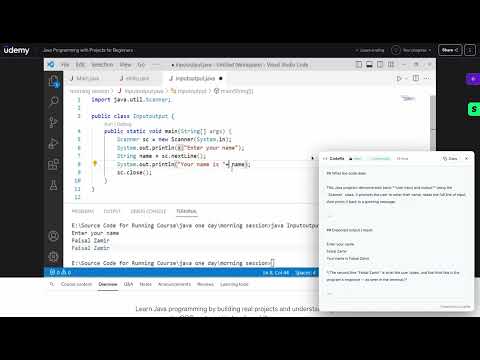
🎬 Stop pausing tutorials to retype code. CodeRa extracts it in 1 click. You're watching a coding tutorial. The instructor shows a complex function. You pause. You retype. You make a typo. You rewind. Sound familiar? CodeRa fixes this forever by extracting clean, ready-to-run code directly from videos and images on YouTube, Udemy, Coursera, and any educational platform. ⚡ HOW IT WORKS: Open any coding lesson (YouTube, Udemy, Coursera, etc.) Click "Capture Frame" while the video keeps playing. Perfectly formatted code lands in your clipboard in 3–5 seconds. Ready to paste. 🧠 THREE POWERFUL MODES: 💻 CODE EXTRACTION (AI-Powered) Claude AI reads the frame, preserving exact indentation, brackets, semicolons, and comments. Paste directly into VS Code and run it immediately — zero formatting cleanup required. 📄 TEXT CAPTURE Extract subtitles, slide text, diagrams, and UI labels exactly as shown. Perfect for fast conference note-taking and documentation. 🔍 UNDERSTAND CODE Don't just copy — learn. CodeRa can explain what the captured code does, trace its execution step-by-step, and show the expected output. Built for learners who want comprehension, not just shortcuts. ✅ PERFECT FOR: YouTube tutorials & Live Streams Udemy & Coursera courses Technical conference talks Documentation with image-only code blocks Extracting text from screenshots (Slack, Discord) 🏆 WHY CODERA BEATS ALTERNATIVES: Standard OCR (Apple Live Text, Google Lens): Breaks code indentation, destroys formatting, and confuses brackets. CodeRa preserves precise structure. ChatGPT/Claude web apps: Requires 5+ tedious steps (screenshot → save → upload → write prompt → copy). CodeRa does it in 1 click. 🔒 PRIVACY FIRST: No account required. Zero images stored on servers — screenshots are processed in real-time and immediately discarded. Completely safe for corporate or proprietary codebases. 🌐 Supports 50+ languages: JavaScript, Python, TypeScript, Java, Go, Rust, C++, C#, Ruby, and more. Built by a developer who got tired of retyping code from tutorials. Streamline your learning today!
5 out of 53 ratings
Details
- Version1.1.0
- UpdatedJuly 9, 2026
- FeaturesOffers in-app purchases
- Size158KiB
- Languages3 languages
- DeveloperWebsite
Email
anton.zaharenko@gmail.com - Non-traderThis developer has not identified itself as a trader. For consumers in the European Union, please note that consumer rights do not apply to contracts between you and this developer.
Privacy

This developer declares that your data is
- Not being sold to third parties, outside of the approved use cases
- Not being used or transferred for purposes that are unrelated to the item's core functionality
- Not being used or transferred to determine creditworthiness or for lending purposes
Support
For help with questions, suggestions, or problems, please open this page on your desktop browser