


Overview
Extract formatted code with correct indentation from YouTube, Udemy, and Coursera videos in one click. No sign-up required.
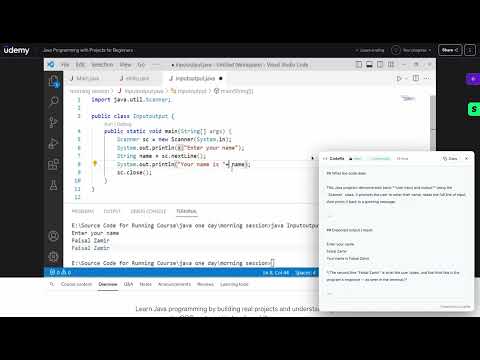
Stop retyping code from video tutorials, courses, and screenshots. CodeRa is a powerful Chrome extension built for developers, students, and self-taught programmers. It captures code directly from video players while they keep playing, preserves your indentation, and puts clean, ready-to-run source code straight into your clipboard. 🔥 KEY FEATURES: • One-Click Video Capture: Works seamlessly on YouTube, Udemy, Coursera, Skillshare, and embedded players. Press Alt+C or use the floating player button. • Smart Indentation & Syntax: Unlike standard OCR or Google Lens, CodeRa preserves tabs, brackets, spacing, and comments. • Three AI-Powered Modes: - Plain Text: Extract subtitles, slides, and UI labels exactly as shown. - Extract as Code: Get clean, IDE-ready source code with preserved syntax. - Understand Code: Let AI trace the snippet line-by-line and explain the logic. • Zero Configuration & No Sign-up: Install and start extracting immediately. No accounts or credit cards required. 🔒 PRIVACY FIRST: CodeRa does not store your screenshots or build cloud libraries. Your snippet history stays locally in your browser. Extracts are processed securely through Anthropic's Claude API, which adheres to strict commercial data privacy standards (data is not used for model training). Stop pausing, squinting, and retyping. Install CodeRa and start extracting code in seconds!
5 out of 53 ratings
Details
- Version1.2.0
- UpdatedOctober 10, 2026
- Size211KiB
- Languages3 languages
- DeveloperWebsite
Email
anton.zaharenko@gmail.com - Non-traderThis developer has not identified itself as a trader. For consumers in the European Union, please note that consumer rights do not apply to contracts between you and this developer.
Privacy

This developer declares that your data is
- Not being sold to third parties, outside of the approved use cases
- Not being used or transferred for purposes that are unrelated to the item's core functionality
- Not being used or transferred to determine creditworthiness or for lending purposes
Support
For help with questions, suggestions, or problems, please open this page on your desktop browser