

CodePush
3 ratings
)
Overview
Push your coding solutions to GitHub from LeetCode, GeeksForGeeks, Codeforces & CodeChef. Track progress and schedule revisions.
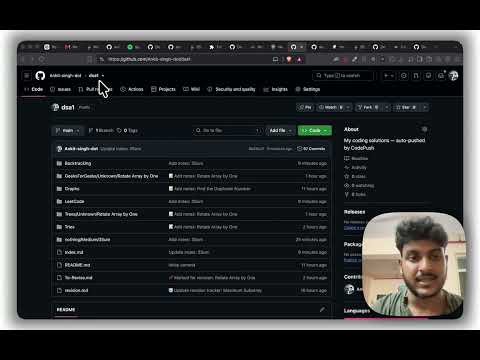
CodePush is the ultimate automated workflow tool for competitive programmers and software engineers. Never lose track of your coding solutions or spend time manually copying and pasting code to GitHub again! CodePush seamlessly integrates with your favorite coding platforms and automatically detects when you successfully solve a problem. With a single click (or automatically, if configured), it extracts your clean code, problem metadata, and notes, pushing them directly into a categorized GitHub repository of your choice. Supported Platforms • LeetCode • GeeksForGeeks (Practice) • Codeforces • CodeChef Key Features • Automated Pushing: Detects accepted solutions and pushes them directly to your GitHub repo without any local Git setup required. • Spaced Repetition (SM-2): Mastering algorithms requires repetition. CodePush uses a built-in spaced repetition algorithm to schedule and remind you to review problems you've solved in the past, ensuring you retain optimal problem-solving patterns. • Custom Organization: Choose how your repository is structured (e.g., Platform/Difficulty/Problem-Name or a flat directory). • Beautiful Dashboard: Track your daily coding streak, view platform and difficulty breakdowns, and manage your revision queue all from a sleek, developer-focused dark-mode dashboard. • Secure Authentication: Connect safely using GitHub OAuth or a Personal Access Token. CodePush communicates directly with the GitHub API—no intermediary servers are used. Get Started 1. Install the extension. 2. Click "Connect with GitHub" in the popup. 3. Select or create a repository to store your code. 4. Go solve a problem and watch the magic happen!
5 out of 53 ratings
Details
- Version1.0.3
- UpdatedSeptember 4, 2026
- Offered byAnkit Raj
- Size18.88MiB
- LanguagesEnglish
- Developer
Email
ankitrajdihara123@gmail.com - Non-traderThis developer has not identified itself as a trader. For consumers in the European Union, please note that consumer rights do not apply to contracts between you and this developer.
Privacy

CodePush has disclosed the following information regarding the collection and usage of your data. More detailed information can be found in the developer's privacy policy.
CodePush handles the following:
This developer declares that your data is
- Not being sold to third parties, outside of the approved use cases
- Not being used or transferred for purposes that are unrelated to the item's core functionality
- Not being used or transferred to determine creditworthiness or for lending purposes
Support
For help with questions, suggestions, or problems, visit the developer's support site