

CodePrettify: JS, JSON, CSS & RSS Formatter

Overview
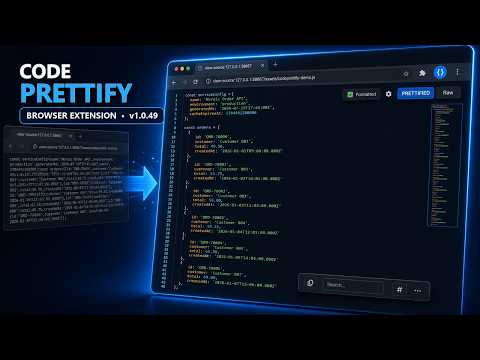
A fast, IDE-like viewer for raw JSON, code, and data files: format, validate, fold, search, diff, and inspect.
CodePrettify turns raw, unformatted developer files into a clean, IDE-like workspace the moment you open them. Whether you're staring at a dense API response, a config file, a data dump, or a minified asset, it formats and highlights the content instantly — then gives you the tools to navigate, validate, fold, search, compare, convert, inspect, and export it, all locally in your browser. 🚀 INSTANT, READABLE FORMATTING • Beautifies supported files the moment they open, with minification detection so compressed files become readable and already-clean files are left untouched • Modern CodeMirror 6 editor with VS Code-inspired syntax highlighting • Code folding, bracket matching, line numbers, and a zero-flash loader that prevents raw-content flicker • One-click toggle between the original and the formatted view 📊 STRUCTURED DATA TOOLS • Collapsible tree view for JSON, with breadcrumb navigation and JSONPath query tools (autocomplete, validation, copy per result) • Table View turns arrays of objects and repeating feed entries into sortable, searchable tables, with chunked loading for big datasets • Clickable URLs and import paths • A clean reading preview for Markdown documents, with embedded HTML kept inert for safety 🔄 FORMAT CONVERSION • Convert a structured document from one format to another — such as JSON to YAML — and download the result, with only valid targets offered for each file 🎛️ COMMAND PALETTE • Press Ctrl+Shift+P to fuzzy-search and run any action — search, go to line, copy, export, convert, compare, statistics, navigator, table view, and more — without hunting through menus • Only commands relevant to the current file are shown 🧪 JAVASCRIPT PLAYGROUND • Runs real code in a sandboxed Web Worker with a configurable 1 / 5 / 15 s timeout • Captures console output and renders console.table as a real HTML table • Reports the return value, execution time, and full stack traces • Optional "Include current file" lets you call its top-level functions • Autocomplete with parameter signatures, top-level await, and auto-saved scratch code • Inspect Runtime (Ctrl+Alt+I) annotates a file with inline runtime values you can jump to • Ctrl+Alt+P to open, Ctrl+Enter to run, Ctrl+Space for autocomplete 🌐 HTTP CLIENT • A full Postman-style client on any web page — compose requests with method, URL, and dedicated Params, Auth, Headers, and Body tabs • Auth presets (Bearer, Basic, API key) and multiple body modes, including form-urlencoded and validated payloads • Save named requests, keep per-URL history, and use environments with {{variable}} interpolation and a live resolved-URL preview • Import cURL commands; copy requests as cURL, fetch(), or PowerShell • Inspect responses across Body, Headers, Cookies, and Raw views 🧭 NAVIGATION & LARGE FILES • Document outline with click-to-jump • Syntax-aware minimap rendered on an offscreen canvas • Per-page view state — fold state, search, highlights, and view mode — restored automatically • Shareable configuration URL recreates the exact view for teammates • Go to Line (Ctrl+G) remembers your last position 🔍 INSIGHTS & VALIDATION • Diagnostics panel with syntax status, warnings, and the request's HTTP context (URL, content type, encoding, size, and timing) • Built-in validation with precise line and column error reporting • Statistics such as size, line count, structural depth, symbol counts, and selector or tag counts 🧬 COMPARE & DIFF • Full-screen split diff (Ctrl+Alt+D) with line-level highlighting, synced scrolling, stats, and swap-sides 🔎 SEARCH • Floating search (Ctrl+F) with live result counts, plus /pattern/flags regular-expression search 🔐 DATA INSPECTION • Inline Base64 and JWT decoding with a copy modal • Unix timestamp detection and human-readable date tooltips 🔎 REGEX PLAYGROUND • Test patterns live against the open document with instant in-viewer highlighting • Match list with counts and jump-to-result, capture and named groups, a built-in guide, an example library, and remembered patterns (Ctrl+Alt+R) 📤 EXPORT & SHARING • Copy the original, formatted, or minified content • Export as a PNG image (viewport or full file), a CSV file, or an HTML table 🎨 CSS UTILITIES • Color swatches with a built-in picker; copy a color as HEX, RGB, or HSL 🔒 PRIVACY & SECURITY • 100% local processing — no external requests, no telemetry, and no third-party runtime dependencies • Playground code runs in a null-origin sandbox with a fresh worker per run, with no access to the page, the extension, or the network • Safe for APIs, tokens, internal systems, and production data 📂 WORKS EVERYWHERE • Activates on raw-code responses and local files, and recognizes supported file types from the response Content-Type even when the URL has no file extension ⚙️ CUSTOMIZABLE • Light, Dark, and Auto themes; adjustable font size, indent, line numbers, word wrap, and minimap • Per-file-type preferences, a language selector, and settings synced across your devices ⌨️ KEYBOARD SHORTCUTS • Ctrl+B — Raw / Pretty • Ctrl+Alt+C — Copy • Ctrl+F — Search • Ctrl+G — Go to Line • Ctrl+Alt+T — Toggle toolbar • Ctrl+Alt+D — Compare / Diff • Ctrl+Alt+P — JavaScript Playground • Ctrl+Alt+I — Inspect Runtime • Ctrl+Alt+R — Regex Playground • Ctrl+Shift+P — Command Palette 📂 LOCAL FILES Open local files by enabling "Allow access to file URLs" in your browser's extension settings, or just drag a file onto — or pick one from — the CodePrettify launcher to open it instantly (no permission needed). Available in 14 languages.
4.8 out of 54 ratings
Details
- Version1.0.62
- UpdatedSeptember 30, 2026
- Size1.15MiB
- Languages13 languages
- DeveloperWebsite
Email
support@fixquotes.com - Non-traderThis developer has not identified itself as a trader. For consumers in the European Union, please note that consumer rights do not apply to contracts between you and this developer.
Privacy

CodePrettify: JS, JSON, CSS & RSS Formatter has disclosed the following information regarding the collection and usage of your data. More detailed information can be found in the developer's privacy policy.
CodePrettify: JS, JSON, CSS & RSS Formatter handles the following:
This developer declares that your data is
- Not being sold to third parties, outside of the approved use cases
- Not being used or transferred for purposes that are unrelated to the item's core functionality
- Not being used or transferred to determine creditworthiness or for lending purposes
Support
For help with questions, suggestions, or problems, visit the developer's support site