

Code Previewer
1 rating
)
Overview
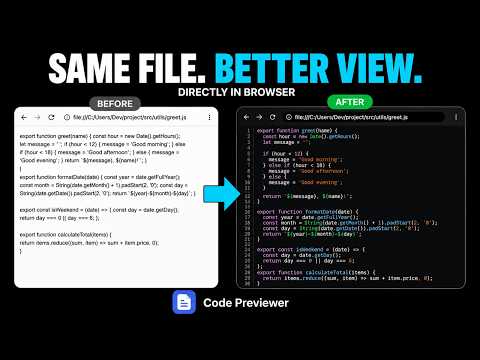
VS Code-like viewer for local source code files opened via file:// URLs
View local source code files beautifully — right in your browser. Code Previewer replaces the browser's plain-text view of local files (file:// URLs) with a VS Code-like viewer: syntax highlighting, line numbers and code folding. WHAT IT DOES • Syntax highlighting for 25+ file types, with a clean plain-text fallback for anything else • Folder view — open a local folder and browse it as a grid, with filter, sort, breadcrumbs and keyboard navigation • Compare mode — side-by-side diff of two files with change highlighting • Markdown preview — split view, preview-only or source-only, with highlighted code blocks • Mermaid diagrams render from diagram files and from diagram blocks inside Markdown • Four themes: Light, One Dark, GitHub Light and Dracula • Search within a file, word wrap, copy, download, reload and full screen • Works entirely offline — your files never leave your computer ONE-TIME SETUP After installing, open the extension's Details page and enable "Allow access to file URLs". The extension does nothing without it. PRIVACY No data is collected or transmitted. The only stored setting is your theme preference.
5 out of 51 rating
Details
- Version1.13.1
- UpdatedAugust 17, 2026
- Size1.23MiB
- LanguagesEnglish
- Developer
Email
rajpurohitlalit181@gmail.com - Non-traderThis developer has not identified itself as a trader. For consumers in the European Union, please note that consumer rights do not apply to contracts between you and this developer.
Privacy

This developer declares that your data is
- Not being sold to third parties, outside of the approved use cases
- Not being used or transferred for purposes that are unrelated to the item's core functionality
- Not being used or transferred to determine creditworthiness or for lending purposes
Support
For help with questions, suggestions, or problems, visit the developer's support site