

Cocoa & Cloud — Cute Desktop Pet
1 rating
)
Overview
A cute desktop pet with local tasks, Focus Buddy, care and on-page games. Calm company that never steals a click.
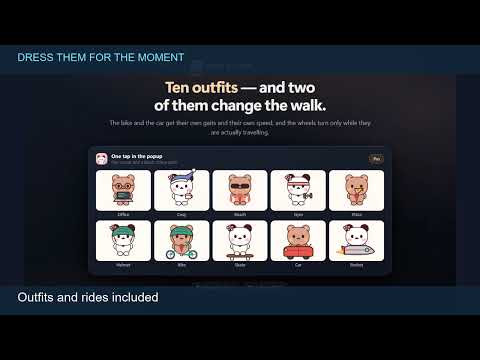
A tiny bear lives at the bottom of your browser. He walks while you read, waves between tasks and curls up for a nap. Choose Cloud, the little white panda, instead—or bring both companions together with Pro. Cocoa & Cloud is a cute browser pet extension with quiet greetings, local tasks, Focus Buddy, care streaks and short on-page games. Add personality to the hours you already spend in Chrome. INSTALL FREE. ELIGIBLE NEW INSTALLS INCLUDE SEVEN DAYS OF PRO. NO CARD. NO AUTOMATIC CHARGE. The trial starts automatically on eligible installations. Afterwards, Free remains available unless you separately choose to purchase Pro. ━━━━━━━━━━━━━━━━━━━━━━━━━━━━━━━━━━━━━━━━━━━━━━━━━━ ■ LITTLE COMPANIONS, NOT ANOTHER FULL-SCREEN APP ━━━━━━━━━━━━━━━━━━━━━━━━━━━━━━━━━━━━━━━━━━━━━━━━━━ Meet Cocoa, the brown bear with a red bow tie, and Cloud, the white panda with a little flower. Either character is available on Free. Pick your companion and let it settle into your day. Watch walking, running, crawling, sitting, waving, dancing, spinning, somersaults and sleep. A stretch after a nap adds another little moment. Behaviour varies with wandering, care and quieter activities. Cocoa's bow tie and Cloud's flower are part of their everyday appearance, not paid outfits. ━━━━━━━━━━━━━━━━━━━━━━━━━━━━━━━━━━━━━━━━━━━━━━━━━━ ■ A LITTLE HELLO, AT A SENSIBLE PACE ━━━━━━━━━━━━━━━━━━━━━━━━━━━━━━━━━━━━━━━━━━━━━━━━━━ Optional greetings bring a quiet hello at different times of your local day. A short text bubble appears beside your companion, without sound, speech or push notifications. Greetings are limited to once per daypart and spaced at least four hours apart. A shared local cooldown prevents every tab from greeting you at once. A hello waits during Focus Buddy, sleep, games and busy interactions. Hidden or unfocused pages do not show greetings. Turn the feature off whenever you prefer silence. Timing uses your device's clock, not a cloud conversation service. Think of it as a friendly browsing moment, not an appointment reminder delivered at an exact minute. ━━━━━━━━━━━━━━━━━━━━━━━━━━━━━━━━━━━━━━━━━━━━━━━━━━ ■ FEED, PET, PLAY: GIVE YOUR COMPANION A LITTLE CARE ━━━━━━━━━━━━━━━━━━━━━━━━━━━━━━━━━━━━━━━━━━━━━━━━━━ Feed your companion, give it attention and play. Hunger, happiness and energy shape the mood you see, including happy, hungry, sleepy, lonely and excited states. Build a local care streak and collect treats. Free includes the Sparkle charm through care progress. Pro adds Heart and Crown at their streak milestones; those rewards still need to be earned. Progress stays local. Treats and charms are part of the companion experience, not cash rewards or a currency you can trade or withdraw. ━━━━━━━━━━━━━━━━━━━━━━━━━━━━━━━━━━━━━━━━━━━━━━━━━━ ■ TINY PLAY BREAKS: STAR CHASE AND MUSHROOM RUSH ━━━━━━━━━━━━━━━━━━━━━━━━━━━━━━━━━━━━━━━━━━━━━━━━━━ Start Star Chase from the popup and watch your companion automatically chase stars for 15 seconds. The page shows a score and countdown; personal bests stay local. Free includes one play per local day; trial and Pro remove that quota. In the 20-second Pro game Mushroom Rush, the companion automatically chases mushrooms and temporarily grows. Its configured size returns after the round. These are watch-the-pet chase games, not keyboard-controlled adventures or multiplayer competitions. Movement and animations must be enabled, with corner pinning and reduced motion off. Games cannot start during Focus Buddy or manual sleep. Switching to a hidden tab ends the round and saves its result. Enjoy either chase when a short distraction suits you; care and ordinary wandering do not require a game. ━━━━━━━━━━━━━━━━━━━━━━━━━━━━━━━━━━━━━━━━━━━━━━━━━━ ■ LOCAL TASKS: KEEP THE NEXT SMALL STEP CLOSE ━━━━━━━━━━━━━━━━━━━━━━━━━━━━━━━━━━━━━━━━━━━━━━━━━━ Keep a simple list beside your browser routine: "finish the introduction", "review the notes" or "send the draft". You decide what belongs there and when it is complete. Free supports two saved tasks, including completed entries until deleted. It is not two active tasks plus unlimited history. Trial and Pro allow unlimited saved tasks. Optional task reminders appear on enabled browsing pages, not through email, a calendar or your phone. No account or external task service is required. Entries stay in this Chrome profile. This is a personal next-step list, not a team project system with assignments, attachments or cloud backup. ━━━━━━━━━━━━━━━━━━━━━━━━━━━━━━━━━━━━━━━━━━━━━━━━━━ ■ FOCUS BUDDY: ONE TASK, ONE QUIETER SESSION ━━━━━━━━━━━━━━━━━━━━━━━━━━━━━━━━━━━━━━━━━━━━━━━━━━ Choose an unfinished task and start a 15, 25 or 45-minute focus session. Your companion settles into a quiet pose, with greetings and routine reminders deferred. Pause, resume or end a session yourself. An optional five-minute break offers a simple next step after the focus period. These controls are Free features. The timer uses local timestamps; the popup need not stay open. Reopen it to check progress or use session controls. Closing the popup does not end the session. Finishing a timer does not mark a task complete automatically. It measures the time you set aside, not the work you produced. ━━━━━━━━━━━━━━━━━━━━━━━━━━━━━━━━━━━━━━━━━━━━━━━━━━ ■ OPTIONAL REMINDERS, WITHOUT TURNING THEM ALL ON ━━━━━━━━━━━━━━━━━━━━━━━━━━━━━━━━━━━━━━━━━━━━━━━━━━ Free water, blink and posture reminders are off by default. Choose a preset and interval if an on-page nudge fits your routine. Pro allows custom wording. A reminder is a short message on an enabled browsing page, not a Windows alarm, mobile notification or alert while Chrome is closed. Focus Buddy defers routine interruptions. Turn reminders off again whenever you want; enabling one does not commit you to a permanent schedule. These are personal prompts, not health recommendations. The extension cannot assess posture or diagnose eye strain. Choose intervals and breaks using your own judgment. ━━━━━━━━━━━━━━━━━━━━━━━━━━━━━━━━━━━━━━━━━━━━━━━━━━ ■ CLICK, DRAG AND RIGHT-CLICK: YOU STAY IN CONTROL ━━━━━━━━━━━━━━━━━━━━━━━━━━━━━━━━━━━━━━━━━━━━━━━━━━ Click to pet, drag to reposition or double-click for a playful startle, when mouse interaction is enabled. Optional mouse-following brings it toward a resting pointer. Right-click opens quick controls: choose a corner, sleep or wake, stop or resume wandering, or hide the pet. You need not reopen all settings for every adjustment. Prefer decoration without mouse reactions? Switch them off. Right-click controls remain available to manage the companion. The surrounding overlay is click-through; the character and its controls are clickable. If it overlaps a button, move, pin or hide it. An interactive companion can still occupy page space. ━━━━━━━━━━━━━━━━━━━━━━━━━━━━━━━━━━━━━━━━━━━━━━━━━━ ■ FIT YOUR PAGE: SIZE, CORNERS, HEIGHT AND VISIBILITY ━━━━━━━━━━━━━━━━━━━━━━━━━━━━━━━━━━━━━━━━━━━━━━━━━━ Choose 50–180 pixels, set opacity from 25% to 100% and raise the companion up to 240 pixels above the bottom to clear sticky footers or other controls. Pin one of four corners or lock movement for a quieter arrangement. Placement controls are Free, not an upgrade requirement. Allow selected websites or exclude others using local site preferences. Rules apply to a site's origin, not an individual page path. The suggested show/hide shortcut is Alt+Shift+9 on Windows or Control+Shift+9 on Mac. Conflicts may leave it unassigned. Check the popup's actual binding and change it at chrome://extensions/shortcuts. ━━━━━━━━━━━━━━━━━━━━━━━━━━━━━━━━━━━━━━━━━━━━━━━━━━ ■ QUIET NAPS AND OPTIONAL SCREENSAVER-STYLE WANDERING ━━━━━━━━━━━━━━━━━━━━━━━━━━━━━━━━━━━━━━━━━━━━━━━━━━ The companion can sleep and wake with a stretch. Behaviour, care mood, focus sessions and manual controls affect naps; no fixed sleep schedule is promised. Screensaver-style wandering explores more of the page after inactivity. Choose 2, 5, 10 or 30 minutes, or switch it off. Returning to activity restores ordinary behaviour. This on-page mode does not replace your operating system's screensaver, lock the computer or keep the device awake. Reduced motion disables automatic travel and animated effects. Movement lock keeps the character in place; switching animations off makes poses and effects static. ━━━━━━━━━━━━━━━━━━━━━━━━━━━━━━━━━━━━━━━━━━━━━━━━━━ ■ FOURTEEN PRO OUTFITS: TINY PETS, BIG OUTFIT ENERGY ━━━━━━━━━━━━━━━━━━━━━━━━━━━━━━━━━━━━━━━━━━━━━━━━━━ Dress your companion for the mood of the day. Trial and Pro unlock fourteen outfits alongside the default look: Office, Cosy, Beach, Gym, Pizza, Helmet, Gamer, Froggy, Wizard, Explorer, Bike, Skate, Car and Rocket. New Gamer, Froggy, Wizard and Explorer styles bring gaming details, a frog-themed look, a magical outfit and an adventure-ready companion. These are costumes, not separate games. Car includes visible wheels; Bike, Skate and Rocket offer other miniature rides. These are illustrated outfits for the two characters, not 3D desktop models. Custom names, fur colours and blush colours make the look yours. Try a pastel palette or your favourite shade. The original appearance remains available free. ━━━━━━━━━━━━━━━━━━━━━━━━━━━━━━━━━━━━━━━━━━━━━━━━━━ ■ TWO TOGETHER, WITH SMALL MOMENTS BETWEEN THEM ━━━━━━━━━━━━━━━━━━━━━━━━━━━━━━━━━━━━━━━━━━━━━━━━━━ Trial and Pro let both companions share a page, with occasional hugs, kisses, high-fives and slow dances. These are small moments, not a continuous scene you must watch. Optional typing reactions add a little notepad moment. Qualifying HTML video playback can trigger glasses and popcorn props. Disable reactions if they do not suit the page. Reactions use local activity and video-state signals, not saved typing or video transcripts. They do not interpret an email or identify a film. Not every player or short clip triggers them. ━━━━━━━━━━━━━━━━━━━━━━━━━━━━━━━━━━━━━━━━━━━━━━━━━━ ■ DESIGNED FOR EVERYDAY BROWSING, WITH HONEST LIMITS ━━━━━━━━━━━━━━━━━━━━━━━━━━━━━━━━━━━━━━━━━━━━━━━━━━ Ordinary movement uses CSS animation and scheduled behaviour decisions. Hidden tabs pause normal wandering, and fullscreen content that covers the companion can suspend it. The character is hidden from printed pages. Isolated styling reduces page clashes without guaranteeing compatibility with every layout or extension. Games, timers and controls also do work beyond ordinary wandering. Resource use depends on your device, pages and enabled features. No zero-CPU or zero-battery claim is made. Hide the companion on a troublesome site and report the issue. ━━━━━━━━━━━━━━━━━━━━━━━━━━━━━━━━━━━━━━━━━━━━━━━━━━ ■ PRIVACY: LOCAL PROGRESS, NOT A CLOUD PROFILE ━━━━━━━━━━━━━━━━━━━━━━━━━━━━━━━━━━━━━━━━━━━━━━━━━━ Settings, tasks, focus sessions, care progress, streaks and game records are stored locally in your Chrome profile. There is no built-in advertising or analytics tracking, and no extension account is required for Free or the trial. Enabled reactions use local activity signals; site addresses apply website preferences. Typed content is not saved, and these signals do not become a cloud browsing profile. Paid licence activation, validation and deactivation send licence and instance information to Lemon Squeezy. A checkout you open may include an email you provide. Payment and support links are not offline features. Sharing copies text or opens a compose page at your request. Feedback prepares an email draft; neither sends automatically. External services have their own privacy practices. There is no cloud sync. Removing the extension or clearing local data can erase progress. Keep important information elsewhere too. ━━━━━━━━━━━━━━━━━━━━━━━━━━━━━━━━━━━━━━━━━━━━━━━━━━ ■ FREE, TRIAL AND PRO: THE DIFFERENCE UP FRONT ━━━━━━━━━━━━━━━━━━━━━━━━━━━━━━━━━━━━━━━━━━━━━━━━━━ FREE, WITH NO EXTENSION ACCOUNT REQUIRED: • Either Cocoa or Cloud, one character at a time. • Ordinary animations, optional mouse responses and quiet greetings. • Size, opacity, height, corner, movement and website controls. • Optional screensaver-style wandering and show/hide shortcuts. • Feed, pet and play, care moods, local streaks and treats. • The Sparkle charm through care progress. • One 15-second Star Chase game per local day. • Two saved local tasks and optional task reminders. • Focus sessions, pause/resume and the optional five-minute break. • Preset water, blink and posture reminders. TRIAL AND PRO ADD: • Cocoa and Cloud together, with pair interactions. • Fourteen outfits, custom names, fur colours and blush colours. • Optional typing and video reaction props. • Unlimited saved tasks and Star Chase games. • The 20-second Mushroom Rush game. • Custom reminder messages. • Heart and Crown charms at their care-streak milestones. Eligible new installations start a seven-day Pro trial automatically; eligible existing installations may receive it when updating to the trial-enabled release. Trial status is shown in the extension. No payment card and no automatic billing are required. After expiry, Free remains available. Saved Pro appearance preferences are kept, while paid features follow your current access. Upgrading is a separate choice. Check current prices and renewal or cancellation terms in checkout before purchasing. ━━━━━━━━━━━━━━━━━━━━━━━━━━━━━━━━━━━━━━━━━━━━━━━━━━ ■ HOW TO START: ONE COMPANION, ONE SMALL NEXT STEP ━━━━━━━━━━━━━━━━━━━━━━━━━━━━━━━━━━━━━━━━━━━━━━━━━━ Choose Add to Chrome, then open an ordinary supported website. Pin the extension icon if you want its controls close by, open the popup and choose Cocoa or Cloud. Adjust size and placement, then decide whether mouse-following suits you. Leave reminders off until you want them. Use the feature tour to discover controls without enabling everything. FOR STUDY: add a reading task and start a focus session. FOR WORK: keep your next step in the local list. FOR A BREAK: care for your companion or start a chase. FOR QUIET: pin a corner, reduce motion or hide it. Share a care card or the extension link if you want someone else to meet your companion. Sharing is optional and user-initiated. No review, rating, referral or social post is required to use the trial or keep Free features. ━━━━━━━━━━━━━━━━━━━━━━━━━━━━━━━━━━━━━━━━━━━━━━━━━━ ■ PERMISSIONS, COMPATIBILITY AND WHAT THIS IS NOT ━━━━━━━━━━━━━━━━━━━━━━━━━━━━━━━━━━━━━━━━━━━━━━━━━━ storage: saves local preferences, tasks, focus state, care progress, game records, trial state and licence information. HTTP and HTTPS website access: displays the on-page companion, supports enabled page interactions and video reactions, applies site preferences and updates open supported pages when you change settings. Built for desktop Chrome 111 or later. Chrome's internal pages, the Chrome Web Store and other protected browser surfaces do not display the pet. The extension does not bypass those restrictions. This is the Chrome extension, not a Windows-wide overlay or Android app. Page companions are separate visual instances with shared local settings and progress. Reminders appear on enabled browsing pages, not while the browser is closed. Local features do not require a cloud companion account. ━━━━━━━━━━━━━━━━━━━━━━━━━━━━━━━━━━━━━━━━━━━━━━━━━━ ■ MADE BY KARTIK LABS ━━━━━━━━━━━━━━━━━━━━━━━━━━━━━━━━━━━━━━━━━━━━━━━━━━ Install for the tiny bear. Stay for the little routine that feels like yours. Choose a companion, care for it, set one small task and make your next tab a little cuter. Keep the experience simple on Free or explore optional Pro personality during the trial. Support: support@kartiklabs.in Product website: https://kartiklabs.in/pet
5 out of 51 rating
Details
- Version1.4.3
- UpdatedOctober 10, 2026
- Offered bykartiklabsinfo
- Size116KiB
- LanguagesEnglish
- Developer
Email
support@kartiklabs.in - Non-traderThis developer has not identified itself as a trader. For consumers in the European Union, please note that consumer rights do not apply to contracts between you and this developer.
Privacy

This developer declares that your data is
- Not being sold to third parties, outside of the approved use cases
- Not being used or transferred for purposes that are unrelated to the item's core functionality
- Not being used or transferred to determine creditworthiness or for lending purposes
Support
For help with questions, suggestions, or problems, visit the developer's support site