

Certyneo — PDF Sign & Verify

Overview
Merge, split, compress, sign and verify PDFs with Certyneo. Free PDF tools that run on your device.
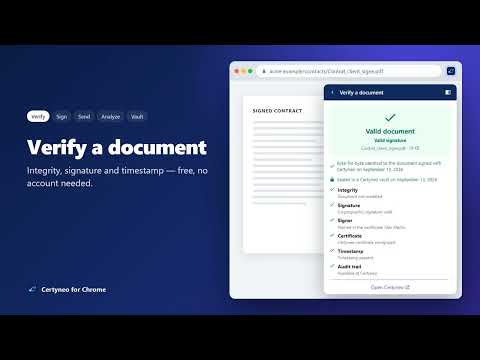
Certyneo puts electronic signature one click away, without leaving your browser. VERIFY A SIGNED PDF — FREE, NO ACCOUNT • Right-click a PDF link, or open the extension on a PDF tab, and choose "Verify with Certyneo". • The file is analyzed inside your browser: integrity, signature, certificate and timestamp. • Only its SHA-256 fingerprint is sent, to recognize documents signed with Certyneo. • Clear result — "Valid document" or the exact reason for doubt — and a downloadable report. SIGN A PDF • Upload a PDF or use the one in your tab; it opens in Certyneo so you can place your signature. SEND FOR SIGNATURE • Add signers, choose sequential or parallel signing, then place the fields in Certyneo and send. ANALYZE A CONTRACT • Get a summary, the key clauses and points to watch before signing. A reading aid, not legal advice. PROTECT IN YOUR VAULT • Save a PDF to your Certyneo digital vault: timestamped, sealed and kept unalterable. PRIVACY BY DESIGN • You sign in on certyneo.com (OAuth 2.0 with PKCE): the extension never sees your password. • No reading of the pages you visit, no browsing history, no ads. • Anonymous usage statistics only. The extension inspects signatures technically; it does not replace a qualified validation service under eIDAS for signatures issued by other providers.
0 out of 5No ratings
Details
- Version1.3.0
- UpdatedOctober 13, 2026
- Offered bycertyneo
- Size1.09MiB
- Languages10 languages
- DeveloperCERTYNEO
14 RUE BEFFROY NEUILLY-SUR-SEINE 92200 FREmail
support@certyneo.comPhone
+33 6 95 13 09 47 - TraderThis developer has identified itself as a trader per the definition from the European Union and committed to only offer products or services that comply with EU laws.
- D-U-N-S287169109
Privacy

Certyneo — PDF Sign & Verify has disclosed the following information regarding the collection and usage of your data. More detailed information can be found in the developer's privacy policy.
Certyneo — PDF Sign & Verify handles the following:
This developer declares that your data is
- Not being sold to third parties, outside of the approved use cases
- Not being used or transferred for purposes that are unrelated to the item's core functionality
- Not being used or transferred to determine creditworthiness or for lending purposes
Support
For help with questions, suggestions, or problems, visit the developer's support site