


Overview
Capture web tables & dropdowns, edit in a side panel, generate SQL, export Excel/CSV/HTML/JSON, and copy hard-to-select page text.
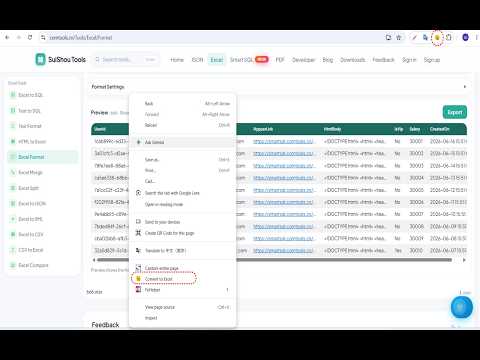
Web Table to Excel & SQL helps developers and data analysts turn HTML tables, data grids, and dropdown lists on any webpage into editable spreadsheets and ready-to-run SQL — without leaving the browser. HOW TO USE 1. Right-click on or near a table, grid, or dropdown on any webpage 2. Choose "Convert to Excel" 3. Edit data in the Chrome side panel spreadsheet 4. Configure table name and primary key in SQL Settings 5. Generate or export SQL scripts for your selected rows SQL FEATURES • Generate INSERT, UPDATE, DELETE, and MERGE scripts • Build WHERE conditions from selected cells • Copy as IN (...), NOT IN (...), or VALUES (...) snippets • Support T-SQL, MySQL, and PostgreSQL dialects • Export SQL scripts to a .sql file SPREADSHEET & EXPORT • Capture HTML tables and common grid layouts • Capture dropdown / select options • Edit data in a full spreadsheet UI inside Chrome's side panel • Save to Excel with selectable style templates • Copy as Markdown, JSON, CSV, or Excel-friendly formats • Export selected ranges to Excel, HTML, or image COPY anything Press ALT + C can copy all text value on the page, like password, button text PRIVACY All processing happens locally in your browser. Your table data is never sent to external servers. RELATED TOOLS • ComTools — free online toolbox (https://comtools.cn/) • Smart SQL for SSMS — export and edit SQL results in SQL Server Management Studio
5 out of 51 rating
Details
- Version1.8.2
- UpdatedOctober 19, 2026
- Size3.74MiB
- LanguagesEnglish
- DeveloperWebsite
Email
344028991@qq.com - Non-traderThis developer has not identified itself as a trader. For consumers in the European Union, please note that consumer rights do not apply to contracts between you and this developer.
Privacy

Web Table to Excel & SQL has disclosed the following information regarding the collection and usage of your data. More detailed information can be found in the developer's privacy policy.
Web Table to Excel & SQL handles the following:
This developer declares that your data is
- Not being sold to third parties, outside of the approved use cases
- Not being used or transferred for purposes that are unrelated to the item's core functionality
- Not being used or transferred to determine creditworthiness or for lending purposes
Support
For help with questions, suggestions, or problems, please open this page on your desktop browser