


Overview
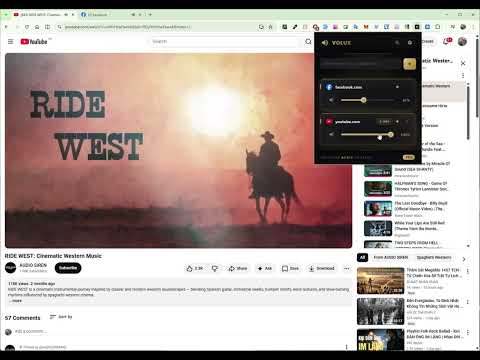
Auto-save volume per site. Pro adds per-tab override — each tab on YouTube, TikTok, Facebook, or any site keeps its own volume.
Tired of adjusting volume every time you open a tab? Volux automatically remembers your preferred volume for each website. Set it once - never adjust again. No more volume resets. No more sudden loud videos. No more constant fidgeting with system volume. 🎯 WHY VOLUX? Most volume extensions just control sound. Volux REMEMBERS it. That means: ✓ YouTube stays at 50% - always ✓ Zoom calls stay at 100% - always ✓ Spotify stays at 30% - always ✓ No manual adjustment needed - ever Set your volume preferences once. Volux handles the rest automatically. 🎚️ KEY FEATURES ✓ Auto-Save Volume Per Website Set volume for YouTube, Spotify, Zoom - Volux saves it automatically. Every reload, every new tab, same volume. Zero effort. ✓ One-Click Add Open the Volux popup on any site and click "Control this site". No typing web addresses. Sites playing audio in other tabs are suggested too. ✓ Scan Open Tabs One button finds the media sites in your open tabs (YouTube, Spotify, Twitch, TikTok and more) and adds ✓ Ready Out of the Box YouTube is added the moment you install, so you can set its volume right away. ✓ Per-Tab Volume Override (Pro) Multiple tabs open on the same sik, Spotify, Twitch — any site)? Give each tab its own volume. The site default still covers any tab you haven't customized. Override clears when the tab closes or navigates away. ✓ Different Volume Per Site Zoom at 100%, YouTube at 40%, Spohe right level. ✓ Smart Mute Mute without losing your volume sur saved level. ✓ Live Audio Detection See which tabs are playing audio ✓ Domain Grouping By default, all tabs from the samontrol. Simple and clean — and Pro lets you peel off individual tabs when you need them. ✓ Works on Tabs Already Open Install or update Volux and control the tabs you already have open. No page reload needed. 💡 PERFECT FOR • Watching YouTube without sudden loud intros • Keeping Zoom/Meet at consistent v • Background music while browsing • Multiple streaming services at di • Avoiding "the YouTube volume lottery" 📋 HOW IT WORKS 1. Open any website (YouTube, Spoti 2. Click the Volux icon, then "Control this site" 3. Adjust volume to your preference - Volux saves it automatically Next time you visit: Your volume is exactly as you left it. No setup. No configuration. Just works. 🔐 PERMISSIONS EXPLAINED Volux needs certain permissions to work. Here's exactly why: • Storage Permission Saves your volume preferences loc All data stays on your computer. Never sent anywhere. • Tabs Permission Detects which tabs have audio and gets website names. Needed to apply the correct volumt the site you're on. • Scripting Permission Lets Volux start controlling tabs that were already open when you installed or updated it, so you never have to reload a page. Only runs Volux's own built-in co • Access to Websites Controls audio/video elements in the page. Volume is only changed on the sites in your Volux list. Your privacy matters: No data collection. No tracking. No accounts. 🆓 FREE VERSION • Control 2 websites • Auto-save volume per website • One-click add for the site you're on • Scan open tabs for media sites • Smart mute and live audio detection • Perfect for most users ⭐ PRO VERSION ($2 one-time) • Unlimited websites • Per-tab volume override (set each • Priority support • Lifetime access • No recurring fees Note: Pro upgrade is an optional direct purchase (not affiliate marketing). 🔒 PRIVACY & SECURITY ✓ No data collection of any kind ✓ No tracking or analytics ✓ All settings stored locally ✓ No accounts required ✓ No servers of our own - the only check with our payment provider (Lemon Squeezy) when you activate Pro ✓ Open source on GitHub Full privacy policy: https://volux.devlifeeasy.com/privacy.html ✨ WHAT MAKES VOLUX DIFFERENT Other extensions: Control volume ✓ Volux: Control volume ✓ + Remember it forever ✓ The difference? You never have to think about volume again. 🛠️ TECHNICAL DETAILS • Lightweight - Minimal resource usage • Fast - No performance impact • Compatible - Works on any site that plays HTML5 audio or video • Reliable - Saves settings automatically • Safe - No code obfuscation, fully 📧 SUPPORT Questions or issues? • Email: support@devlifeeasy.com • GitHub: https://github.com/vannk84/volux/issues • Website: https://volux.devlifeeasy.com We typically respond within 24 hours. 🚀 TRY IT NOW The free version gives you every co Perfect for testing. Upgrade anytime if you need more. Install → Click "Control this site" → Adjust volume → Never think about it again. Made with care for people who value their time and sanity. No subscriptions. No dark patterns. Just a tool that solves a real problem.
3.5 out of 52 ratings
Details
- Version1.0.8
- UpdatedNovember 10, 2026
- FeaturesOffers in-app purchases
- Size54.66KiB
- LanguagesEnglish
- DeveloperWebsite
Email
vansunny12@gmail.com - Non-traderThis developer has not identified itself as a trader. For consumers in the European Union, please note that consumer rights do not apply to contracts between you and this developer.
Privacy

This developer declares that your data is
- Not being sold to third parties, outside of the approved use cases
- Not being used or transferred for purposes that are unrelated to the item's core functionality
- Not being used or transferred to determine creditworthiness or for lending purposes