

WASendly - WA Contacts Extractor, Group Members & Chat Backup to Excel

Overview
Export & extract WhatsApp contacts, group members & phone numbers to Excel, CSV, vCard. Back up chat history as HTML with photos.
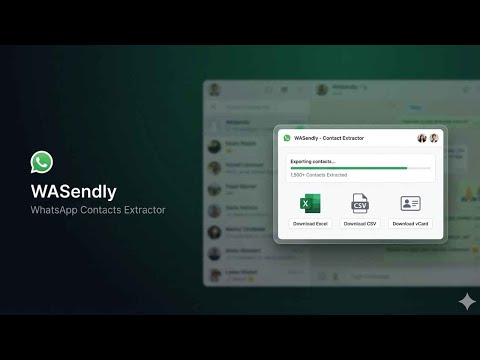
WASendly is a contacts extractor for WhatsApp Web. It exports your WhatsApp contacts, group members and complete conversations to Excel, CSV, vCard, JSON or a self-contained HTML file, with no copy-paste and no screenshots. Your contacts and messages are read inside your browser and never uploaded. WHAT YOU CAN EXPORT • Saved contacts: export your whole address book, only the numbers you saved, or only the ones you did not save. • Chat contacts: export everyone you have talked to, including phone numbers that are not in your address book. • Group members: pick one or more groups and export every participant. A switch includes or skips group admins, and the group name gets its own column so several groups stay apart in one sheet. • Full conversations: save a chat as one HTML file with messages, times, senders and photos. It opens in any browser and looks like the app itself. Add a date range, or download full-resolution photos when you need them. • Bulk chat backup: export many chats, or every chat, as a single ZIP sorted into chats and groups folders, with an index page that links them all. WHAT EACH ROW CONTAINS Country code, country name, phone number, international format, saved name, public name, address-book status, business-account flag, admin flag, labels and group name. Open the file in Excel or Google Sheets and sort, filter or import it into your CRM. HOW IT WORKS 1. Open web.whatsapp.com and sign in as usual. 2. Click the WASendly icon in the toolbar. 3. Choose Tools for contacts and groups, or Chat History for conversations. 4. Pick a format and press the export button. The file lands in your Downloads folder. BUILT FOR • Sales and support teams moving phone numbers into a CRM or mailing tool • Community admins keeping a member list up to date • Anyone who wants a copy of an important chat before changing phones • Anyone who simply wants their address book in a spreadsheet GOOD TO KNOW • WhatsApp Web must be open and linked to your phone. WASendly reads what WhatsApp Web holds in the browser, so large exports take longer and the window should stay open while it works. • WASendly only reads. It never sends, edits or deletes a message. • It works in Chrome and other Chromium browsers such as Edge, Brave and Opera. PRIVACY Contacts, phone numbers and messages are processed inside your browser and written straight into the file you download. They are never uploaded, stored or sold. WASendly asks you to sign in with Google. This shares your Google name, email address and profile picture address with our server so that it can recognise your account. Nothing from your chats or contacts is sent. WASendly is an independent extension. It is not affiliated with, endorsed by, sponsored by, or in any way officially connected to WhatsApp LLC, Meta Platforms, Inc., or any of their subsidiaries or affiliates. "WhatsApp" and related names, marks and logos are trademarks of their respective owners and appear here only to describe what this extension works with.
4.6 out of 5130 ratings
Details
- Version1.3.3
- UpdatedNovember 18, 2026
- Size1.19MiB
- Languages54 languages
- DeveloperWebsite
Email
contact@addonschrome.com - Non-traderThis developer has not identified itself as a trader. For consumers in the European Union, please note that consumer rights do not apply to contracts between you and this developer.
Privacy

WASendly - WA Contacts Extractor, Group Members & Chat Backup to Excel has disclosed the following information regarding the collection and usage of your data. More detailed information can be found in the developer's privacy policy.
WASendly - WA Contacts Extractor, Group Members & Chat Backup to Excel handles the following:
This developer declares that your data is
- Not being sold to third parties, outside of the approved use cases
- Not being used or transferred for purposes that are unrelated to the item's core functionality
- Not being used or transferred to determine creditworthiness or for lending purposes
Support
For help with questions, suggestions, or problems, visit the developer's support site