


Overview
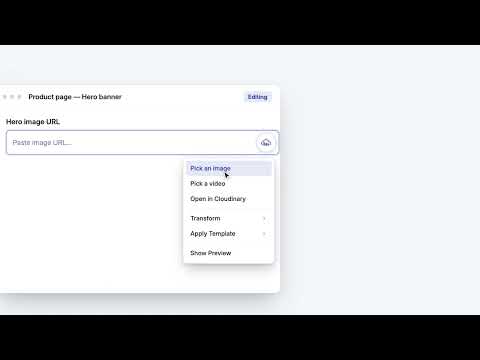
Insert Cloudinary image and video asset URLs into matching web form fields.
Note: This is a Beta release for customers who want to preview version 3.2 of the Cloudinary Chrome extension. Cloudinary Media Library lets you insert Cloudinary assets straight into image and video URL fields anywhere on the web. Browse your Cloudinary Media Library, pick an asset, preview it inline, and generate an optimized Cloudinary delivery URL — all without leaving the page you're working on. It fits common CMS, ecommerce, and marketing workflows, including dynamic image fields in platforms such as Klaviyo and Braze. Key features: * Insert image and video URLs from your Cloudinary account * Preview Cloudinary media right beside supported fields * Apply named transformations and template-based dynamic media * Detect relevant URL fields automatically * Power dynamic personalization workflows for email and marketing tools * Manage multiple Cloudinary accounts * Linked fields - designate a field to auto-fill whenever an asset is picked into a main URL field — with the full asset JSON, asset ID, public ID, display name, a structured metadata field value, or a delivery-URL variant with a named transformation. Linked fields are locked against manual edits and marked with a link icon. Also: named transformations applied to a field are retained when a new asset is picked; the popup logo opens your account's Console Media Library; the field button now avoids covering page controls (e.g. the upload widget's URL arrow). Built for Cloudinary users who need a faster way to connect their media with external tools, page builders, commerce platforms, and marketing editors.
5 out of 52 ratings
Details
- Version3.2.1
- UpdatedSeptember 23, 2026
- Size1.45MiB
- Languages12 languages
- DeveloperCloudinary LtdWebsite
Aharon Bart Street 20 Building C Petah Tikva 4951448 ILEmail
cldchrome@cloudinary.comPhone
+1 234-567-9462 - TraderThis developer has identified itself as a trader per the definition from the European Union and committed to only offer products or services that comply with EU laws.
- D-U-N-S600030698
Privacy

Cloudinary has disclosed the following information regarding the collection and usage of your data. More detailed information can be found in the developer's privacy policy.
Cloudinary handles the following:
This developer declares that your data is
- Not being sold to third parties, outside of the approved use cases
- Not being used or transferred for purposes that are unrelated to the item's core functionality
- Not being used or transferred to determine creditworthiness or for lending purposes
Support
For help with questions, suggestions, or problems, please open this page on your desktop browser