


Overview
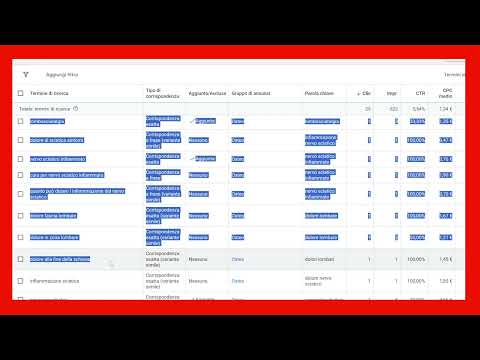
Select and copy vertical column data in Google Ads tables without adjacent metrics. Hold Ctrl + Alt and drag over any column.
Stop struggling with Google Ads tables! When you try to copy a specific list of keywords or search terms from Google Ads reports, the browser usually forces you to copy the entire table—including unwanted metrics, impressions, clicks, and adjacent columns. Google Ads Vertical Selector fixes this exact friction point with a clean, lightweight, zero-bloat solution. Key Features - Vertical Column Selection: Hold Ctrl + Alt and drag your mouse over any column. Select and copy only the vertical text values you actually need (such as a list of search terms to add to your negative keyword list). - Match-Type Cycling: Select keywords and press Ctrl + Space to quickly cycle through match types (Exact [keyword], Phrase "keyword", Broad keyword). Designed specifically for Google Ads Specialist workflows to speed up account management, negative keyword mining, and reporting. Vibe-coded by Alessandro Scialotti.
5 out of 52 ratings
Details
- Version1.0.1
- UpdatedAugust 5, 2026
- Size65.32KiB
- LanguagesEnglish
- DeveloperWebsite
Email
alessandroscialotti@gmail.com - Non-traderThis developer has not identified itself as a trader. For consumers in the European Union, please note that consumer rights do not apply to contracts between you and this developer.
Privacy

This developer declares that your data is
- Not being sold to third parties, outside of the approved use cases
- Not being used or transferred for purposes that are unrelated to the item's core functionality
- Not being used or transferred to determine creditworthiness or for lending purposes
Support
For help with questions, suggestions, or problems, visit the developer's support site