

ClipVault — Clipboard History & Snippet Manager
2 ratings
)
Overview
Save, search & re-paste copied text & images. Pin favorites, dark mode, one-click paste-back. Your clipboard history, always ready.
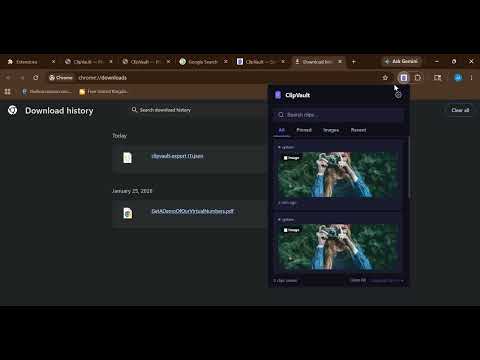
📋 ClipVault — Clipboard History Manager for Chrome Tired of losing important text or images you copied just minutes ago? Whether it's a code snippet, a URL, a customer email, or a product image — once you copy something new, the old one is gone. ClipVault fixes that. ClipVault is a powerful, lightweight clipboard history manager that automatically saves everything you copy — text and images — and lets you search, organize, and re-paste your clipboard entries with a single click. Designed for developers, writers, researchers, marketers, designers, and anyone who copies and pastes more than once a day. ━━━━━━━━━━━━━━━━━━━━━━━━━━━━━━━━━━━━━━━━━ 🚀 WHY CLIPVAULT? Every day, you copy dozens of things — links, code, addresses, emails, product names, paragraphs, images. But your clipboard only holds one item at a time. The moment you copy something new, the previous entry is lost forever. ClipVault solves this by running silently in the background and capturing every copy you make — automatically. No extra steps. No manual saving. Just keep copying as you normally would, and ClipVault stores it all for you. Need something you copied 20 minutes ago? Open ClipVault, search for it, and click to re-copy it — or paste it directly into any text field, input box, or form on the web. ━━━━━━━━━━━━━━━━━━━━━━━━━━━━━━━━━━━━━━━━━ ✨ KEY FEATURES 📋 Automatic Clipboard History ClipVault automatically saves your last 50 clipboard entries — both text and images. Every time you press Ctrl+C, Cmd+C, or use the right-click copy menu, ClipVault captures it instantly. No clicks. No buttons. It just works. 🖼️ Image Clipboard Support Not just text! ClipVault also captures images you copy from web pages, screenshots, and other applications. View your copied images in a dedicated Images tab, and re-copy them to your clipboard with one click. 🔍 Instant Search Find any past clipboard entry in seconds. ClipVault's real-time search bar filters your entire clipboard history as you type. Looking for that URL from an hour ago? That code snippet from yesterday? Just type a few characters and ClipVault will find it. 📌 Pin Important Clips Got clips you use repeatedly — like an email signature, API key, or code template? Pin them to the top of your list so they're always one click away. Pinned clips stay at the top no matter how many new entries are added. 🗂️ Smart Tabs for Easy Navigation Organize and browse your clipboard history with built-in category tabs: • All — Every clip in your history • Pinned — Only your pinned favorites • Images — Just the image clips • Recent — The most recently copied entries One click switches views instantly — no scrolling through hundreds of entries. 📋 One-Click Re-Copy See a clip you need? Click the copy button and it's instantly back on your clipboard, ready to paste anywhere. ClipVault even shows a confirmation toast so you know it worked. 📥 Paste Directly into Any Field ClipVault doesn't just copy to your clipboard — it can paste directly into the text field you're working in. Click the paste button on any clip, and the text is inserted right where your cursor was. Works with input fields, textareas, contentEditable elements, and rich text editors. ✋ Floating Copy Button When you select text or an image on any web page, ClipVault shows a small floating button near your selection. Click it to instantly save it to your clipboard history — no keyboard shortcut needed. Perfect for quick research and content collection. 🌐 Source Tracking Every clipboard entry shows the website domain it was copied from. Whether you copied text from GitHub, Stack Overflow, Google Docs, or any other website — you'll always know where each clip originated. This is incredibly useful when you're doing research across many tabs. 🌙 Beautiful Dark Mode ClipVault ships with three theme options: • Auto — Automatically follows your operating system's dark/light preference • Light — Clean, bright interface • Dark — Easy on the eyes, perfect for late-night work The theme applies across both the popup and the settings page for a consistent experience. ⚡ Lightning Fast & Lightweight ClipVault is built with pure vanilla JavaScript — zero frameworks, zero npm dependencies, zero bloat. The entire extension is less than 50KB. It loads instantly when you click the icon. No React. No Angular. No webpack. No build tools. Just clean, fast, efficient code that respects your browser's resources. ━━━━━━━━━━━━━━━━━━━━━━━━━━━━━━━━━━━━━━━━━ 🔒 PRIVACY & SECURITY Your privacy is our #1 priority. ClipVault was built with a privacy-first architecture: ✅ 100% Local Storage — All clipboard data is stored locally on YOUR device using Chrome's built-in chrome.storage API. Nothing is ever sent to any server. Nothing is ever uploaded to the cloud. ✅ No Analytics — We don't track you. No Google Analytics, no Mixpanel, no telemetry, no usage tracking of any kind. Period. ✅ No Third Parties — ClipVault has zero external dependencies. No CDN scripts, no remote API calls, no third-party libraries. Everything runs entirely within your browser. ✅ No Account Required — ClipVault works instantly. No sign-up, no login, no email verification. Install it and start using it. ✅ Auto-Exclude Sensitive Sites — ClipVault automatically avoids capturing data from known banking and password manager domains. Your sensitive financial and security data is never stored. ✅ Custom Domain Exclusions — Want to block additional websites from being tracked? Add any domain to your exclusion list in Settings, and ClipVault will skip those sites entirely. ✅ Delete Anytime — You can delete individual clips, or wipe all data from the Settings page at any time. Once deleted, the data is gone permanently — because there's no server backup to worry about. ClipVault includes a full privacy policy accessible directly from the extension's Settings page. ━━━━━━━━━━━━━━━━━━━━━━━━━━━━━━━━━━━━━━━━━ ⚙️ CUSTOMIZATION & SETTINGS ClipVault gives you full control over how it works: • Max Clips — Choose how many clipboard entries to keep (25 or 50 in the free version) • Auto-Clear — Automatically delete clips older than 7 or 30 days, keeping your history clean and tidy • Show Source Domain — Toggle whether website source labels appear on each clip card • Theme — Choose Auto, Light, or Dark mode • Exclude Domains — Add websites you want ClipVault to ignore (e.g., your banking site) • Export Data — Download your entire clipboard history as a JSON file for backup or migration • Import Data — Restore clips from a previously exported JSON file • Delete All — Wipe all ClipVault data with a confirmation prompt All settings auto-save instantly. No "Save" button required. ━━━━━━━━━━━━━━━━━━━━━━━━━━━━━━━━━━━━━━━━━ 💼 WHO IS CLIPVAULT FOR? 👩💻 Developers & Programmers Copy code snippets, API keys, terminal commands, error messages, SQL queries, and config values all day long? ClipVault lets you go back and find that exact line of code you copied 30 minutes ago. Search through your clipboard history, pin commonly used snippets, and paste them directly into your code editor or terminal. ✍️ Writers, Bloggers & Content Creators Collecting research from multiple sources means copying dozens of quotes, stats, and links. ClipVault captures every single one and shows you where each clip came from — so you can build your article without losing any source material. 📧 Customer Support & Sales Teams Juggling multiple tickets, emails, and chat messages? Save your common responses, frequently used links, and canned replies in ClipVault. Pin them to the top for one-click access, and paste them directly into any customer chat or email field. 🎨 Designers & UX Professionals Copy color codes, font names, dimension values, and design specifications as you work. ClipVault captures all of them — including images — so you always have your design references at your fingertips. 📊 Researchers & Students Gathering information from academic papers, websites, and documents? Copy freely and search later. ClipVault's source tracking tells you exactly which website each clip came from — making citations and fact-checking significantly easier. 🧑🏫 Teachers & Educators Preparing lesson materials from various online sources? Copy text, links, and images from across the web. ClipVault keeps everything organized and searchable for when you're putting together your final presentation or document. ━━━━━━━━━━━━━━━━━━━━━━━━━━━━━━━━━━━━━━━━━ 🔧 HOW IT WORKS 1️⃣ Install ClipVault from the Chrome Web Store — it takes 2 seconds 2️⃣ Copy anything as you normally would (Ctrl+C / Cmd+C / right-click → Copy) 3️⃣ ClipVault automatically captures and saves it in the background 4️⃣ Click the ClipVault icon in your toolbar to see your clipboard history 5️⃣ Search, pin, copy, or paste any entry directly from the popup 6️⃣ That's it! No configuration needed. It works out of the box. ━━━━━━━━━━━━━━━━━━━━━━━━━━━━━━━━━━━━━━━━━ 🛡️ BUILT ON MODERN STANDARDS ClipVault is built on Chrome's latest Manifest V3 platform, which means: • Enhanced security with a sandboxed service worker • Lower memory usage compared to older Manifest V2 extensions • Better performance with event-driven background processing • Full compatibility with Chrome's latest APIs ━━━━━━━━━━━━━━━━━━━━━━━━━━━━━━━━━━━━━━━━━ 🌍 WORKS ON ALL CHROMIUM BROWSERS ClipVault is compatible with: • Google Chrome • Microsoft Edge • Brave Browser • Opera • Vivaldi • Any Chromium-based browser One install. All browsers. Same great clipboard management experience. ━━━━━━━━━━━━━━━━━━━━━━━━━━━━━━━━━━━━━━━━━ 📦 EXPORT & BACKUP Worried about losing your clipboard history? ClipVault lets you export your entire clip collection as a downloadable JSON file. Save it to your hard drive, cloud storage, or share it between computers. Migrating to a new machine? Import your previously exported JSON file and pick up exactly where you left off. Your clipboard history moves with you. ━━━━━━━━━━━━━━━━━━━━━━━━━━━━━━━━━━━━━━━━━ ❓ FREQUENTLY ASKED QUESTIONS Q: Does ClipVault save passwords? A: No. ClipVault automatically excludes known banking and password manager domains. You can also add custom domains to your exclusion list. Q: Does ClipVault send my data to a server? A: Absolutely not. All data is stored 100% locally on your device. There is zero network activity. Q: How many clips does ClipVault save? A: The free version saves up to 50 clipboard entries. Once the limit is reached, the oldest clip is automatically removed when a new one is added. Q: Does it capture images? A: Yes! ClipVault captures both text and images from your clipboard, including screenshots and images copied from web pages. Q: Can I use ClipVault on multiple browsers? A: Yes. ClipVault works on Chrome, Edge, Brave, Opera, Vivaldi, and any Chromium-based browser. Each browser maintains its own local clipboard history. Q: Is ClipVault free? A: Yes! ClipVault is free to use with all core features included. A Pro upgrade with expanded storage and cross-device sync is coming soon. Q: How do I delete my data? A: Open ClipVault → Settings → click "Delete All Data." You can also delete individual clips from the popup by clicking the delete button on each card. ━━━━━━━━━━━━━━━━━━━━━━━━━━━━━━━━━━━━━━━━━ ⭐ INSTALL CLIPVAULT TODAY Stop losing your clipboard. Start being more productive. Install ClipVault now — it takes less than 5 seconds, and you'll wonder how you ever lived without it. 📋 ClipVault — Your clipboard, with a memory.
5 out of 52 ratings
Details
- Version1.1.0
- UpdatedJune 2, 2026
- Offered byMuhammad Ali
- Size100KiB
- LanguagesEnglish
- DeveloperMuhammad Ali
P/O Daghoni Village Chughu Groung Tehsil Daghoni 16750 PKEmail
developerali99@gmail.comPhone
+92 348 8092160 - TraderThis developer has identified itself as a trader per the definition from the European Union and committed to only offer products or services that comply with EU laws.
Privacy

ClipVault — Clipboard History & Snippet Manager has disclosed the following information regarding the collection and usage of your data. More detailed information can be found in the developer's privacy policy.
ClipVault — Clipboard History & Snippet Manager handles the following:
This developer declares that your data is
- Not being sold to third parties, outside of the approved use cases
- Not being used or transferred for purposes that are unrelated to the item's core functionality
- Not being used or transferred to determine creditworthiness or for lending purposes
Support
For help with questions, suggestions, or problems, please open this page on your desktop browser