


Overview
Match your resume to the job posting you're viewing and tailor it with ClippyCV.
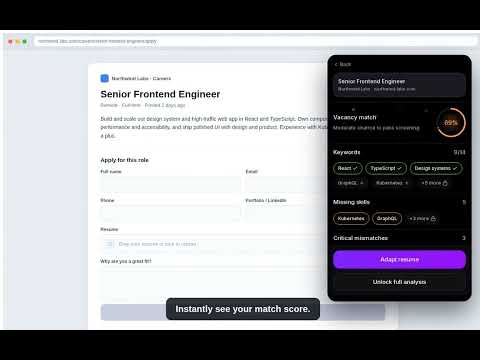
You found the job. The tedious part comes next: rewriting your resume for it, guessing what the recruiter looks for, and retyping the same details into another application form. ClippyCV handles that work on the page you already have open. Open a posting on LinkedIn, Greenhouse, Lever, Workday, Ashby, or a company's own careers site and click the ClippyCV icon. It reads the role, compares it against your resume, and shows your match score, the keywords you already hit, and the skills the posting wants that your resume is missing. One more click tailors your resume to that specific role and drafts a cover letter to match. Edit anything, switch between templates, and download a clean PDF that's ready to send. When the application form loads, ClippyCV fills it in for you: name, contact details, portfolio links, resume, and the free-text questions. It handles forms embedded from other career platforms too. Nothing gets submitted until you review it. What you get: Your real match score and the exact gaps, before you spend time applying. A resume and cover letter tailored to the job in front of you. Autofill across common application systems, with a review step every time. Resumes saved to your ClippyCV account, ready to reuse on the next posting. Privacy: ClippyCV reads a page only when you ask, by clicking the icon or the right-click menu. No background tracking, and no broad access to your browsing history. It will not answer legal, immigration, or demographic questions for you. Those stay in your hands. Sign in once with your ClippyCV account to start. Free credits let you try it out. Generating a tailored resume or letter uses credits; downloading and copying your results is always free. Stop rewriting the same resume for every posting. Tailor it right where you apply.
0 out of 5No ratings
Details
- Version1.0.0
- UpdatedJuly 14, 2026
- FeaturesOffers in-app purchases
- Size661KiB
- LanguagesEnglish
- DeveloperWebsite
Email
support@clippycv.com - Non-traderThis developer has not identified itself as a trader. For consumers in the European Union, please note that consumer rights do not apply to contracts between you and this developer.
Privacy

ClippyCV — Match Your Resume to the Job has disclosed the following information regarding the collection and usage of your data. More detailed information can be found in the developer's privacy policy.
ClippyCV — Match Your Resume to the Job handles the following:
This developer declares that your data is
- Not being sold to third parties, outside of the approved use cases
- Not being used or transferred for purposes that are unrelated to the item's core functionality
- Not being used or transferred to determine creditworthiness or for lending purposes
Support
For help with questions, suggestions, or problems, visit the developer's support site