

Clipper — Save text to Notion from any webpage

Overview
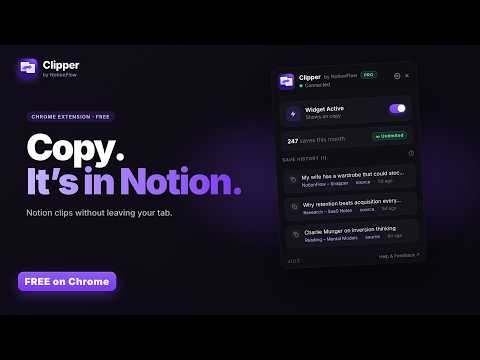
Save text from any webpage to Notion in 2 clicks. Highlight, choose your destination page, done. No tab switching required. Free.
Clipper by NotionFlow — Save anything to Notion in 2 clicks. Stop breaking your flow. Clipper lets you grab text from any webpage and send it straight to your Notion workspace — no tab switching, no copy-paste juggling, no context lost. How it works: 1) Highlight any text on a page 2) Copy any text on a website and the Clipper desktop widget will appear 3) Choose your Notion page or database — done. Your clip lands exactly where you want it, formatted and ready to use. Why Clipper? If you use Notion as your second brain, Clipper is the bridge between what you find on the web and where you think. It's like having a pocket that empties directly into your filing cabinet — except the filing cabinet is smart and the pocket works on every website. Built for speed, not bloat. - Lightweight — no slowdowns, no background bloat - Works on any webpage 100% FREE — everything included. Unlimited saves. Clip straight into Notion databases with property filling. History of your last 50 saves. Every feature, no subscription, no license key, no catch. Perfect for: - Researchers collecting sources and references - Content creators building swipe files - Students organizing notes from across the web - Anyone who lives in Notion and wants less friction Clipper is part of the NotionFlow suite — a family of focused tools that make Notion better, one workflow at a time.
0 out of 5No ratings
Details
- Version1.0.11
- UpdatedOctober 8, 2026
- FeaturesOffers in-app purchases
- Size1.13MiB
- LanguagesEnglish
- DeveloperBeast Creative LLCWebsite
30 N Gould St Ste N Sheridan, WY 82801-6317 USEmail
treyinchina@gmail.comPhone
+1 503-308-8900 - TraderThis developer has identified itself as a trader per the definition from the European Union and committed to only offer products or services that comply with EU laws.
- D-U-N-S143977674
Privacy

Clipper — Save text to Notion from any webpage has disclosed the following information regarding the collection and usage of your data. More detailed information can be found in the developer's privacy policy.
Clipper — Save text to Notion from any webpage handles the following:
This developer declares that your data is
- Not being sold to third parties, outside of the approved use cases
- Not being used or transferred for purposes that are unrelated to the item's core functionality
- Not being used or transferred to determine creditworthiness or for lending purposes
Support
For help with questions, suggestions, or problems, visit the developer's support site