


Overview
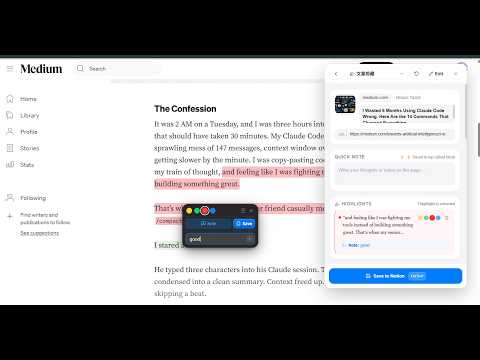
Save clean articles, full email threads, multi-images with markup, PDFs, and video transcripts directly into Notion.
🚀 Clipper: One 2 Notion — The Ultimate High-Fidelity Web Clipper for Notion. No more formatting nightmares. No more messy email chains. Just clean, hand-crafted notes straight to your workspace. ━━━━━━━━━━━━━━━━━━━━━━━━━━━━━━━━━━━━━ 💡 WHY CHOOSE ONE 2 NOTION OVER TRADITIONAL CLIPPERS? ━━━━━━━━━━━━━━━━━━━━━━━━━━━━━━━━━━━━━ Most clippers simply scrape messy HTML, leaving you with broken layouts, unreadable email reply chains, and images overwriting each other. Clipper: One 2 Notion transforms web clipping into an art form: • 💎 Native Hand-Crafted Fidelity: Code blocks with syntax highlighting, nested toggles, quotes, and tables look like you typed them yourself. • 🌐 Full-Spectrum Media: Auto-merges X (Twitter) threads, extracts video transcripts with timestamps, and grabs native PDF attachments. • 📑 Database Template Support: Seamlessly applies your custom Notion database templates and pre-fills your preset properties. • ⚡ 0-Second Instant Save: Press Ctrl+Enter and the popup closes instantly — your browser never freezes. • 🔒 100% Direct & Private: Zero middleman servers. Clips travel straight from your browser to Notion's official endpoints. ━━━━━━━━━━━━━━━━━━━━━━━━━━━━━━━━━━━━━ 🌟 KILLER FEATURES DESIGNED FOR YOUR WORKFLOW ━━━━━━━━━━━━━━━━━━━━━━━━━━━━━━━━━━━━━ 🐦 X (TWITTER) THREAD AUTO-AGGREGATION • Capture Full Insights: Never lose the context of a long Twitter thread! Automatically pulls all subsequent replies from the original author and merges them into a cohesive, chronological note. • Media & Identity Intact: Keeps author avatars, post dates, and high-res attachments neatly embedded. 📑 FULL NOTION DATABASE TEMPLATES SUPPORT • Works with Your Templates: Love templates? Finally, a clipper that respects them! Automatically inherits your database’s default template or lets you switch between templates directly from the popup. • Pre-fill Everything: Automatically applies icons, tags, statuses, and layout headers without manual post-cleanup. 📧 CLEAN EMAIL & TICKET RECONSTRUCTION (Gmail & Outlook) • Say Goodbye to Reply Clutter: Intelligently cuts out repetitive reply histories, nested quotes, and ticketing system boilerplate, keeping only the meaningful conversation. • Customer Support Attribution: Recognizes true agent signatures for transparent conversation tracking. • One-Click PDF Invoices: Automatically detects attached PDF receipts and nests them as clean, previewable Notion Toggle blocks. 🎬 VIDEO SUBTITLES & TRANSCRIPT CLIPPING (YouTube & Bilibili) • No More Manual Typing: Pulls official subtitles and intelligently reconstructs them into smooth, readable paragraphs with clickable timestamps (e.g., [02:15]). • In-Notion 16:9 Player: Watch videos inside your Notion page while searching spoken keywords with Cmd+F. 🧲 MULTI-IMAGE BATCH PICKING & INLINE MARKUP • Magnetic Image Picker: Click images directly on any webpage to batch-collect them into your note in your exact clicking order — no more overwriting! • Built-in Markup Studio: Annotate before saving — draw arrows, add rectangles, blur sensitive data with mosaics, or add text callouts. • 6-Way Header Cover: Set gorgeous page covers by picking from the DOM, viewport screenshots, zone crops, or local uploads. 💬 PARAGRAPH-LEVEL INLINE COMMENTS & HIGHLIGHTS • Native Margin Comments: Your highlighted thoughts sync into Notion as floating comment bubbles right alongside the paragraph — never dumped at the bottom! • Clean Underline Mode: Highlight text with 5 vibrant colors or a subtle, color-free underline that preserves the website's original design. ⚡ CUSTOMIZABLE FORM & 0-SECOND INSTANT SAVE • Drag-and-Drop Reordering: Move high-frequency properties (Tags, Status, Rating) to the top, and hide unneeded modules with one click. • Save & Go: Close the popup instantly upon saving (Ctrl+Enter / ⌘+Enter); background syncing handles the rest with a 1-click recent history drawer. ━━━━━━━━━━━━━━━━━━━━━━━━━━━━━━━━━━━━━ 🔒 ABSOLUTE PRIVACY — ZERO THIRD-PARTY SERVERS ━━━━━━━━━━━━━━━━━━━━━━━━━━━━━━━━━━━━━ • 100% Client-to-Notion: Your notes, clips, and tokens NEVER touch external proxy servers. Everything communicates directly with official Notion endpoints. Start building your clean, structured second brain in Notion today!
5 out of 54 ratings
Details
- Version3.0.97
- UpdatedOctober 14, 2026
- Size508KiB
- Languages7 languages
- DeveloperWebsite
Email
faiz2agi@gmail.com - Non-traderThis developer has not identified itself as a trader. For consumers in the European Union, please note that consumer rights do not apply to contracts between you and this developer.
Privacy

Clipper: One 2 Notion has disclosed the following information regarding the collection and usage of your data. More detailed information can be found in the developer's privacy policy.
Clipper: One 2 Notion handles the following:
This developer declares that your data is
- Not being sold to third parties, outside of the approved use cases
- Not being used or transferred for purposes that are unrelated to the item's core functionality
- Not being used or transferred to determine creditworthiness or for lending purposes