

ClipNote
1 rating
)
Overview
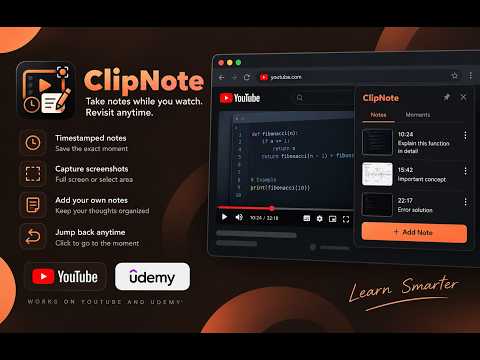
Capture timestamped notes and screenshots from YouTube videos, Udemy lectures, and ChatGPT conversations.
ClipNote is a simple and practical note-taking tool for people who learn through YouTube videos, Udemy courses, and ChatGPT conversations. It helps you save important parts of a video or conversation as timestamped notes, capture screenshots, add your own explanations, and quickly return to the exact moment later. When learning from online videos or AI conversations, it is common to pause, take a screenshot, write something in another application, and then spend time trying to find that same part again. ClipNote is built to make this process easier by keeping your notes and saved moments connected to the content you are watching or reading. How ClipNote works While watching a YouTube video, Udemy lecture, or browsing a ChatGPT conversation, you can create a note for an important moment. ClipNote records the current position of the video or conversation along with the note. You can also capture the video frame or select a specific area of the screen when you want to save something visual. Later, you can open your saved notes and click on a timestamp to go directly back to that part of the video. This makes it easier to review lessons, revisit explanations, remember important concepts, or go back to a piece of code that you want to understand again. Main features 2.1 Timestamped notes Create notes while watching a video or reading a conversation and save the exact position where the note was created. Each saved moment stays connected to its original position. 2.2 Screenshot capture Capture the current video frame or page content when something important appears on screen. You can also select a specific area of the screen when you only want to save part of what you are seeing. 2.3 Quickly return to important moments Every saved moment has a timestamp. Clicking the timestamp takes you back to that point in the video so you do not have to search for the same section again. 2.4 Add your own notes and explanations Add text to any saved moment to record your understanding, important points, questions, code explanations, or anything else you want to remember. Your changes are saved automatically. 2.5 Organize your notes Notes are organized around the videos, lectures, and conversations you are using. You can save multiple moments in a single note and reorder your saved moments when needed. 2.6 Export your notes Export your notes as a PDF when you want to keep a copy of your learning material, review it later, or use it for study and revision. 2.7 Works with YouTube, Udemy, and ChatGPT ClipNote works with supported YouTube watch and embed pages, Udemy lecture pages, and ChatGPT conversation pages. It is designed to stay out of the way when you are browsing other pages. Built for students and developers ClipNote can be useful when learning programming, preparing for exams, following online courses, watching technical tutorials, researching a topic through video, or saving useful ChatGPT responses for later reference. For example, if a programming tutorial explains an important concept or shows a piece of code that you want to remember, you can save that exact moment and add your own explanation. Later, you can return to the same part of the video without searching through the entire lecture again. Local first and private ClipNote does not require an account or a separate server to store your notes. Your notes and metadata are stored locally in your browser, while screenshots can be saved to a folder you choose. Why ClipNote ClipNote is built with a simple goal: make it easier to learn from videos and conversations without constantly switching between your content, screenshot tools, and separate note-taking applications.
5 out of 51 rating
Details
- Version1.4.2
- UpdatedSeptember 29, 2026
- Offered bysangbedpati
- Size195KiB
- LanguagesEnglish
- Developer
Email
sangbedpati1234@gmail.com - Non-traderThis developer has not identified itself as a trader. For consumers in the European Union, please note that consumer rights do not apply to contracts between you and this developer.
Privacy

This developer declares that your data is
- Not being sold to third parties, outside of the approved use cases
- Not being used or transferred for purposes that are unrelated to the item's core functionality
- Not being used or transferred to determine creditworthiness or for lending purposes
Support
For help with questions, suggestions, or problems, visit the developer's support site