


Overview
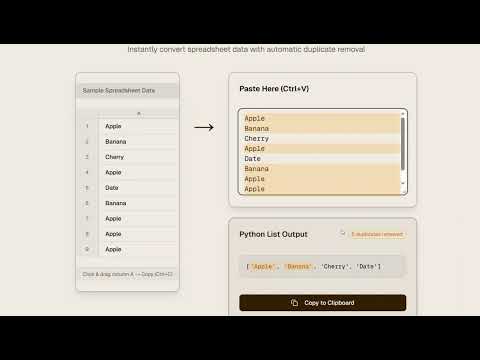
Clean and convert clipboard data instantly. Format Excel to Python, SQL, JSON. Remove duplicates, add quotes.
Copy a column from Excel. Clean the data. Get a Python list, SQL IN clause, or JSON array. That's it. WHAT IT DOES Converts pasted data into common formats: - Python lists: ['item1', 'item2', 'item3'] - SQL IN clauses: ('value1', 'value2', 'value3') - JSON arrays: ["a", "b", "c"] - Comma-separated with custom quotes and brackets FEATURES - Remove duplicates - Sort alphabetically - Pick your brackets and quote style - Flat or stacked output BUILT FOR Data analysts writing SQL. Developers formatting test data. Anyone tired of manually adding quotes and commas to lists. PRIVACY Everything runs locally in your browser. No clipboard data leaves your machine. Works offline. HOW TO USE 1. Copy data from Excel, Sheets, or anywhere 2. Click the extension icon 3. Click "Paste from Clipboard" 4. Pick your format options 5. Click "Copy to Clipboard" 6. Paste with Ctrl+V where you need it Full web version at clipboardtools.com.
5 out of 51 rating
Details
- Version1.2.5
- UpdatedJanuary 30, 2026
- Size19.0KiB
- LanguagesEnglish (United States)
- DeveloperWebsite
Email
coletenold@gmail.com - Non-traderThis developer has not identified itself as a trader. For consumers in the European Union, please note that consumer rights do not apply to contracts between you and this developer.
Privacy

This developer declares that your data is
- Not being sold to third parties, outside of the approved use cases
- Not being used or transferred for purposes that are unrelated to the item's core functionality
- Not being used or transferred to determine creditworthiness or for lending purposes
Support
For help with questions, suggestions, or problems, visit the developer's support site