


Overview
Clipboard history + notes + lists! Smart folders, color tags, favorites & unlimited storage. Your productivity workspace.
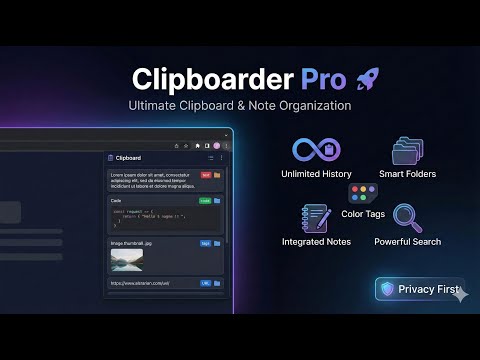
Stop juggling sticky notes and lost snippets; Clipboarder Pro gives you a unified space to capture history, organize it into smart folders, and manage your ideas instantly. **Clipboarder Pro** transforms your browser into a powerful productivity workspace, capturing every piece of text and image you copy, organizing it intelligently, and making it instantly accessible whenever you need it. 🚫 The Problem You copy a phone number, then a link, then a quote. By the time you need the phone number again, it's gone. You paste into random sticky notes, lose track of tabs, and waste time re-searching for things you already found. ✅ The Solution: Clipboarder Pro We don't just save your history; we give you a workspace. ✔️ New for Clipboarder Pro V2: Checklists ✔️ ✔️ ✔️ Convert your notes to checklists with satisfying and juicy animations to motivate you to complete all your tasks ## ✨ Why Clipboarder Pro is Perfect for You ### 📋 **Unlimited Clipboard History** Stop losing that important text you copied 5 minutes ago. Clipboarder Pro automatically captures **everything you copy** - text, URLs, code snippets, and even images - creating an unlimited history that's always accessible with a single click (Alt+V). ### 📂 **Smart Folder Organization** Create unlimited custom folders to organize your clipboard items and notes by project, client, or category. Drag and drop items between folders effortlessly. **Nest folders up to 3 levels deep** for sophisticated organization systems that match your workflow. ### 🎨 **Color Tag System** Mark items with color tags (Red, Orange, Yellow, Green, Blue, Purple) for instant visual categorization. Filter your clipboard and notes by color with a single click. Perfect for prioritizing tasks, categorizing content types, or creating your own organizational system. ### 📝 **Integrated Note-Taking** Create rich notes alongside your clipboard history in one unified workspace. Each note can have a title, detailed content, and color tags - perfect for capturing ideas, instructions, or important information. ### ⭐ **Favorites & Pinning** Star your most important items to access them instantly. Favorites are accessible from a dedicated view, ensuring critical information is never more than a click away. ### 📦 **Archive System** Archive items you want to keep but don't need daily access to. Restore them anytime you need them back. Keep your workspace clean while preserving everything. ### 🔍 **Powerful Search** Find anything instantly with the built-in search (Cmd/Ctrl+Shift+F). Search across clipboard history, notes, and folders - filtering by text content or titles. ### 📸 **Image Support** Enable image copying to capture screenshots, graphics, and photos. Perfect for designers, researchers, and visual content creators. ### ⚡ **Bulk Operations** Select multiple items and copy them all at once. Perfect for gathering information from multiple sources or creating compilations. ### 🎯 **Drag & Drop Everything** - Drag items into folders - Drag folders into other folders (nesting) - Drag color tags onto items - Reorder items within lists - Move items between folders ### ⏰ **Smart Retention** Configure how long clipboard history is kept (1-365 days). Older items are automatically cleaned up based on your preferences, keeping your workspace manageable. ### 🔐 **Privacy First** All your data is stored locally in your browser. Nothing is uploaded to external servers (except for license verification). Your clipboard history and notes stay private and secure. --- ## 🎯 Perfect For: ### 👨💻 **Developers** - Save code snippets across multiple files - Organize API keys, tokens, and credentials - Keep error messages and logs accessible - Build a personal code snippet library ### ✍️ **Writers & Content Creators** - Collect research quotes and references - Save multiple draft versions - Organize content by project or topic - Never lose that perfect sentence you just wrote ### 📊 **Researchers & Students** - Gather information from multiple sources - Organize research by subject - Keep citations and references organized - Build a knowledge base as you research ### 💼 **Professionals & Business Users** - Save client information and communications - Organize project materials - Keep frequently used text templates - Manage multiple projects simultaneously ### 🎨 **Designers** - Save color codes and design specs - Organize assets by project - Keep client feedback and notes - Capture visual references (with image support) --- ## 🌟 Key Features at a Glance | Feature | Description | |---------|-------------| | **Unlimited History** | Never runs out of space for your clipboard items | | **Auto-Capture** | Automatically saves everything you copy | | **Folders** | Unlimited custom folders with 3-level nesting | | **Color Tags** | 7 color options for visual organization | | **Notes** | Full note-taking with titles and rich content | | **Favorites** | Star items for instant access | | **Archive** | Store items you want to keep but not see daily | | **Search** | Powerful search across all content | | **Images** | Optional image clipboard support | | **Bulk Copy** | Select and copy multiple items at once | | **Keyboard Shortcut** | Alt+V to open instantly | | **Drag & Drop** | Intuitive organization | | **Smart Retention** | Configurable auto-cleanup (1-365 days) | | **Privacy** | All data stored locally | --- ## 💡 Smart Design Choices ### **Two-Column Layout** Clipboard history and notes are displayed side-by-side, allowing you to see both types of content simultaneously. This design maximizes productivity by reducing context switching. ### **Color Filtering** Each section (clipboard and notes) has its own color filter bar. Click a color to see only items with that tag, making it easy to focus on specific categories. ### **Sidebar Navigation** The folder sidebar provides quick access to all your organizational structures, with expand/collapse functionality for nested folders. ### **Context-Aware Actions** Every item has relevant actions (copy, star, archive, delete) right at your fingertips. Different views show different actions based on context. ### **Modal Editing** Edit clipboard items and notes in focused modal windows, preventing accidental changes and providing a clean editing experience. --- ## 🚀 Getting Started in 30 Seconds 1. **Install** Clipboarder Pro from the Chrome Web Store 2. **Copy** anything - it's automatically saved 3. **Press Alt+V** to open your clipboard history 4. **Click** on any item to copy it back to your clipboard 5. **Create folders** to organize your content 6. **Add color tags** for visual categorization 7. **Create notes** for important information that goes beyond clipboard text That's it! You're now equipped with a powerful productivity tool that grows with you. --- ## 🎁 Why Choose Clipboarder Pro? ### **It Just Works** No complicated setup, no learning curve. Install it and start being more productive immediately. ### **Beautiful & Intuitive** Modern design with smooth animations, dark theme option, and glassmorphism effects. A joy to use every day. ### **Performance Focused** Built with vanilla JavaScript for optimal speed. No frameworks, no bloat - just fast, responsive performance. ### **Constantly Improving** Regular updates with new features, improvements, and bug fixes based on user feedback. ### **Professional Support** Dedicated support team ready to help with any questions or issues. --- ## 📈 Boost Your Productivity Imagine never losing important information again. Imagine having all your copied content organized and searchable. Imagine reducing the time spent searching through browser history or re-typing information you've already copied. **That's the Clipboarder Pro promise.** Whether you're managing complex projects, conducting research, writing content, or coding, Clipboarder Pro becomes your second brain - remembering everything so you can focus on what matters. --- ## 🌍 Join Thousands of Productive Users Clipboarder Pro is trusted by developers, writers, researchers, students, and professionals worldwide. Join them and experience the freedom of never losing important information again. --- ## 🔒 Your Privacy Matters We believe your clipboard history is personal. That's why: - All data is stored **locally in your browser** - No tracking, no analytics, no data collection - License verification only requires a secure check to our server - We **never** sell or share your data - Open to security audits and transparency --- ## ⚡ Start Your Journey Today Install **Clipboarder Pro** and transform how you work with information. Your future productive self will thank you. **Never lose important information again. Never waste time searching for what you just copied. Never feel disorganized again.** ### Ready to supercharge your productivity? 🎯 **Install Clipboarder Pro now and experience the difference.** --- *Built with ❤️ for people who value their information and time.*
0 out of 5No ratings
Details
- Version2.0
- UpdatedDecember 19, 2025
- FeaturesOffers in-app purchases
- Size222KiB
- LanguagesEnglish
- DeveloperWebsite
Email
solaitions@gmail.com - Non-traderThis developer has not identified itself as a trader. For consumers in the European Union, please note that consumer rights do not apply to contracts between you and this developer.
Privacy
Clipboarder Pro - Clipboard, Notes & Lists Manager has disclosed the following information regarding the collection and usage of your data. More detailed information can be found in the developer's privacy policy.
Clipboarder Pro - Clipboard, Notes & Lists Manager handles the following:
This developer declares that your data is
- Not being sold to third parties, outside of the approved use cases
- Not being used or transferred for purposes that are unrelated to the item's core functionality
- Not being used or transferred to determine creditworthiness or for lending purposes
Support
For help with questions, suggestions, or problems, visit the developer's support site