

Clipboard History Manager
8 个评分
)

概述
A full-featured desktop clipboard manager for Mac, Windows and Linux to record what you copy to the clipboard
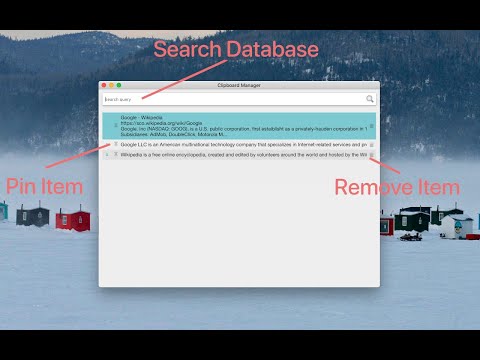
A powerful desktop clipboard manager with a fast, searchable local database that can store hundreds of clipboard entries without any performance drawbacks. CAPTURE MODES On first run, the extension explicitly asks you to select one of four collection modes, and you can switch between them at any time without losing your history: 1. Native Client (Global): a very simple native component written in C++ monitors clipboard changes system-wide and notifies the extension about each change. This way, the extension never polls the system clipboard (no continuous checking with a fixed interval), and it is notified even if the clipboard content is changed by a process outside your browser environment. 2. Browser + System (No Helper Needed): collects clipboards of all applications for as long as the browser is running. No installation is needed. The polling interval is fully configurable (from 1 to 60 seconds). 3. Browser + System Events (ChromeOS only): gets notified by the operating system whenever the clipboard of any application changes. Nothing is polled in the background at all. This mode is automatically disabled on platforms that do not support it. 4. Content Script (Browser Only): collects clipboard entries made inside the pages of your browser only. The optional native component is open-source and is compiled with the sources available at: https://github.com/lunu-bounir/clipboard-helper/commits/master/ COLLECT AND MANAGE - Each clipboard entry can be up to 1 MByte in size (the limit is adjustable). - Duplicate entries are automatically detected and merged; only unique contents are stored. - Up to 5000 entries can be stored; once the total number of entries is reached, the oldest non-pinned entries are automatically cleaned up while the computer is idle. - Each entry can be pinned to prevent the automatic clean-up module from removing it. To search among pinned entries, append "keyword:pinned" to your query. - To move an entry back onto the clipboard, press the Enter key or double-click the entry in the manager window. SEARCH Every entry is indexed in a built-in database, so your entire history is instantly searchable. The search engine is very powerful and supports wildcard matching, "OR" and "AND" search operators, and query stemming in 20 languages. The language of each entry is automatically detected to improve the results. CONVENIENCE - The manager opens in a toolbar popup or in a standalone window (selectable), with a configurable global keyboard shortcut. - Automatically closes when the manager window is not focused. - On clipboard paste events, the last active window can be re-focused automatically. - Dashboard tools to inspect and maintain the database: total number of items, total size, clean and compact the storage to reclaim disk space. - One-click export of the entire history to a JSON backup file, and restoring from a previously created backup. - Optional notification page on updates to keep you informed about new changes. At this moment, the extension does not support automatic insertion (pasting) of the clipboard content into the target application. PLATFORM SUPPORT This extension works on Linux, Windows, Mac OS, and ChromeOS at this moment: - Native Client mode: Linux, Windows, and Mac OS (requires the helper installation). - Browser + System, Browser + System Events, and Content Script modes: no installation needed (the Events mode requires a ChromeOS device). If you can help with improving the native ports, please open a GitHub issue.
3.4 星(5 星制)8 个评分
详情
- 版本0.3.2
- 上次更新日期2026年11月1日
- 提供方lunu.bounir
- 大小467KiB
- 语言English
- 开发者
邮箱
lunu.bounir@gmail.com - 非交易者该开发者尚未将自己标识为交易者。欧盟地区消费者须知:消费者权利可能不适用于您与该开发者达成的合约。
隐私权

该开发者已声明,您的数据:
- 不会因未获批准的用途出售给第三方
- 不会为实现与产品核心功能无关的目的而使用或转移
- 不会为确定信用度或放贷目的而使用或转移
支持
若有任何疑问、建议或问题,请访问开发者的支持网站